
What is Web Scraping and Why Use It?
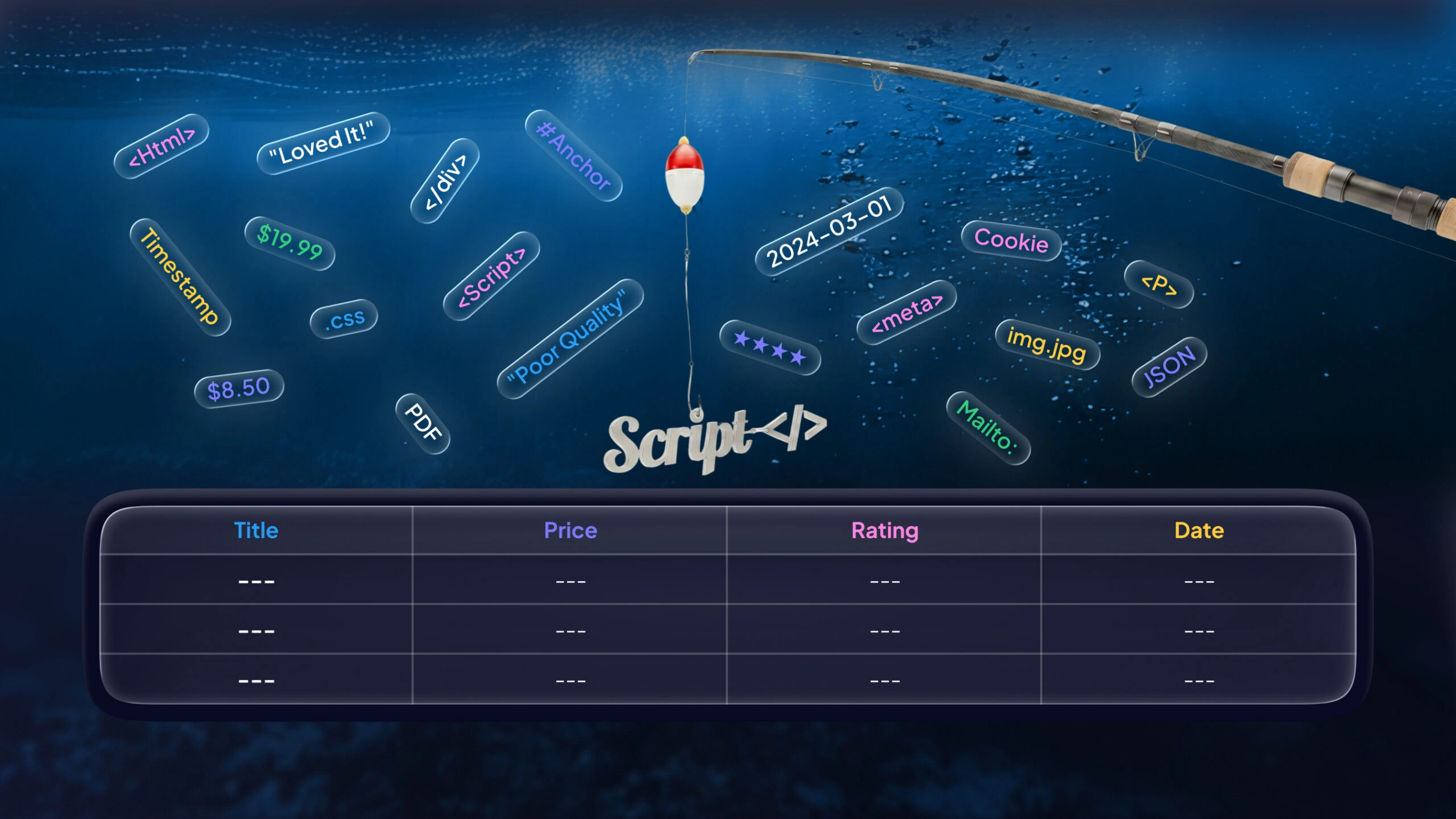
Web scraping (aka data scraping or web crawling) is the automated process of grabbing information from websites. In plain terms, it “enables us to download particular data from web pages based on specific parameters”. Think of the internet as a vast data ocean and a scraper as your digital fishing rod: a small bot (script) casts out to reel in relevant content (text, prices, images, etc.) from HTML pages. The result is structured data where the web was messy.
Why bother? Because the web holds a treasure trove of potential training data. IDC predicts that by 2025 only about 20% of the world’s data will be structured – meaning roughly 80% will be unstructured (emails, social media, web pages, PDFs, etc.). Scraping helps turn that chaos into clean, tabular data. For example, Amazon reviews (text and ratings) or LinkedIn job posts (titles and descriptions) can be harvested to build recommendation or labor-market models. In machine learning and data science, scraped data lets you create custom datasets tuned to your problem, filling gaps where ready-made data sources don’t exist.
The payoff can be huge. Search engines index the entire web via automated crawlers, and many ML projects start with scraped data. IBM notes that web scraping is now a “core part” of our digital foundation and is “key to big data analytics, machine learning, and artificial intelligence”. With the right scripts, you can assemble exactly the data you need – be it product attributes, social media comments, or real-time metrics – to power your models and insights.
Essential Tools and Libraries for Web Scraping
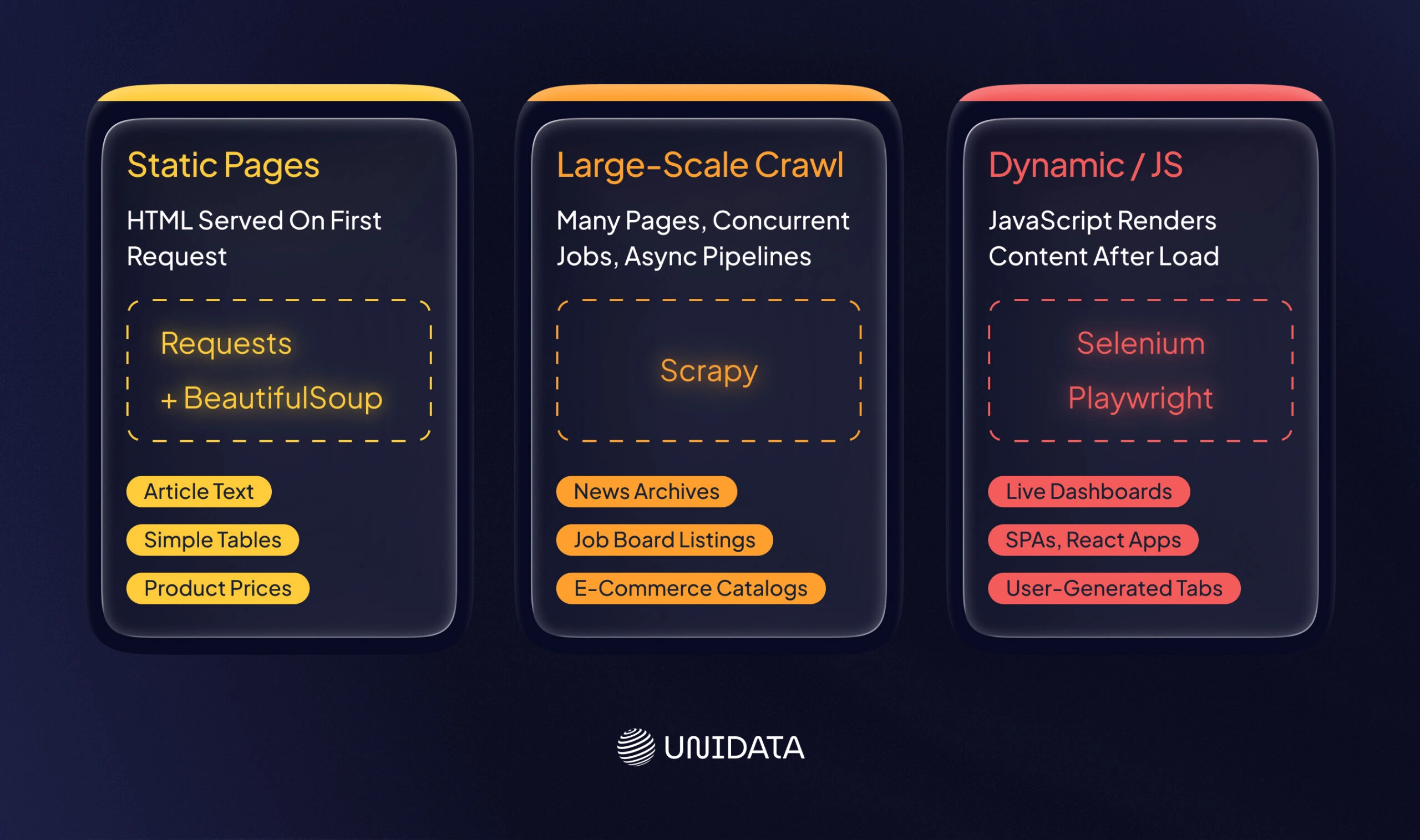
Building a scraper is like packing a toolkit for a job. Python’s ecosystem provides a rich toolbox for web data collection and structured data extraction. BeautifulSoup and requests are two basic tools: requests fetches HTML from a URL, and BeautifulSoup parses it. IBM even highlights BeautifulSoup for extracting data from HTML/XML and building parse trees.
For larger projects, Scrapy is a popular Python framework that combines crawling, parsing, and data pipelines in one package. And for dynamic websites (heavy on JavaScript), Selenium (or similar browser-automation libraries) can drive a headless browser to render pages before scraping.
| Library | Typical Use | Pros | Cons |
|---|---|---|---|
| BeautifulSoup | Parsing HTML/XML | Easy to parse static pages | Not a crawler; can be slow on large sites |
| Scrapy | Large-scale crawling | Built-in crawling, async support, pipelines | Steeper learning curve |
| Selenium | Dynamic/JS pages | Renders JavaScript, mimics browser | Slower, resource-intensive |
In practice, you often combine tools. For example, use requests (or Scrapy) to download pages, and then feed the content to BeautifulSoup or lxml for parsing. To illustrate, here’s a simple Python snippet that fetches a page and extracts product names using requests and BeautifulSoup:
import requests
from bs4 import BeautifulSoup

response = requests.get("https://example.com/products")
soup = BeautifulSoup(response.text, 'html.parser')
products = [item.text for item in soup.select(".product-name")]
For heavy duty scraping, you might use Pandas to turn lists of extracted data into DataFrames, or even headless browsers like Playwright/Puppeteer (especially in Node.js). The key is matching the tool to the task: static pages → requests+parsing; complex sites → Scrapy or Selenium; APIs when available (since APIs give structured data with clear rate limits).
Designing a Scraping Pipeline (Step by Step)
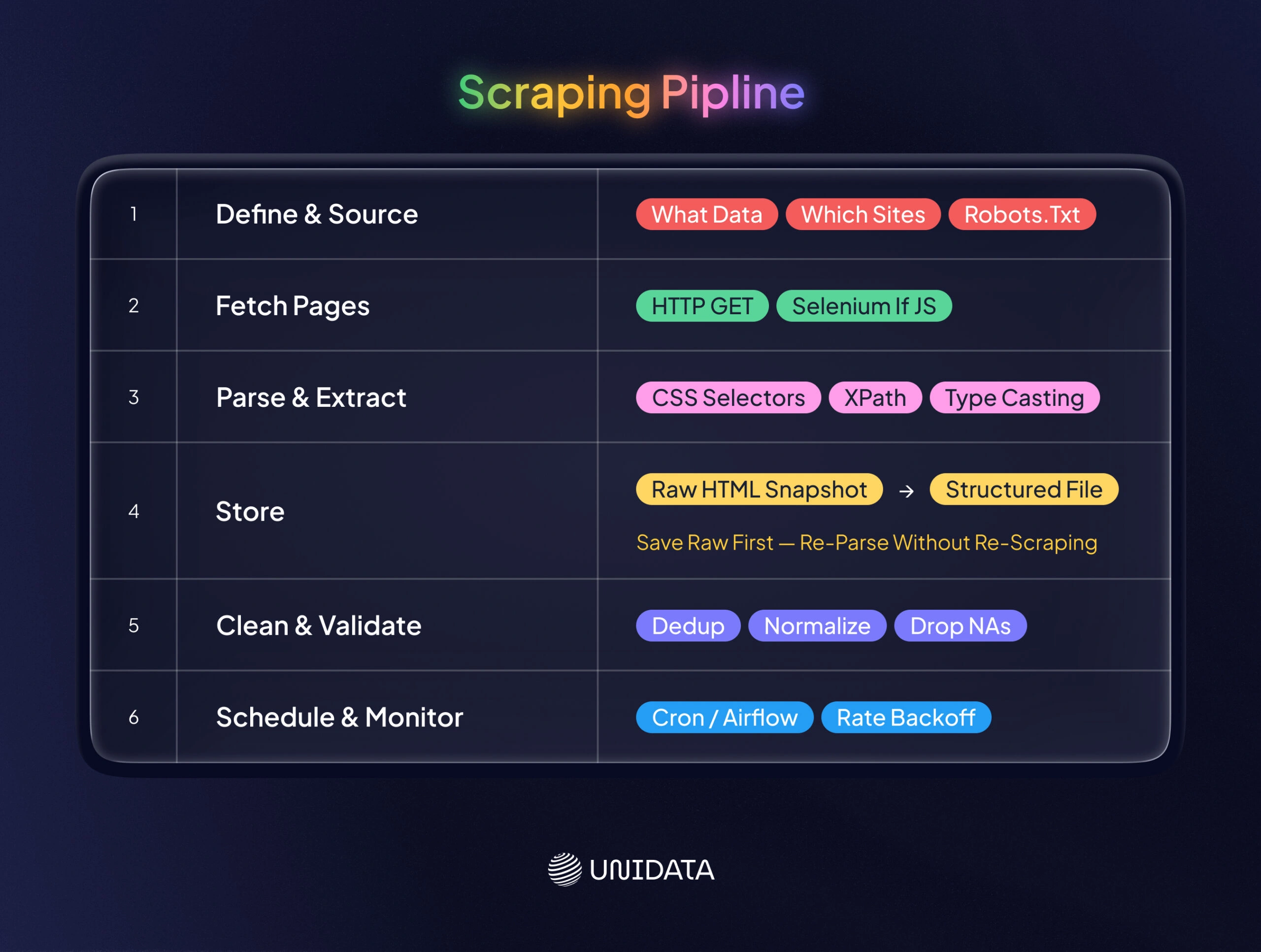
Think of a scraping pipeline like an assembly line in a factory: raw materials (web pages) enter on one end, and a polished product (a clean dataset) comes out the other. A robust pipeline breaks down the process into stages. Here are the core steps:
- Define Goals and Identify Sources. Decide what data you need (e.g. product prices, job descriptions, image URLs) and where to get it (specific sites or APIs). Verify permissions: check each site’s robots.txt and Terms of Service upfront. Only proceed if scraping is allowed, or be ready to request permission.
- Fetch Pages. Use a crawler or requests loop to download the raw content. For static pages, an HTTP GET (via
requestsor Scrapy) is enough. For dynamic websites scraping, use Selenium or a headless browser to let JavaScript execute. Example: automate Chrome with Selenium to capture pages that render content dynamically. - Parse and Extract Data. With the raw HTML/JSON in hand, parse it to pull out the fields you want. Use CSS selectors or XPath to target elements (like product titles, prices, or table cells). Convert strings to proper types (e.g. strip “$” and cast to float, parse dates, etc.).
- Store Raw and Structured Data. It’s often wise to save raw HTML/JSON snapshots (a “data lake” approach) before transforming them. This creates a backup and lets you re-run parsing if your logic changes. Then write the extracted fields to a structured format (CSV, JSON, or a database).
- Clean and Validate. Immediately apply sanity checks. Remove duplicates, handle missing values, normalize formats (see next section). Basic validations might include checking expected number of columns or data ranges. Logging during this stage helps trace issues back to source pages.
- Schedule and Monitor. Automate the pipeline to run on a schedule (e.g. daily via cron, Airflow, or cloud jobs). Implement delays and backoff to avoid hammering the site. Monitor for failures (e.g. changed page structure, blocked requests) and alert if manual fixes are needed.
In fact, Valohai illustrates a resilient pattern by decoupling collection from parsing. Their approach saves raw HTML every day (like a mini-Wayback Machine) and later processes these snapshots in batch. This means if your parsing code breaks or the site layout changes, you can re-run it on the stored pages without re-scraping live. Such a pipeline (shown above) is more flexible and fault-tolerant .
Ensuring Data Quality and Cleanliness
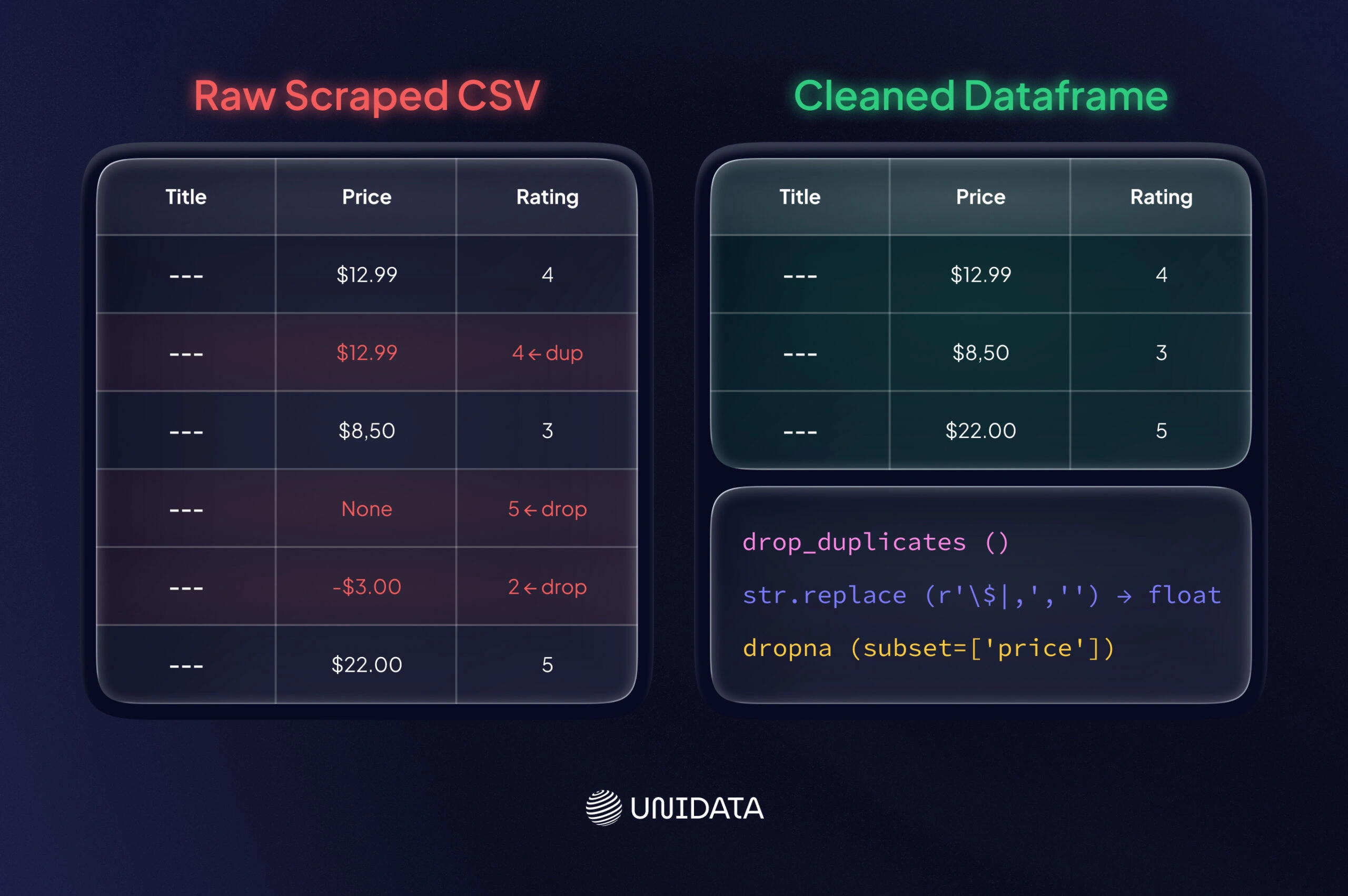
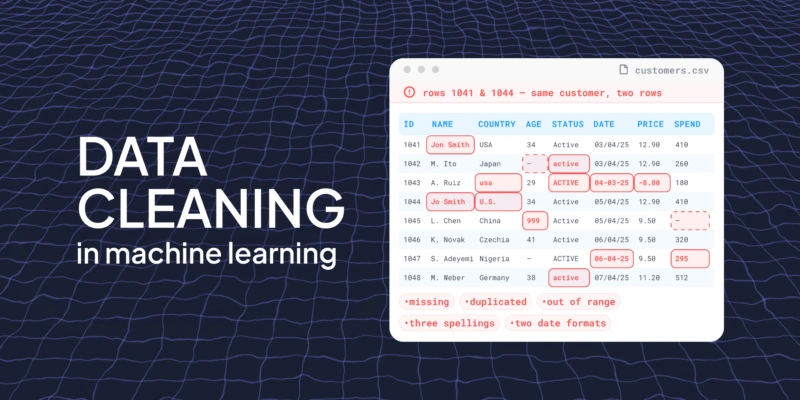
Raw scraped data is often messy. Cleaning it is as important as collecting it: Gartner estimates that poor data quality costs organizations about $12.9 million per year on average. You should immediately audit and clean your dataset to maximize its utility. Key steps include:
- De-duplicate and Filter: Remove duplicate entries (e.g. same product scraped twice). Drop irrelevant or empty rows.
- Normalize Formats: Standardize date formats, convert currency and numbers (e.g. strip “$” or “,” and cast to float). Lowercase or trim text as needed.
- Handle Missing and Outliers: Decide how to fill or drop missing values. If a scraped field like “price” is blank, you may drop that row or fill with a placeholder. Filter out data points that lie outside expected ranges (e.g. negative prices or blank reviews).
- Validate Consistency: Check that related fields make sense (e.g. a product’s category matches its ID). You might cross-reference against known schemas or use sanity checks (all ratings between 1 and 5, for example).
- Document Cleaning Steps: Log how you cleaned and transformed the data. This data provenance builds trust in the dataset.
Here’s a small example of cleaning with Pandas, continuing from a scraped CSV:
import pandas as pd

df = pd.read_csv("scraped_data.csv")
df = df.drop_duplicates()
# Remove $ and commas, convert to float
df['price'] = df['price'].str.replace(r'\$|,', '', regex=True).astype(float)
df = df.dropna(subset=['title', 'price'])
df.to_csv("cleaned_data.csv", index=False)
Notice how this code ensures data types are consistent and empties are dropped. Always cross-check statistics (e.g. min/max values) after cleaning. Poorly cleaned data can mislead models, so invest time here to "polish the gold" in your dataset.
Ethical and Legal Considerations
Scraping without caution can cause problems. Think of it as driving on the information superhighway: follow the rules of the road.
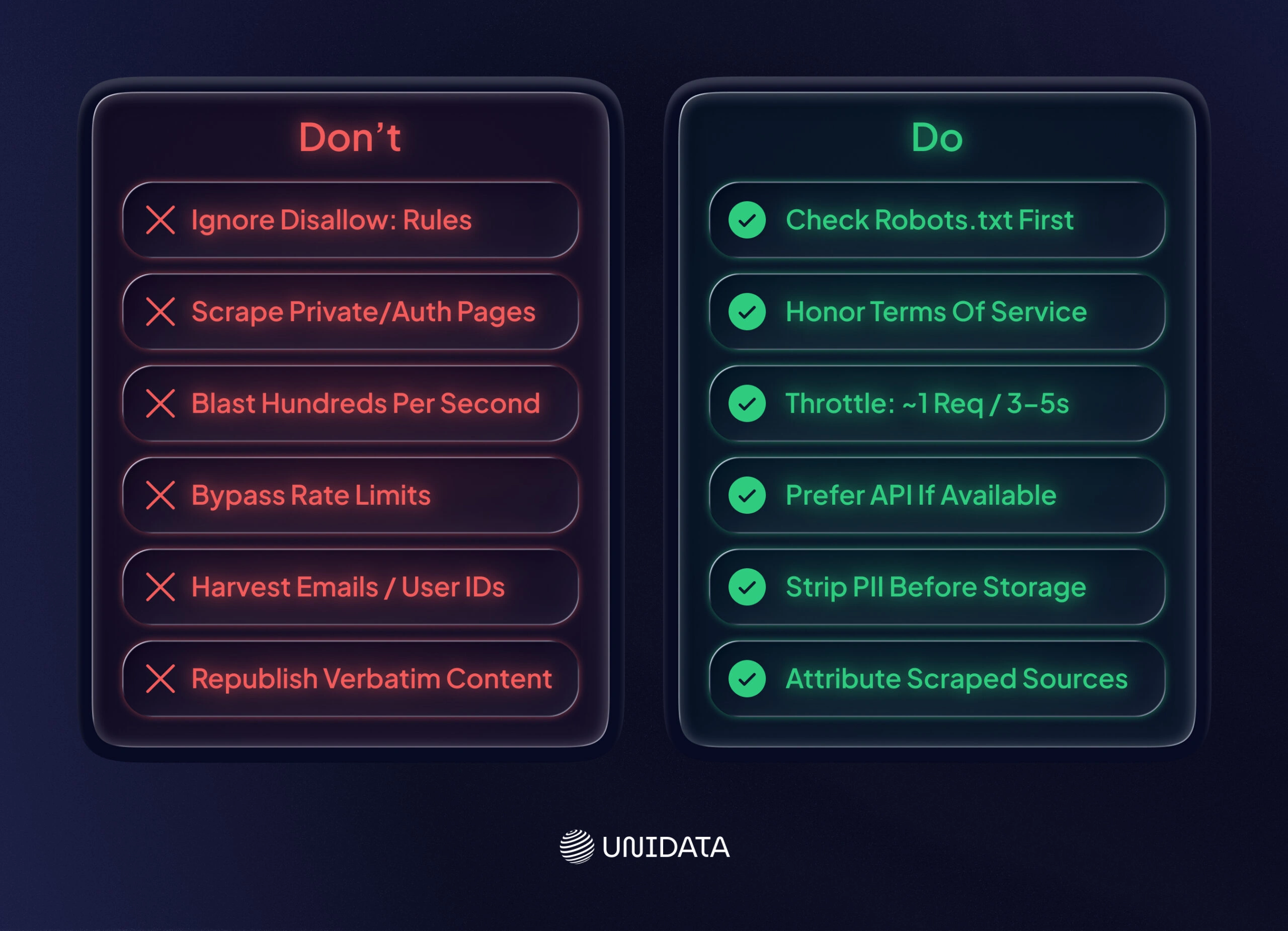
Respect Site Rules and Rate Limits
Always check a site’s robots.txt and Terms of Service. DataCamp stresses that ethical scrapers should “respect robots.txt files” and terms of use. If a section is disallowed (e.g. Disallow: /private/), skip it. Honor these boundaries. Also throttle your requests: don’t blast hundreds of pages per second. DataCamp suggests a reasonable pace (often 1 request per 3–5 seconds for small sites). Insert delays or random sleeps so you act like a polite visitor, not a denial-of-service attack.
Ensure Privacy and Proper Use
Avoid scraping sensitive personal data. Laws like the EU’s GDPR or California’s CCPA strictly regulate personal information. Do not harvest emails, IDs, or profiles unless you have consent. Even if data is public, consider the ethics: don’t reconstruct private datasets from public traces. Furthermore, scraped textual content can be copyrighted. Facts and numbers are free to use, but copying large bodies of text (or unique images) may infringe copyright. A good rule: attribute sources when feasible and don’t republish scraped content verbatim as your own work. If a site offers an API or data dump, prefer that (it’s built for sharing).
Understand Legal Risks and Compliance
The legality of web scraping is complex. Unauthorized commercial scraping can violate terms of service or laws like the U.S. Computer Fraud and Abuse Act (CFAA). For example, scraping a social media platform’s private user data could trigger legal action. Even scraping public data (like news articles) has seen lawsuits (see recent Reddit v. Anthropic case for scraped forum data). Always review up-to-date legal guidance for your use case. When in doubt, err on the side of transparency: cite your sources, comply with robots.txt, and consult lawyers if you plan large-scale scraping in regulated domains.
Real-World Use Cases for ML
Web scraping is not just theory – it’s widely used to build real ML datasets. Here are some common examples:
Amazon Product Reviews (Sentiment Analysis)
Millions of Amazon customer reviews have been scraped to train sentiment classifiers and recommendation systems. For instance, researchers have built huge corpora of review text and star ratings for books, electronics, clothing, etc. Models trained on this data can predict product ratings or extract key features from free-form review text. From a legal standpoint, scraping reviews is typically fine – as Apify notes, it “merely automates what a human would do” by reading reviews, so long as you avoid copyrighted content beyond the quotes that users wrote. Once collected, the reviews (with metadata like date and product ID) form a structured dataset for NLP models or time-series analysis of consumer sentiment.
Job Listings and Labor Market Data
Job boards (LinkedIn, Indeed, Glassdoor) are another hot spot for scraping. Employers post virtually every skill and salary on these sites, making them “a great data source” for labor-market analysis. For example, economists might scrape thousands of data analyst job posts to see which programming languages are most in demand. Studies show online postings cover “nearly all occupation categories” and reveal trends like regional wage changes or emerging skills. By extracting fields (job title, description, location, date, salary), one can train models to forecast hiring demand or power career recommendation tools.
- Competitor Price Monitoring: Retailers scrape competitor sites (Amazon, Walmart) to collect pricing and product availability data. This structured dataset feeds dynamic pricing algorithms or market analyses.
- Social Media Sentiment: Analysts scrape public social media or forums (Twitter, Reddit) to create sentiment datasets. For instance, mining tweets about products or news events provides training data for sentiment analysis and trend detection.
These real-world cases illustrate the power of web data collection: by turning web pages into structured tables, you fuel ML projects that would otherwise lack data.
Conclusion
Web scraping is a practical way to build custom datasets when APIs, open datasets, or vendors fall short. It allows ML engineers and data scientists to collect fresh, domain-specific data directly from the web and convert it into structured, model-ready formats.
To work at scale, scraping must be treated as an engineering pipeline, not a one-off script. That pipeline includes source selection, controlled crawling, structured extraction, data cleaning, validation, and monitoring. Each step directly affects dataset quality and downstream model performance.
Frequently Asked Questions (FAQ)
It depends on three factors: the website’s terms of service, the type of data you’re collecting, and your jurisdiction. Scraping publicly available data is not automatically legal — many sites explicitly prohibit it in their ToS, and EU GDPR applies to any personal data collected. The safest path is to scrape only sites that explicitly permit it, avoid collecting PII, document your legal basis, and get legal review before scaling.
Your choice depends on one variable: is the target page static or dynamic? For static HTML pages, BeautifulSoup with Python’s requests library is enough. For JavaScript-rendered content, use Selenium or Playwright — they drive a real browser and capture dynamically loaded elements. For large-scale crawls across thousands of pages, Scrapy provides built-in pipelines, rate limiting, and retry logic.
The most reliable approach is to slow down. Set random delays between requests (2–5 seconds), rotate user agents, and respect robots.txt directives. For CAPTCHAs, automated solving services exist but add cost and latency. One practical rule: if a site is aggressively blocking you, that’s often a signal it prohibits scraping in its ToS — pause and check before continuing.
Raw scraped data is almost never model-ready. Typical cleaning steps: remove HTML tags and boilerplate, deduplicate records, strip PII, normalize encoding, and handle missing values. For text datasets, also filter by language and validate label consistency. A useful rule of thumb: budget at least as much time for cleaning as for scraping. Teams building training data at scale add a human review pass on a random sample before the data enters any training pipeline.
Scraping gives you control over data composition, freshness, and domain specificity — but you own the quality pipeline end to end. Ready-made datasets are faster to deploy and come pre-labeled, but may not match your exact use case or demographic distribution. If your model needs to perform in a specific geographic market, vertical, or language variant, targeted data collection consistently outperforms off-the-shelf alternatives. If you need a general-purpose baseline fast, a pre-labeled dataset is the faster path.
There’s no universal number — it depends on model architecture, task complexity, class imbalance, and whether you’re training from scratch or fine-tuning. Fine-tuning a pre-trained language model on a narrow domain can work with a few thousand high-quality examples. Training a computer vision model from scratch typically needs 1,000–5,000 labeled examples per class as a starting point. The more important variable is quality, not volume — a noisy dataset of 100,000 examples routinely underperforms a clean dataset of 10,000.