
Data ingestion is the loading dock of your data pipeline. It is how you collect raw data from many sources (databases, files, APIs, IoT sensors, and more). You then bring it into a central store for processing and reporting. Because ingestion is the first step, it has to handle volume, speed, and how often data arrives.
There is no single best way to ingest data. Common choices include batch (large loads on a schedule) and streaming (a nonstop, real-time flow). You also see hybrids such as lambda and micro-batch setups. Each choice comes with different tools and trade-offs. For example, incremental batch ingestion “collects data at set intervals, ideal for periodic updates”. Streaming ingestion “continuously processes data from event sources like Kafka, Kinesis, Pub/Sub or Event Hubs”.
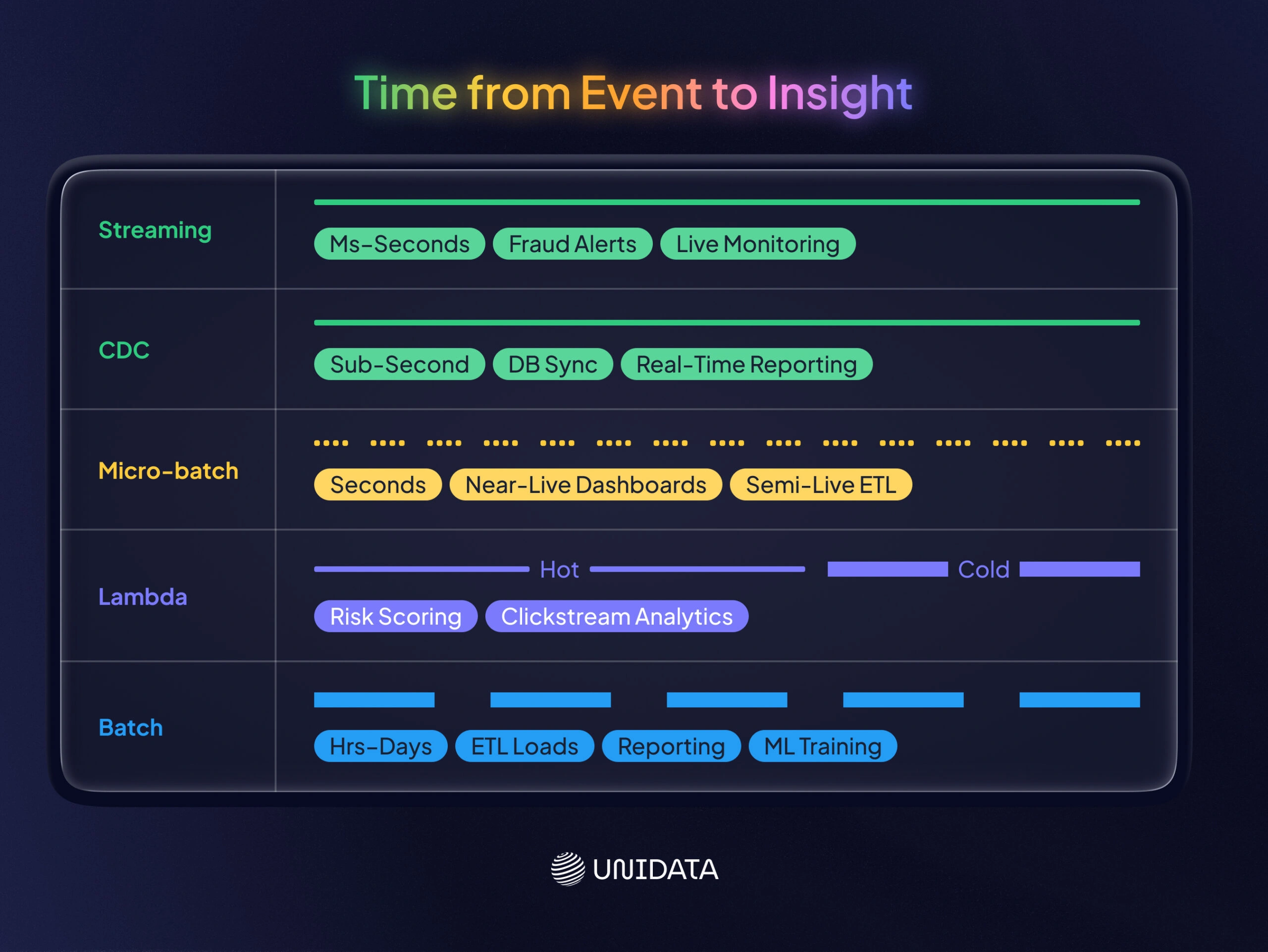
In this guide, we cover five patterns: batch, streaming, lambda architecture, micro-batch, and change data capture (CDC). For each one, you will see typical use cases, common tools, and key trade-offs. A side-by-side table and a short decision guide help you pick the right approach.
Batch Ingestion
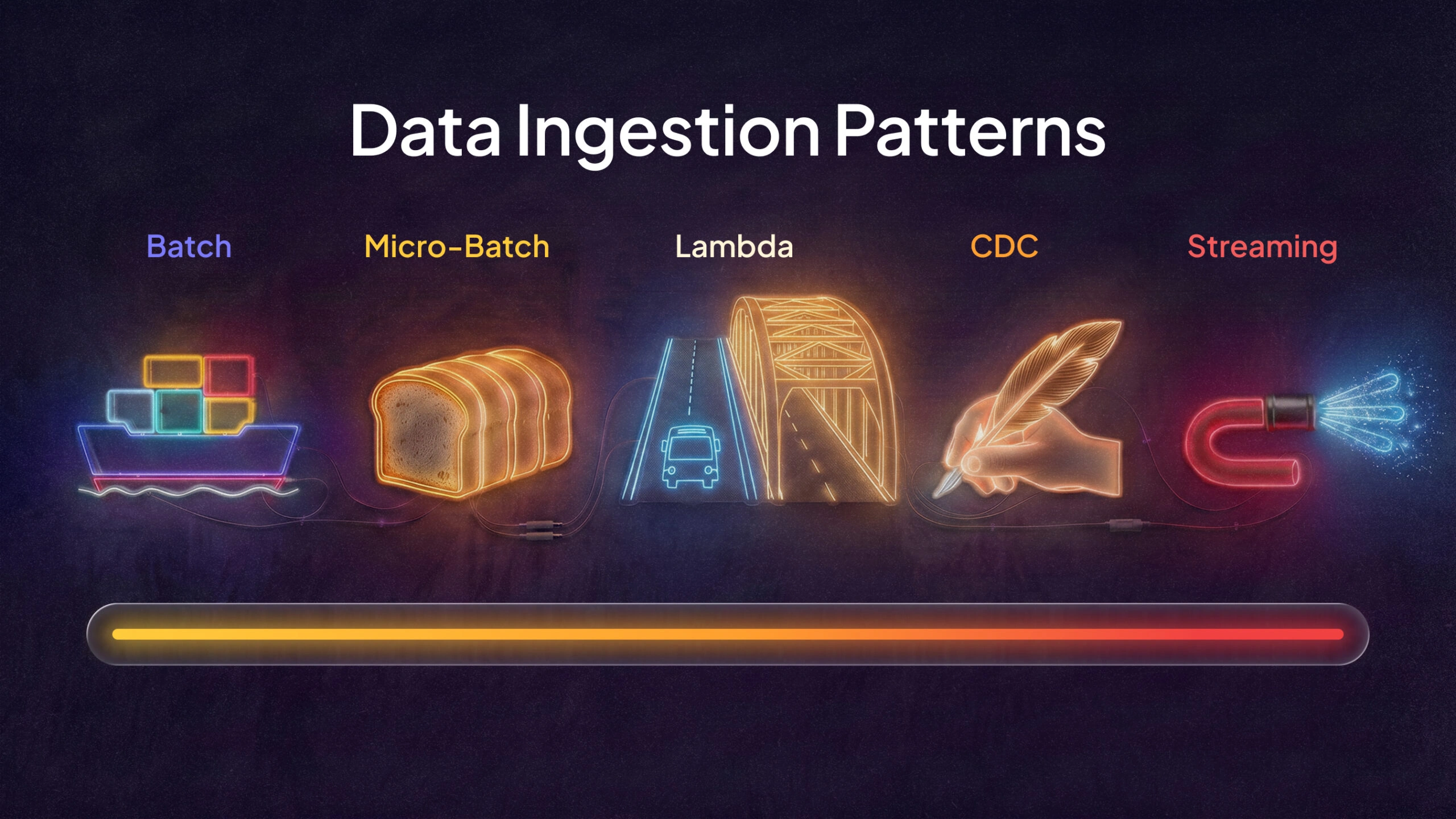
Ever heard the one about the cargo ship? Large batches of goods (data) arrive on a fixed schedule.
Batch ingestion moves large volumes of data in bulk. You run it on a schedule, like hourly or nightly jobs. It works best when you care about throughput more than fresh, second-by-second data. Common examples include end-of-day reporting, trend analysis, and periodic ETL jobs.
Batch sources are often flat files, database exports, or daily log dumps. Then you process it with tools like Apache Spark, Hadoop MapReduce, or classic ETL tools. These jobs run at a low frequency.
Key points: Batch jobs maximize throughput and can be cost-efficient for large volumes. The trade-off is latency. By the time you process the data, it may be hours or days old. Common tools include AWS Glue, Azure Data Factory, Apache NiFi, and Apache Airflow for scheduling.
Use cases:
- Daily report generation.
- Data warehouse refresh.
- Migrating legacy data.
- Machine learning feature updates from offline sources.
For instance, a retailer might ingest all sales transactions nightly and then aggregate daily totals. Batch fits when you can tolerate higher latency (minutes to days) and you want to process very large volumes together.
Tools/Platforms:
- AWS Glue jobs.
- Azure Data Factory pipelines.
- Google Cloud Dataflow (batch mode).
- Snowflake Bulk Data Load.
- Talend.
- Informatica.
These tools handle scheduling, error recovery, schema mapping, and scalable storage. For example, AWS Batch (for compute scheduling) or Amazon EMR can process petabyte-scale data on a fixed schedule.
Streaming Ingestion
Imagine a firehose: data flows continuously and must be caught on the fly.
Streaming (real-time) ingestion takes data in as events happen. It is built for high-speed, time-sensitive data such as sensor readings, user clicks, logs, or IoT telemetry. AWS defines streaming data as data “generated continuously by thousands of sources”. You process it record by record, or in small windows. Unlike batch, a streaming pipeline can act on each event right away, often in milliseconds to seconds. This is vital for real-time dashboards, live monitoring, and fast response.
Key points: Streaming gives very low latency, so you can get near-immediate insights. The price is complexity. You need state, windowing, and fault tolerance for a system that never really stops. Common tools include Apache Kafka, Amazon Kinesis Data Streams, Azure Event Hubs, Google Pub/Sub, Apache Flink, and Spark Structured Streaming. You also see stream processing services such as Kafka Streams, Kinesis Data Analytics, and Azure Stream Analytics. Databricks notes that streaming ingestion “continuously processes data from event sources like Kafka, Kinesis, Pub/Sub or Event Hubs”. It is also “ideal for real-time dashboards, alerting systems and anomaly detection”.
Use cases:
- Fraud detection (process transaction events in real time).
- Anomaly alerts.
- Live metrics dashboards.
- Real-time personalization.
Research describes streaming pipelines as a way to “ensure minimal latency and continuous data flow”. It also highlights ultra-low latency and event-driven flexibility. The downside is higher ops cost and higher build effort.
Tools/Platforms:
- Event and message brokers (Kafka, RabbitMQ, Kinesis, Pub/Sub, Azure IoT Hub) buffer the stream.
- Stream processors (Flink, Spark Streaming, NiFi, Kafka Streams) run transforms.
- Managed services (Confluent Cloud, AWS MSK, AWS Firehose, Google Dataflow) can reduce the ops load.
For example, a typical AWS streaming path might be Kinesis Data Streams → Lambda or Flink → S3 or Redshift. AWS also offers Kinesis Data Firehose, which can batch and deliver stream data to S3, OpenSearch, Redshift, and more. In Kafka stacks, connectors help move data between many sources and sinks. Confluent also offers a Schema Registry to manage schema changes.
Lambda Architecture
Lambda architecture is like having two roads: one for morning commuters (batch) and one for express cars (streaming).
Lambda architecture is a hybrid pattern. It combines batch and streaming so you can get both throughput and low latency. Nathan Marz popularized it as a way to get real-time views while keeping accurate results over the full history. In Lambda, all incoming data goes down two paths: a batch (cold) layer and a speed (hot) layer learn.. The batch layer stores raw data and recomputes full results on a schedule, often with Hadoop or Spark. The speed layer processes recent data in real time, often with streaming engines. The serving layer merges both outputs so queries can combine “fresh” and “complete” views.
Example: imagine metrics for a social feed. The batch layer might recompute global user metrics nightly. At the same time, the speed layer updates counters for the last few minutes of events. Queries pull from the serving layer, which combines results to return a complete answer.
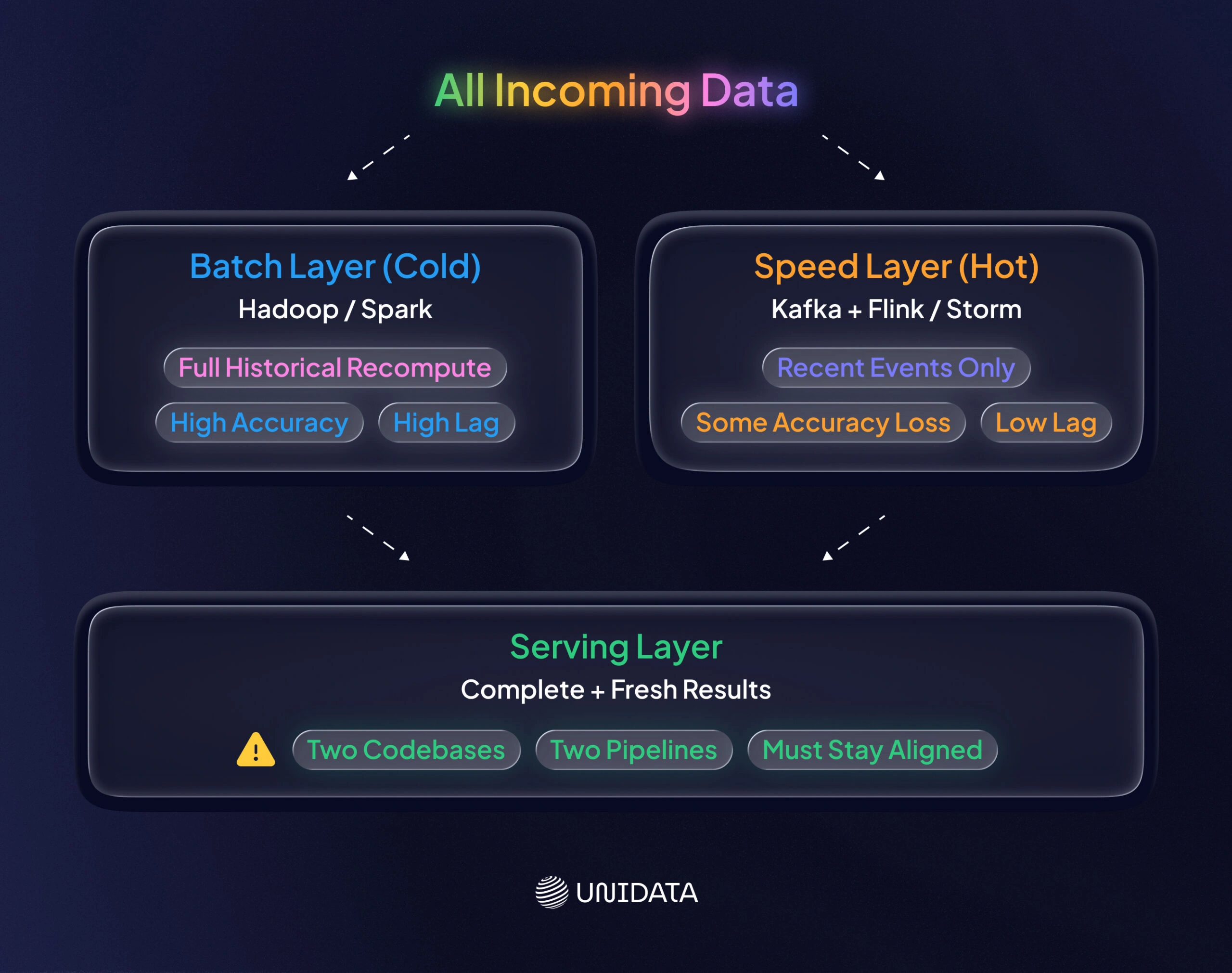
Key points: Lambda can deliver both accuracy and freshness, but it raises complexity. You maintain two pipelines. Databricks describes Lambda as a “hybrid approach” that combines batch and streaming methods. Databricks also warns that Lambda “can be highly complex… two separate code bases for batch and streaming layers”. A serving layer is also required to merge and serve both outputs.
Tools/Platforms:
- Batch layer: Hadoop, Spark, or Hive.
- Speed layer: Kafka plus Storm, Spark Streaming, or Flink.
- AWS: EMR (or Glue) for batch with Kinesis (plus Lambda or Flink) for streaming.
- Google: Dataflow and BigQuery can support similar designs.
- Common mixes: Kafka + Spark + Cassandra, or S3 + Spark + Kinesis + DynamoDB.
Use cases: Lambda fits when you need real-time results and full accuracy at the same time. Common examples include sensor analytics, clickstream metrics, and financial analytics. Many teams now prefer Kappa architecture (stream-only) or unified lakehouse pipelines, mostly to avoid Lambda’s overhead. Research notes that Lambda (hybrid) and Kappa (streaming-first) are common evolutions, since “no single architecture addresses all needs”.
Micro-Batch Ingestion
Micro-batch is like slicing a loaf into many small loaves. You still bake, but you serve slices faster.
Micro-batching sits between batch and streaming. You ingest and process data in small, fixed-size batches. You do it very often (every few seconds or minutes). Apache Spark Streaming’s original model uses micro-batches. Tools like AWS Glue Streaming do as well. One researcher describes micro-batch as a compromise between latency and throughput. Data is collected in short windows (seconds) and processed in bursts, mimicking streaming but with less overhead.
Key points: Micro-batch gives moderate latency (seconds or minutes) with better resource efficiency. It can reuse batch engines, such as Spark, for streaming-like work. Examples include Spark Structured Streaming, AWS Glue streaming jobs, and Google Dataflow with short triggers. Common use cases include near-real-time dashboards, semi-live reporting, and cases where strict real time is not required. Research lists near-real-time dashboards and fraud detection with tolerable latency.
Tools/Platforms:
- Apache Spark Structured Streaming (with short trigger intervals).
- Apache Storm (with micro-batch topology).
- Apache Flink (supports both micro and event modes).
- Managed services like AWS Kinesis Data Analytics (Flink).
- Snowflake Snowpipe (ingests continuously, batches updates inside the service).
Pros/Cons: Micro-batches reduce system overhead. They are often easier to debug than full streaming. The trade-off is “artificial latency” from windowing. Late or out-of-order events can also cause issues, since late data might land in the wrong micro-batch window. Still, this is a practical middle ground. Research notes that micro-batch “balances latency and throughput”. In practice, it often means seconds of delay, which is fine for many pipelines.
Change Data Capture (CDC) Pattern
Think of CDC as a vigilant scribe. It copies every edit from the master record to the copy, right as it happens.
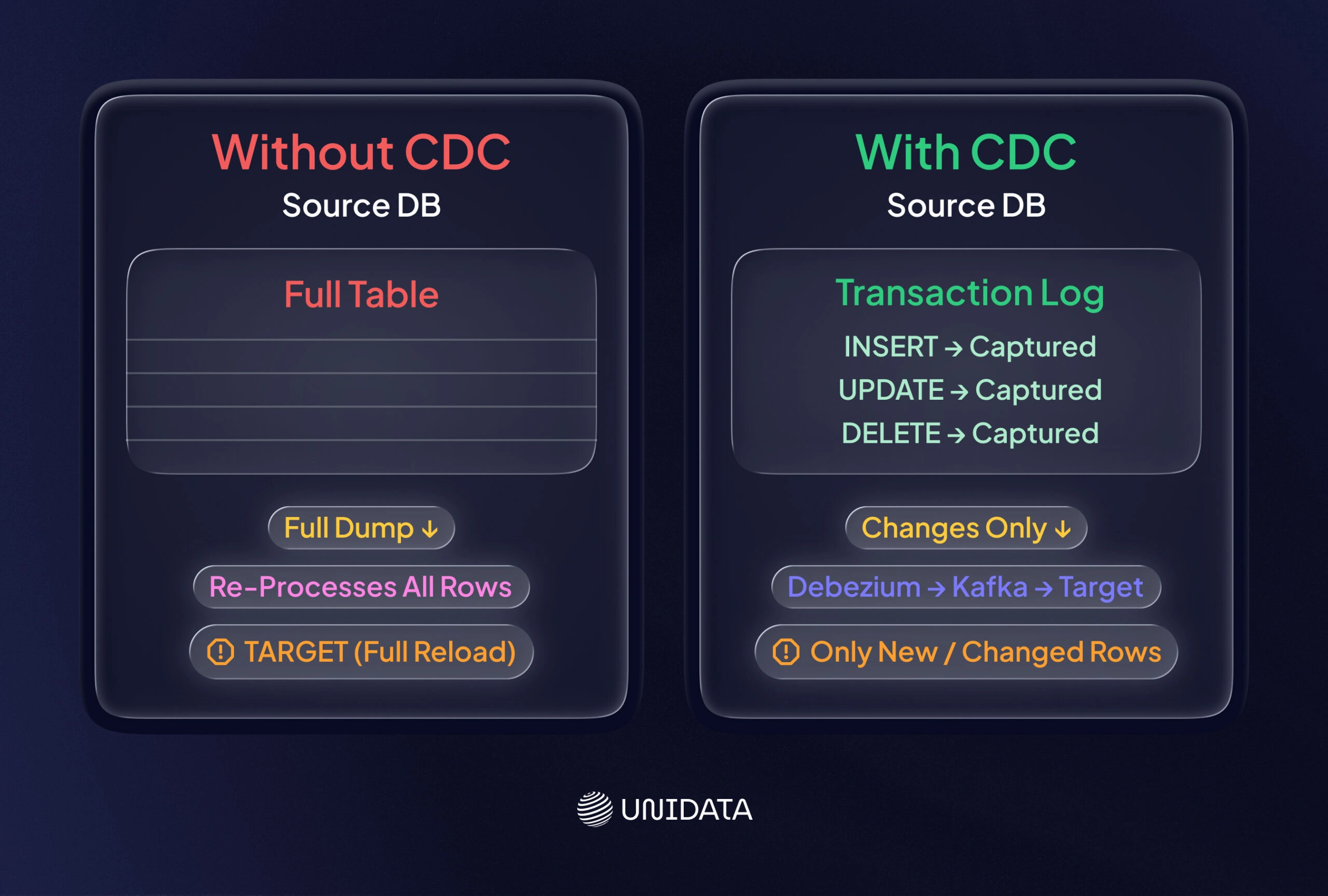
Change data capture (CDC) focuses on ingesting only the changes from a source database. That includes inserts, updates, and deletes. Instead of running full extracts, CDC reads transaction logs or uses triggers to stream changes to a target system. Confluent defines CDC as “tracking all changes in data sources, such as databases, so they can be captured in destination systems”. Confluent also notes that “CDC enables incremental loading or real-time streaming of data changes… with no need for bulk load updates and inconvenient batch windows”.
In practice, you can implement CDC through log-based capture (for example, Debezium reading database logs into Kafka) or through triggers. Debezium and Kafka Connect are popular open-source options for CDC from MySQL, Postgres, SQL Server, Oracle, and more. Cloud services like AWS Database Migration Service (DMS) can do CDC from on-prem or cloud databases. Microsoft SQL Server also has native CDC features that use transaction logs learn..
Key points: CDC provides low-latency, incremental updates and helps keep systems in sync. Teams use it to replicate an OLTP database into a warehouse or lake, or to feed real-time dashboards. For example, AWS shows how DynamoDB Streams (a form of CDC) can feed a Kinesis stream. AWS Lambda can then index each change into OpenSearch.
Use cases:
- Incremental table sync for warehousing.
- Replication or mirroring.
- Audit logs.
- Real-time reporting on database changes.
Typical platforms include Debezium/Kafka Connect, AWS DMS, Azure Data Factory CDC connectors, Oracle GoldenGate, Talend CDC, or database-specific CDC features. Common targets include data lakes (for example, via Kinesis Firehose to S3) or message queues such as Kafka topics.
Comparative Patterns Overview
| Pattern | Latency | Throughput | Scalability | Complexity | Common Tools/Examples |
|---|---|---|---|---|---|
| Batch | High (minutes–hours) | High (large volumes) | Scales with more workers (linear) | Low (well-understood ETL) | AWS Glue, Azure Data Factory, Apache NiFi, Apache Spark/Hadoop |
| Streaming | Low (sub-second to sec) | Medium (per-event) | Highly scalable (event-driven) | High (state, fault-tolerance) | Apache Kafka, Kinesis, Flink, Spark Structured Streaming, Azure Event Hubs |
| Lambda | Moderate (batch + real-time) learn. | High (combines both) | High (depends on both layers) | Very High (dual pipelines) | Hadoop/Spark + Kafka/Storm, AWS Lambda + EMR, Databricks Lakehouse |
| Micro-batch | Low–Medium (seconds) | Medium | High (elastic micro-batches) | Medium (simpler than full stream) | Spark Streaming, AWS Glue Streaming, Apache Beam, Google Dataflow |
| CDC | Low (real-time diffs) | Varies (depends on change volume) | High (incremental loads) | Medium–High (log parsing) | Debezium/Kafka Connect, AWS DMS, Oracle GoldenGate, SQL CDC, Azure SQL CDC |
The table highlights how each pattern behaves. Latency is how quickly data is ready. Streaming and CDC usually win here. Throughput is how much data you can move. Batch is often the cheapest way to move huge volumes. Scalability is about how easily you add capacity. Streaming and micro-batch scale well with partitions and workers. Complexity is the code and ops burden. Lambda is often hardest, since you run two paths and keep them aligned.
Choosing the Right Ingestion Pattern
No single pattern fits all cases. Pick the one that matches what the business needs from your data.
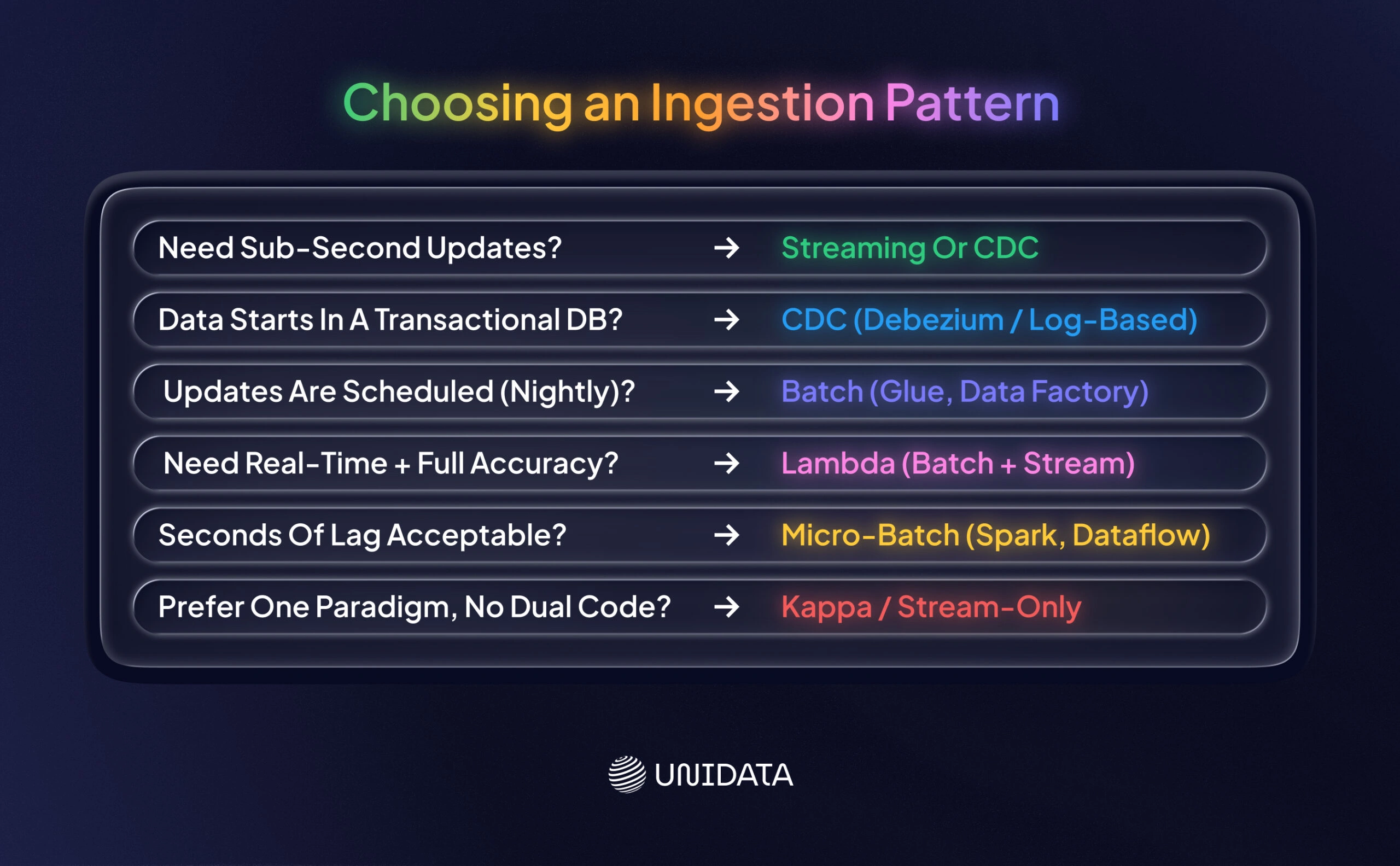
Decision guidance:
- If latency is critical (real-time needs): streaming or CDC is often the right call. If you need sub-second updates or nonstop insights, use a streaming platform (for example, Kafka + Spark or Flink). If your data starts in a transactional database, CDC is often a strong fit. If you can read its logs, tools like Debezium + Kafka can capture changes.
- If data can wait (batch windows are fine): batch is usually the simplest option. For scheduled reports or bulk historical processing, use scheduled ETL jobs (AWS Glue, Data Factory).
- If you need both real time and full accuracy: consider Lambda. It fits use cases where you want fast “now” results plus periodic full reprocessing (for example, some risk scoring). Plan for the added complexity.
- If you need a balance: micro-batch can be the sweet spot. If you want near-live dashboards but can tolerate a few seconds of lag, a Spark micro-batch pipeline often works. Research describes micro-batch as a way that “bridges the gap” between batch and stream processing.
- Source-specific: If you are integrating an operational database, CDC often makes sense. It keeps OLTP and OLAP systems aligned. First, confirm your source supports change logs or safe triggers.
Checklist:
- Do I require real-time (sub-second) updates? → Use streaming (Kafka, Kinesis) or CDC (log-based capture).
- Are updates scheduled (for example, nightly)? → Use batch ingestion (scheduled pipelines).
- Is data coming from a database with change logs? → Consider CDC with Kafka Connect or database-native CDC.
- Do I need up-to-the-minute results and full historical correctness? → Use Lambda (batch + stream).
- Is there moderate latency tolerance (seconds to minutes)? → Micro-batch may be enough (Spark, Dataflow).
- Are my pipelines easier if I use one paradigm? → Kappa architecture (pure streaming, not covered here) is an alternative to Lambda.
These guidelines help you match requirements (latency vs accuracy) to the pattern that fits.
Trade-offs and Challenges
At scale, ingestion is not just “move data.” You also have to manage change, errors, and cost.
Schema evolution: Source schemas change. Columns appear. Types shift. Your ingestion layer has to adapt. Streaming stacks often use schema registries (for example, Confluent Schema Registry) with Avro or JSON Schema to evolve safely. Data lakes often use formats like Delta Lake or Apache Iceberg to support schema evolution. Databricks points to open formats (Delta/Iceberg) that support evolving schemas. Tools like Spark Autoloader can also detect new columns. In any pattern, plan for schema changes instead of treating them as rare.
Late data and out-of-order events: In streaming, events can arrive late or out of order (for example, due to network delays). To handle this, use event-time windowing with watermarks, which is common in Spark and Flink. In batch, this is less visible because you process a complete chunk at once.
Idempotence and deduplication: Retries happen. Events get duplicated. If you write duplicates to the sink, you corrupt downstream metrics. Streaming systems need idempotent sinks or dedup logic. Some teams use Kafka transactions or idempotent writes with unique keys. CDC streams often include transaction IDs so you do not apply the same change twice.
Monitoring and error handling: A real-time pipeline needs monitoring you can trust. Track lag, throughput, and error rates. Use platform metrics (for example, AWS CloudWatch for Kinesis). Build failure paths, too, such as replay from logs or dead-letter queues. Frameworks like Apache Flink also emphasize state durability, which helps with recovery.
Costs vs performance: More frequent processing costs more. Streaming can be more expensive than batch. Hybrid setups add cost, since you run two layers. Choose a pattern based on how much the business values fresh data versus infra cost.
Real-World Pipeline Example
Databricks and AWS provide reference architectures illustrating these patterns in action. One AWS real-time setup uses Kinesis and Lambda to ingest and process events. It can also deliver the same data to a query store. The diagram above shows a design where DynamoDB Streams (a CDC source) feed Kinesis Data Streams. AWS Lambda reads each change and indexes it into OpenSearch for live search capabilities. In the same setup, data can also land in S3 or Redshift for batch analysis and historical archiving.
Figure: AWS reference architecture for real-time streaming and CDC ingestion. Updates from a DynamoDB table are captured via Kinesis Data Streams (CDC). AWS Lambda then writes them into Amazon OpenSearch Service for real-time search.
Databricks also highlights lakehouse-style ingestion, where batch, CDC, and streaming can land in one place with governance and performance controls. This can reduce fragmentation. You still need to pick the ingestion mode per source and per SLA, but a unified storage layer can simplify downstream processing.
Using managed cloud building blocks can simplify deployment. This example shows the core choice. Use CDC to capture database changes. Use streaming tools for immediate indexing. Use batch sinks (S3, Redshift) for history. You get fresher data. You also take on more moving parts.
Conclusion
In summary, batch, streaming, lambda, micro-batch, and CDC are different ways to get data where it needs to go. Each one trades off speed, cost, and complexity. Batch is strong for huge volumes when you can wait. Streaming is built for tight latency and fast reaction. Micro-batch and lambda sit in the middle. The right choice depends on how much freshness and accuracy you need at once. CDC is a natural fit when you are syncing databases and feeding reports without full reloads.
These patterns are different modes of transportation. Some get you there fast. Some move heavy cargo cheaply. Your job is to match the mode to the trip. If you understand the trade-offs, the table and decision guide become practical tools. You can match a source and a use case to an ingestion mode, pick tools that fit your stack, and avoid building a pipeline that fights your requirements.
Frequently Asked Questions (FAQ)
Batch ingestion collects data at scheduled intervals — hourly, nightly, or on-demand — and processes it all at once. Streaming ingestion moves data continuously as events happen, with latency measured in milliseconds to seconds. The choice comes down to how fresh the data needs to be. If your model scores transactions for fraud in real time, streaming is the only viable option. If you’re retraining a recommendation model weekly on historical data, batch is simpler and cheaper to operate.
CDC is a pattern that tracks row-level inserts, updates, and deletes in a source database and streams only those changes downstream — rather than re-copying the entire table on each run. Use it when your source system is a transactional database (Postgres, MySQL, Oracle) and you need near-real-time data in your warehouse or ML pipeline without the cost of full table scans. CDC is the right call when data volumes make nightly full loads too slow or too expensive.
ETL (Extract, Transform, Load) transforms data before loading it into the destination. ELT (Extract, Load, Transform) loads raw data first and transforms it inside the warehouse using SQL or Python. In practice, ELT has become the default for modern cloud data stacks — cloud warehouses like BigQuery, Snowflake, and Redshift are fast enough that transforming data in-place is more flexible than preprocessing it in transit. Use ETL only if your destination system can’t handle raw or messy data, or if you have strict privacy requirements that demand scrubbing before storage.
Schema drift — a source system adding, renaming, or removing a field — is one of the most common causes of silent pipeline failures. The standard mitigation is a data contract: an explicit agreement between the data producer and the pipeline about column names, types, and nullability. In practice, teams add schema validation at the ingestion layer (tools like Great Expectations or dbt tests), configure alerts on schema changes, and build pipelines to fail loudly rather than silently ingest corrupted records. Catching drift at the source boundary is always cheaper than debugging it downstream.
The most common failure modes are: source API rate limits, schema drift, network timeouts, and duplicate records from retry logic. Each has a specific fix — rate limits require backoff and throttling logic; schema drift requires contract validation; timeouts require idempotent writes so retries don’t corrupt data; duplicates require deduplication keys or upsert semantics. The broader principle: design for failure from the start. A pipeline with no retry logic, no alerting, and no dead-letter queue will silently drop or corrupt data the first time a source system hiccups.
ML training pipelines have different requirements than operational analytics. Training jobs are typically batch by nature — they consume a static snapshot of data at a point in time — but the data collection feeding them may need to be near-real-time to keep training data fresh. The pattern that works best: stream or CDC for data collection into a feature store or data lake, batch export for training job consumption. This separates freshness concerns (handled by the streaming layer) from reproducibility concerns (handled by versioned batch snapshots). Teams that try to train directly off a live stream almost always hit consistency problems.