
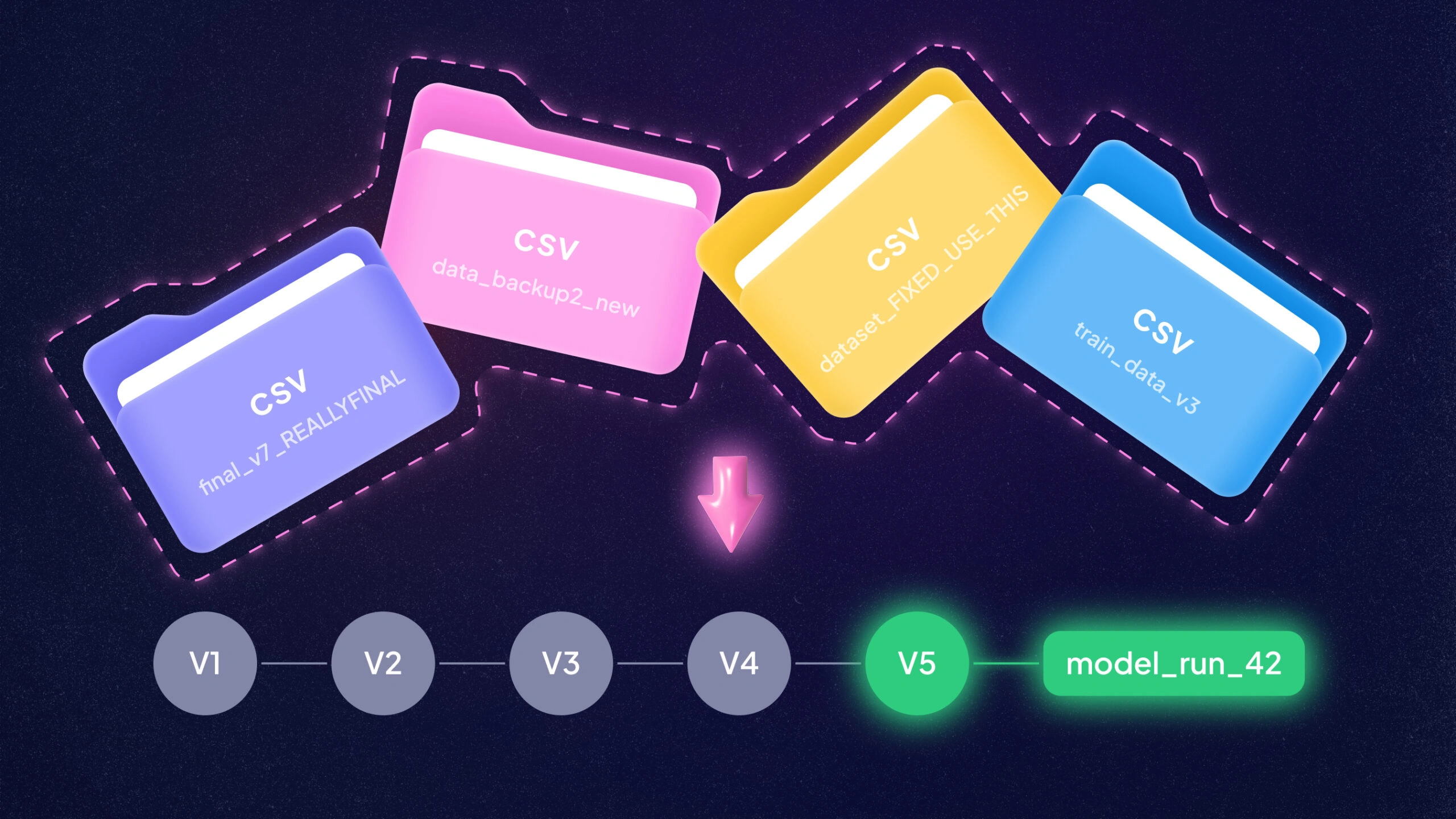
Ever wish your data had a time machine? In ML, datasets change quietly and constantly. New files land, labels get fixed, and “just one more filter” sneaks into the pipeline. Dataset version control brings Git-style order to that chaos. A data VCS (Version Control System) records what changed, when it changed, and which model used it, so you can reproduce results instead of. It also makes teamwork safer.
People stop passing around mystery CSVs named final_v7_REALLYFINAL.csv. When something breaks in production, you can point to the exact snapshot and trace the path back to the decision that caused it.
Why Do ML Teams Need Dataset Versioning?
Is data versioning just a nice-to-have? Not in modern ML. It’s critical for reproducibility, collaboration, and compliance. Imagine your model underperforms in production. Without versioning, it can be hard to confirm which exact data snapshot produced it. With version control, you can answer “what changed?” at each step.
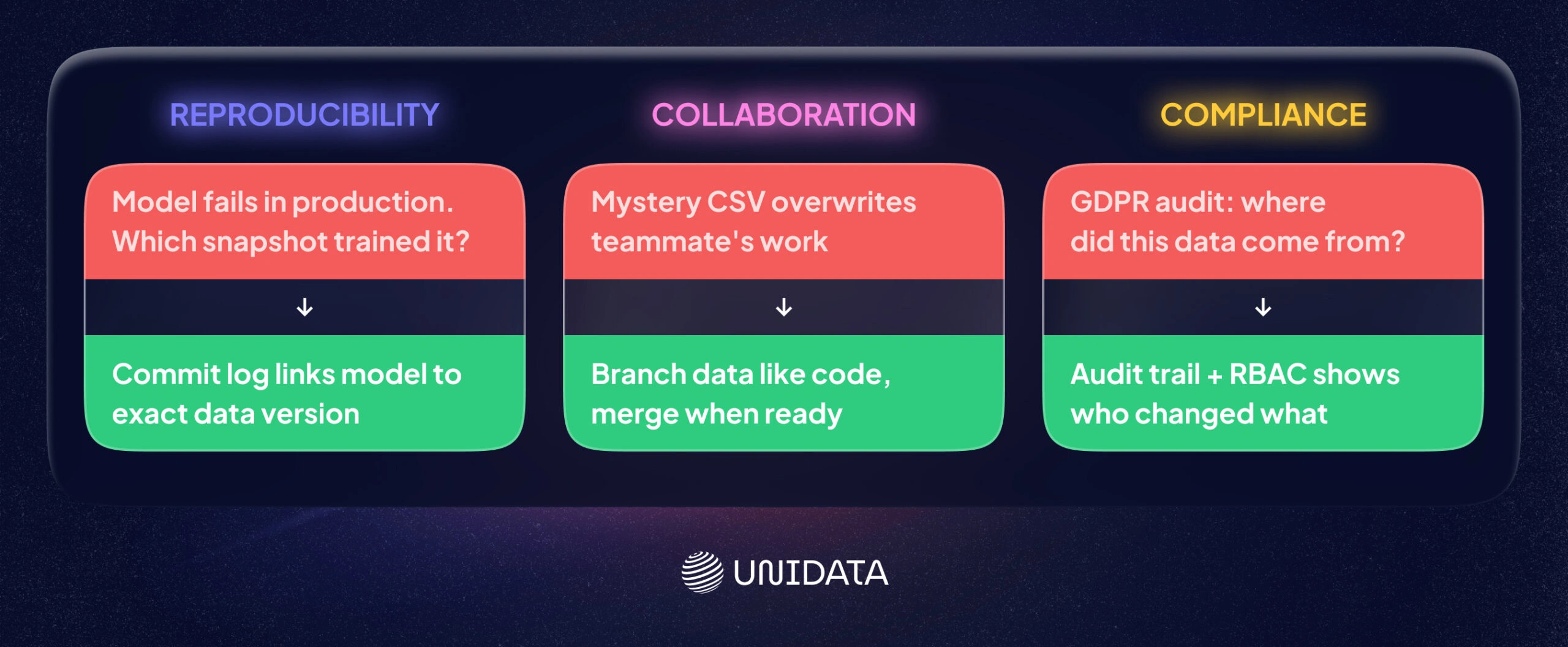
ML pipelines often include many transformations. Version control keeps a clear record of each one. For example, DVC creates lightweight metafiles that track large dataset versions alongside Git commitsphdata.io. That way, you can link a model to the raw and processed data it used. Google’s ML Best Practices echo this idea: track data lineage and artifacts so you can reproduce.
Collaboration is another driver. Teams often run experiments in parallel. With versioning, they can branch data for those experiments, then merge changes once results look good. Tools like lakeFS and Pachyderm support Git-like dataset branches, which helps teams avoid overwriting each other’s work.
Compliance is the third big reason. Regulations like GDPR and CCPA require traceability for personal data. Data versioning supports that by keeping audit trails for changes. For example, lakeFS’s commit log can act as an immutable audit trail, and its RBAC controls define who can do what with the data. Dataset version control helps replace scattered copies with a controlled history you can inspect.
Read also: Build or Buy ML Dataset?
Key Features to Look For
What should you check when comparing tools? Focus on the pieces you will use every week. You want features that prevent mistakes, support teamwork, and keep rollbacks easy. You also want a tool that fits your storage and ML stack.
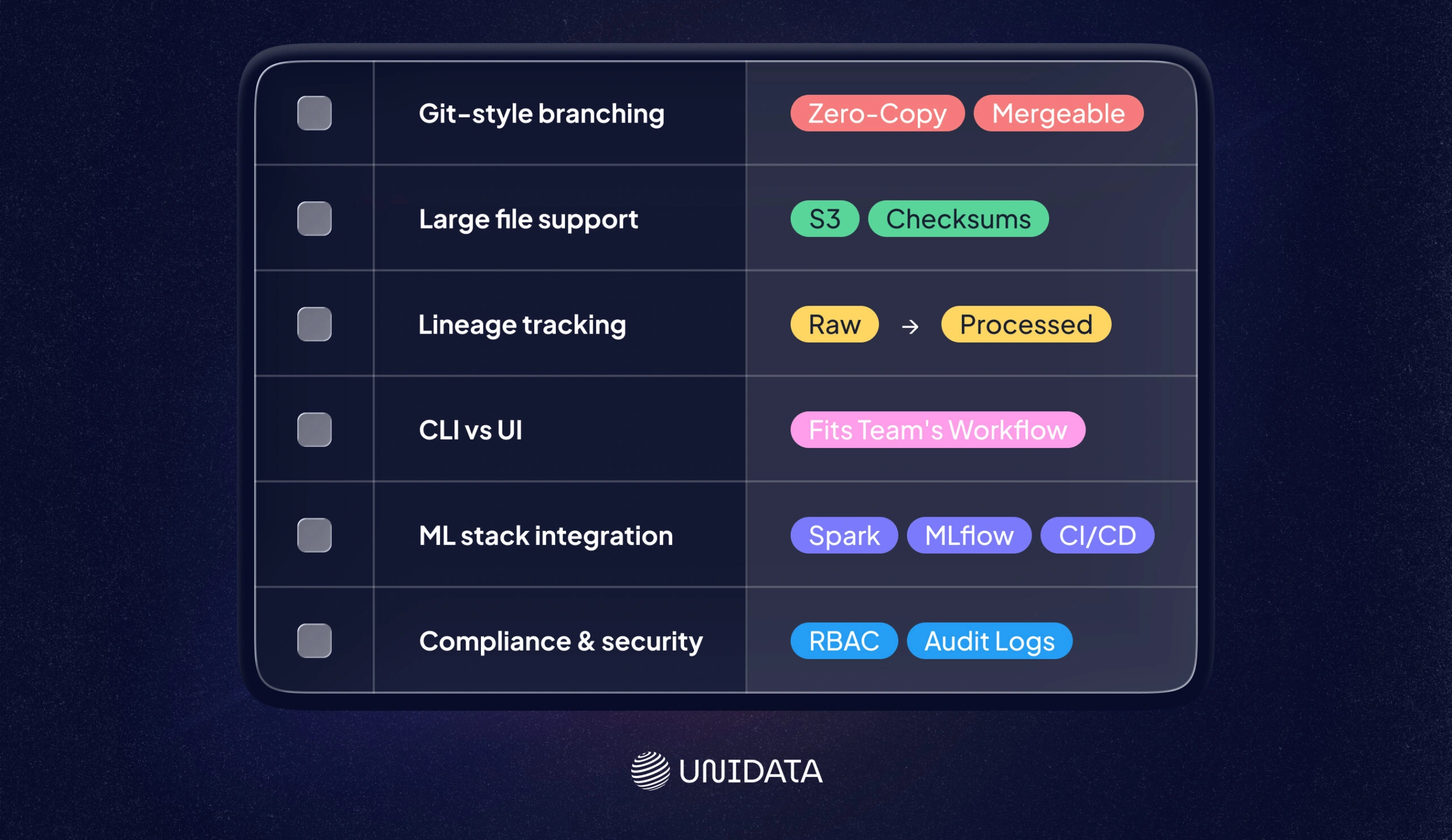
- Git-Style Branching & Merging: Can you create isolated branches of your dataset? Tools like lakeFS, Pachyderm, and ClearML let you branch data just like code. You should be able to experiment on a copy and merge changes when you are ready. Branching should stay efficient (ideally zero-copy) and reproducible.
- Large File Support & Deduplication: ML data can be huge. Look for support of object storage (S3, Azure Blob, etc.) or a storage layer built for big files. For example, DVC stores content on S3 or HDFS and uses checksums (SHA-256) to avoid duplicates. Git LFS is a simpler option for adding big files to Git. Efficient tools transfer only what changed (partial fetch) and avoid re-uploading identical files.
- Lineage & Metadata Tracking: Good systems track more than file snapshots. They also track how data was processed. Full lineage lets you trace a model’s data path end to end. Pachyderm logs every transformation and pipeline version. DVC’s dvc.yaml pipelines also capture dependencies in a structured way. This lineage matters for debugging and for auditabilityphdata.io.
- CLI vs. UI: Some teams prefer CLI tools for automation (DVC, lakeFS CLI, Pachyderm’s pachctl). Others want a visual dashboard for browsing data and history. LakeFS provides both a CLI (lakectl) and a web console for data browsing. W&B and Quilt lean more UI-first. Pick a tool your team will actually use.
- Integration with ML Stack: Does it fit your workflow? Check integrations with pipeline frameworks (Kubeflow, Airflow), experiment trackers (MLflow, TensorBoard), and orchestration tools. LakeFS works on top of Spark, Trino, and dbt. MLflow can also use DVC or lakeFS under the hoodphdata.io. W&B Artifacts integrates with its experiment tracking and other platforms. Strong integrations reduce glue code and reduce “works on my machine” failures.
- Compliance & Security: For GDPR/CCPA, look for audit logs, encryption, and access control. LakeFS Enterprise supports RBAC, integrates with SSO/LDAP, and provides hooks to enforce compliance checks before merging. These features help you control access and prove who changed what.
Choosing a dataset VCS is about fit. It should match your data size, workflow, and compliance needs.
Open-Source Data Versioning Tools
Here are some leading open-source tools. Each one solves a slightly different problem, so the best choice depends on your environment.
DVC (Data Version Control)
DVC is a Git-like toolkit for data and ML. It’s open source and popular with engineers. You use DVC commands to add data to Git. For example:
dvc init
dvc add data/raw_dataset.csv
git add data/raw_dataset.csv.dvc
git commit -m "Add raw dataset to DVC"
dvc push
DVC stores the actual data in remote storage (S3, Azure, GCS, etc.). The Git repo keeps only tiny metafiles, so your repo stays lean. Key features include pipeline definition (dvc.yaml), experiment tracking, and file checksums for integrity. Because DVC integrates tightly with Git, your code, data, and experiments can evolve together. It’s CLI-first. There’s no built-in UI, which makes it a fit for terminal-native teams.
Strengths: Lightweight (no lock-in), flexible, strong large file support, and a strong community. It can also track ML pipelines. Limitations: CLI-only (which can mean a learning curve), not built for huge warehouses or real-time streams, and it lacks built-in compliance features.
lakeFS
LakeFS is an open-source data lake versioner with Git-like semantics. Think “Git for your data lake.” It sits on top of S3, Azure Blob, or GCS and lets you create branches of your entire data lake in milliseconds. Branching is copy-on-write, which keeps it efficient. LakeFS integrates with common tools like Spark, Trino, and dbt, and it can connect to data quality frameworks.
LakeFS focuses on scale and governance. It provides a commit log of data operations for auditability. Enterprise features (RBAC, SSO, audit logs) are in the paid version. Even in open source, you still get atomic commits, taggable checkpoints, and rollback. The practical win is that lakeFS brings branches, commits, and merges to big data lakes. That makes complex workflows, and strict regulatory requirements, easier to manage.
Pachyderm
Pachyderm combines data versioning with containerized pipelines. You get Git-style commits for data plus built-in workflow orchestration. Each time you update data, Pachyderm creates an immutable snapshot. It can also trigger downstream processing containers. You can think of it as “Git for data” with Kubernetes as the engine.
Pachyderm tracks lineage at fine granularity (“datum” level) and supports full provenance. It works well in production pipelines because it can rerun only the data that changed. That can save compute and time. It supports many data types and scales through Kubernetes. For security, it offers RBAC and OIDC auth. The trade-off is operations. Pachyderm needs Kubernetes and people who can run it, so it fits teams with real infrastructure capacity.
Quilt Data
Quilt Data (often just “Quilt”) is an open-source data registry for the cloud. It packages data and metadata into versioned “packages” hosted in S3. With the Quilt Python SDK, you can push and pull packages programmaticallydocs.quilt.bio. Quilt is built for collaboration.
Behind the scenes, Quilt turns files into entries in a key-value store and tracks versions in Git. In practice, you version datasets as named objects with versions. Quilt supports large files through S3 storage. Key features include a catalog interface, metadata search, and the ability to include notebooks or docs with each versiondocs.quilt.bio. It’s SaaS-hosted (in your AWS account), so it’s not “local only.” It’s free at smaller scales, which makes it practical for teams that want a dataset catalog plus versioning and sharing.
Dolt
Dolt is an open-source versioned SQL database. If your data lives in relational tables, Dolt can fit well. It works like MySQL, but it adds Git-like commands. Every table is under version control. You can branch the database, merge changes, and inspect diff history. Under the hood, it uses a “prolly tree” structure that mixes B-trees and Merkle trees.
Dolt is useful when you want ACID transactions plus history. You can also push and pull between Dolt servers. Drawbacks: Dolt targets structured SQL data. Petabyte-scale volumes and unstructured blobs are not its strong suit.
(Others: Git LFS, Delta Lake, Nessie, etc. exist but are either limited to specific use-cases or part of other ecosystems).
Commercial & Platform Solutions
Not all teams want to self-host. Some prefer a platform that bundles versioning into a broader ML toolset. One example is Weights & Biases Artifacts. W&B is a SaaS ML platform for experiment tracking and collaboration. It also includes Artifacts, which provides lightweight dataset versioningdocs.. With a few lines of Python, you can log datasets or models as artifacts and tag versions. W&B handles storage and gives you a UI to compare versionsdocs.
Because it’s an enterprise product, W&B also focuses on compliance and security. It is ISO 27001 and SOC2 certified, HIPAA-ready, and aligned with GDPR requirements. It supports SSO/RBAC and encrypts data at rest and in transit. The trade-off is the deployment model. It’s not open source, and you send data to their cloud. For many teams, the hosted setup and audit features are worth it.
Other commercial services include Neptune.ai (experiment tracking with artifact logging) and Databricks’ Delta Lake (time-travel for tabular data). Platforms like DagsHub or Domino Data Lab bundle versioning as part of broader MLOps suites. In this article we focus on W&B as one example of proprietary options, since 90% of our recommendations are open source.
GDPR & CCPA: Compliance by Design
Can data version control help with privacy laws? Yes. Regulations ask for lineage, audit logs, and access controls. Those are the same capabilities these tools provide. GDPR, for example, expects you to know where personal data came from and who accessed it. A dataset VCS records who changed what and when. LakeFS’s commit log and audit trail let you trace dataset changes. Weights & Biases also states GDPR alignment and offers enterprise SLAs.
In practice, look for tools that support:
- Audit Trails: Every commit or push is logged with a timestamp and author (like lakeFS’s versioned activity log). This supports audits and speeds up investigations.
- Fine-Grained Access Controls: Tools that support RBAC/SSO (e.g. lakeFS Enterprise, W&B) let you restrict who can read or write sensitive branches or datasets. This matches GDPR’s principle of least privilege.
- Data Masking/Filter Hooks: Some platforms can run checks before merges. For example, lakeFS Hooks can block merges that miss required meta data. You can enforce rules like “no missing ownership tags” or “no unreviewed schema changes,” without changing the core tool.
Regulators want a clear chain of custody. As the lakeFS compliance docs note, data version control “helps reduce delays” in regulatory approval by making each component of a model reproducible. When version control is part of the workflow, controls become routine instead of emergency cleanup.
Solo vs Enterprise Use Cases
Who needs dataset version control? In practice, almost everyone does. The real question is which tool fits your scale and constraints.
Solo practitioners or small teams often do well with lightweight tools. A single data scientist might use DVC or Git LFS in a GitHub project. These tools version datasets without heavy infrastructure. For one-person work, a CLI-first tool is often enough. DVC, for example, is free and works with public Git repos. ClearML (open-source) can also fit this style with Git-like data branching.
Mid-size teams care more about collaboration. They may adopt lakeFS or Pachyderm on cloud storage so data scientists can branch data safely. These teams often want CI/CD for data. That means pipelines that run when a new data version lands. Open-source platforms can cover this well, as long as integrations are solid.
Large enterprises need scale and governance. They might deploy lakeFS Enterprise or Pachyderm on Kubernetes for petabyte-scale lakes. They also need audit logs, SSO, and vendor support. Some will pay for W&B or similar platforms to get enterprise security and a polished UI.
In practice, many organizations mix tools. A team might use DVC for quick experiments and lakeFS for production data lakes. A solo researcher might start with W&B’s free tier, then move to open tools as needs grow. Tool choice usually comes down to data volume, workflow, and privacy constraints.
Comparing the Top Tools
Below is a quick comparison of six popular tools. Each has its own flavor of data versioning:
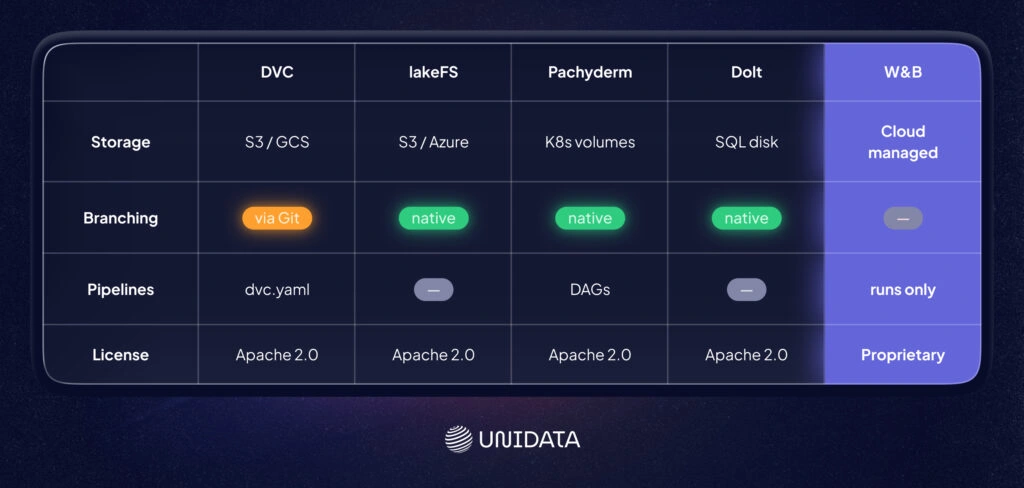
| Feature | DVC | lakeFS | Pachyderm | Quilt | Dolt | W&B Artifacts |
|---|---|---|---|---|---|---|
| Type | Open-source toolkit | Open-source platform | Open-source platform | Open-source registry | Open-source DB | Commercial SaaS |
| Git-style Branching? | Works via Git commits, no separate branches | Yes – Git-like branches on object storage | Yes – data branches with commits | Versioned packages (no true branching) | Yes – Git-branch semantics on tables | No (uses run-based versioning) |
| Data Storage | Remote (S3, GCS, HDFS, SSH, local) | Object stores (S3, Azure, GCS) | Object stores on Kubernetes volumes | AWS S3 buckets (via Quilt registry) | Its own SQL storage (disk-based) | W&B managed cloud storage |
| CLI / API / UI | CLI, Python API | CLI (lakectl), REST API, Web UI | CLI (pachctl), Web UI | Python SDK, Web UI | CLI (like MySQL), HTTP API | Python SDK, Web UI |
| Integration | Kubeflow, MLflow, CI/CD | Spark, Trino, dbt, CI/CD | Kubernetes, CI/CD, LDAP/SSO | ML pipelines (Nextflow, etc.) | MySQL tools, Git (semi) | W&B ecosystem (Trains, UI, etc.) |
| Lineage / Pipelines | DVC pipelines (dvc.yaml) | Branch lineage, metadata | Automated pipelines (DAGs) | No native pipelines – focuses on packages | Version history on tables | Ties artifact inputs/outputs to runs |
| Access Control / Compliance | Depends on storage (e.g. Git permissions) | Enterprise RBAC, audit logs (EE) | RBAC & OIDC, immutable history | IAM roles via S3, package permissions | MySQL auth + branch permissions | Enterprise security (SSO, ISO/SOC2) |
| Scale | Medium datasets, Git-backed | Petabyte-scale data lakes | Large-scale, Kubernetes-based | Large S3 datasets, limited by AWS | Medium (DB-based) | Scales to team needs, cloud-limited |
| License | Apache 2.0 | Apache 2.0 (OSS) | Apache 2.0 | Apache 2.0 (core) | Apache 2.0 | Proprietary (Free/Paid) |
This table shows the differences at a glance. DVC is CLI-driven and Git-integrated, while lakeFS is an API/GUI platform built on object storage. Pachyderm stands out because it bundles pipelines with versioning. Quilt focuses on dataset catalogs with versioned packages, but it lacks true branching and pipelines docs. Dolt is a versioned SQL database that brings Git commands to tables. W&B is a hosted platform with compliance certifications.
Conclusion
Dataset version control is not a luxury feature. It’s the difference between “we think we know why the model changed” and “we can prove it.” With versioned snapshots, clear lineage, and rollback, you can connect a model to the exact data it saw and repeat the same training run when you need to. That matters for everyday debugging, and it matters even more when compliance enters the room with a clipboard. The right tool depends on your setup. Some teams want Git-native workflows. Others need data-lake branching at scale (lakeFS) or versioned pipelines on Kubernetes. If you prefer a hosted platform with strong governance, W&B emphasizes enterprise security and compliance. Whatever you pick, the goal stays the same: make data changes visible, reviewable, and reversible.
Frequently Asked Questions (FAQ)
Dataset version control is the practice of tracking datasets like code. You store a history of changes, keep each dataset snapshot identifiable, and link those snapshots to model training runs. This makes ML pipelines reproducible. It also makes debugging faster, because you can compare “data version A” vs “data version B” instead of guessing what changed. Good dataset versioning also supports branching and rollbacks, so experiments do not overwrite each other.
Start by treating your raw data as immutable. Store it in stable storage (often object storage) and version your processed datasets as explicit snapshots. Track metadata that points to the exact files, partitions, or objects used, and tie that metadata to the code commit that produced them. Keep a clear link between data version, feature pipeline outputs, and model artifacts. The goal is simple: one command should recreate the same training data and the same model inputs.
DVC is repo-centric. It works well when your workflow already revolves around Git, and you want “Git-style” dataset versioning with metadata files and remote storage. lakeFS is storage-native. It versions data directly on top of an object store and supports Git-like branching and merging for data lakes. If you version datasets inside a code repository, DVC often fits. If you need dataset version control across a large data lake and many tools, lakeFS often fits better.
Git is built for source code, not large datasets. Git LFS can help by storing large files as pointers, but it usually does not give you strong dataset lineage across ML pipelines. It also struggles when you need frequent dataset snapshots, data lake branching, or reproducible “raw → processed” transformations at scale. For small projects, Git LFS may be fine for a few artifacts. For most ML teams, dedicated data versioning tools (like DVC or lakeFS) plus experiment tracking give clearer data lineage and more reliable reproducibility.