
Over the past few decades, computer vision has made remarkable progress. What once involved recognizing simple geometric shapes has evolved into advanced systems capable of "seeing" much like humans. These systems can detect intricate details, interpret complex scenes, and even predict object movement with impressive accuracy.
One of the key challenges in this field is panoptic segmentation. In this article, we’ll explore the fundamentals of panoptic segmentation, the practical problems it helps solve, and the best practices for preparing data to train these models effectively.
What Is Panoptic Segmentation?
In the broadest sense, image segmentation in computer vision is the process of dividing an image into distinct regions, where each region corresponds to a specific object. Whether it’s a person, a building, or a tree, the goal of segmentation is to identify objects with maximum precision, capturing their shape, boundaries, and spatial relationships for further analysis.
There are three primary types of segmentation: semantic segmentation, instance segmentation, and panoptic segmentation. Panoptic segmentation is considered the most complex because it combines the principles of the other two. To understand how it works, let’s first break down the differences between these approaches.
Semantic Segmentation
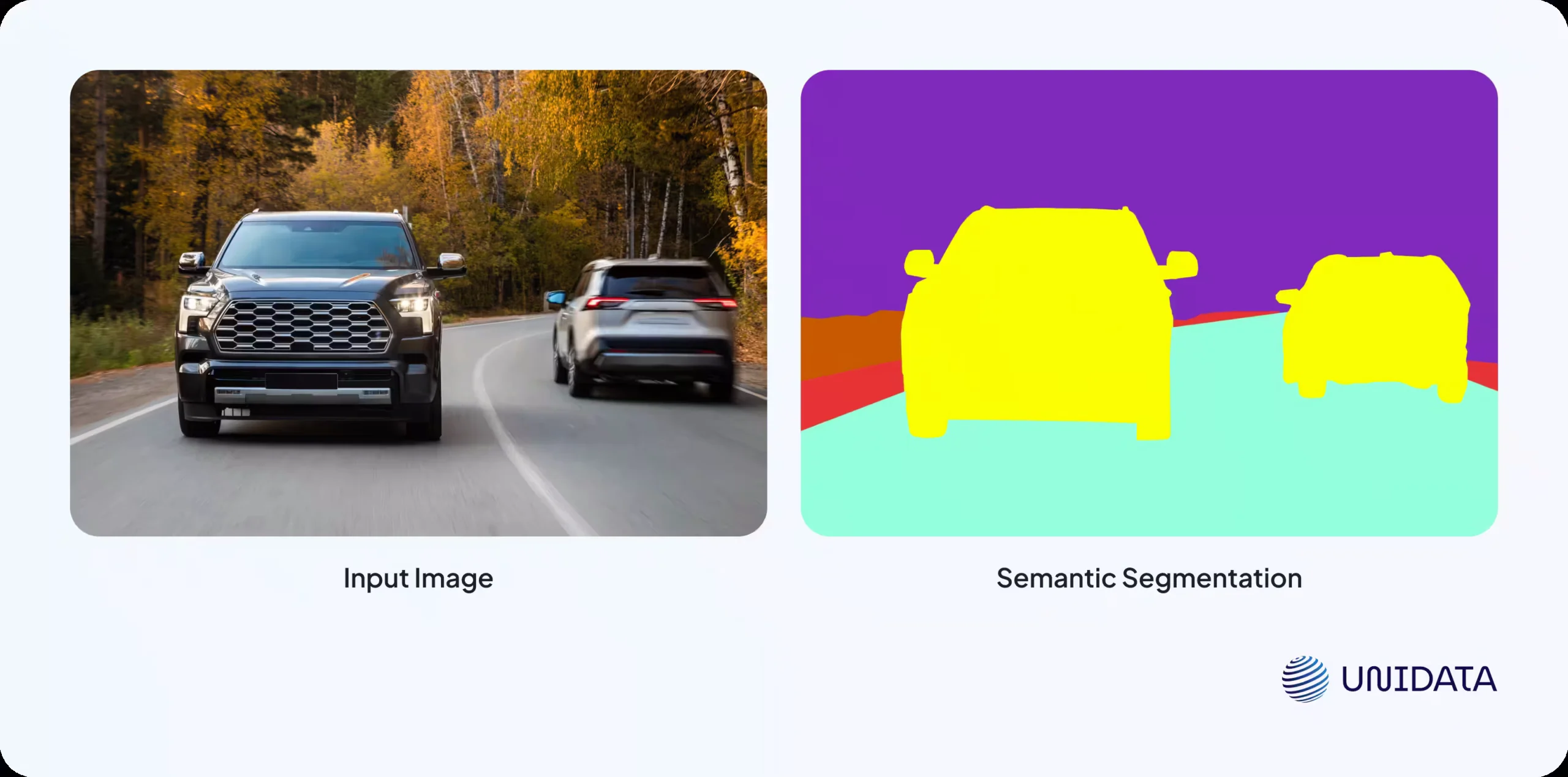
Semantic segmentation classifies every pixel in an image according to its category. One key characteristic of this approach is that all objects of the same class are labeled identically. For example, if there are multiple cars in an image, they will all be marked as "car" without distinguishing between individual instances.
Instance Segmentation
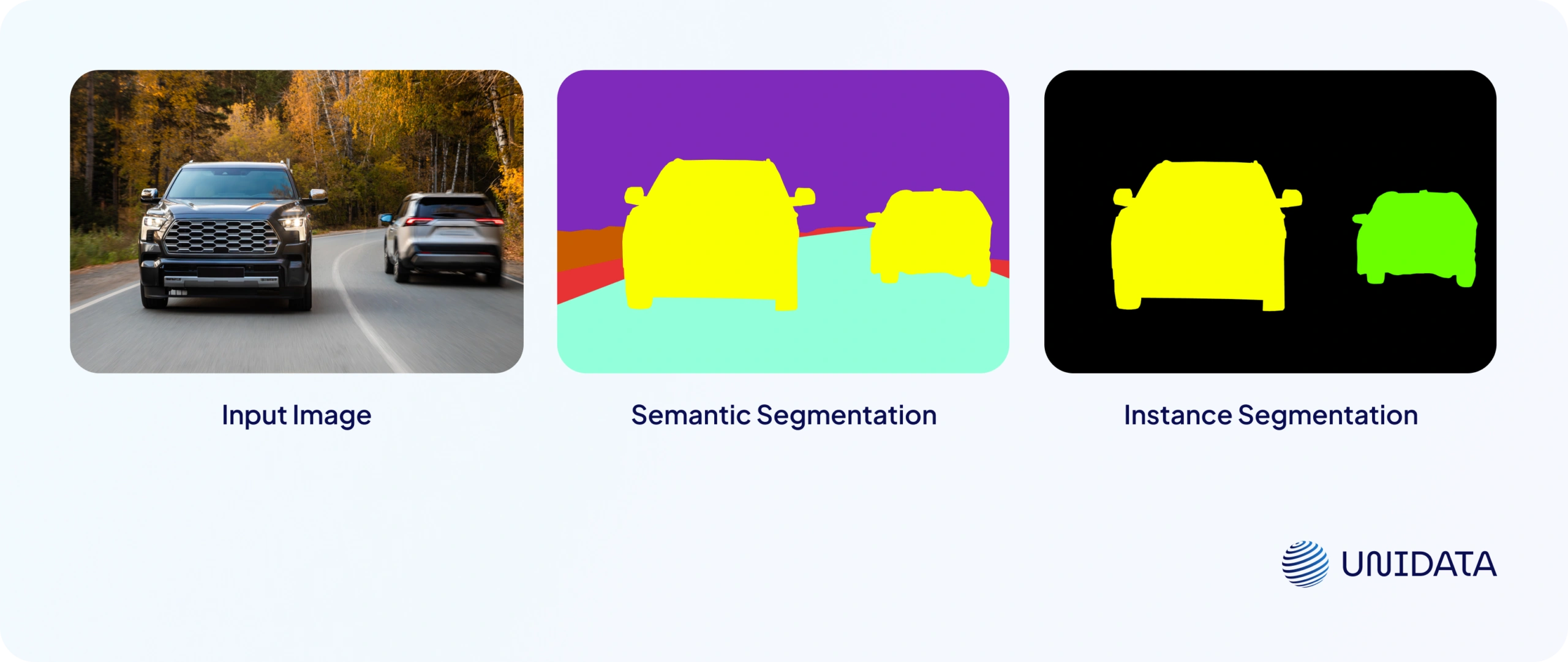
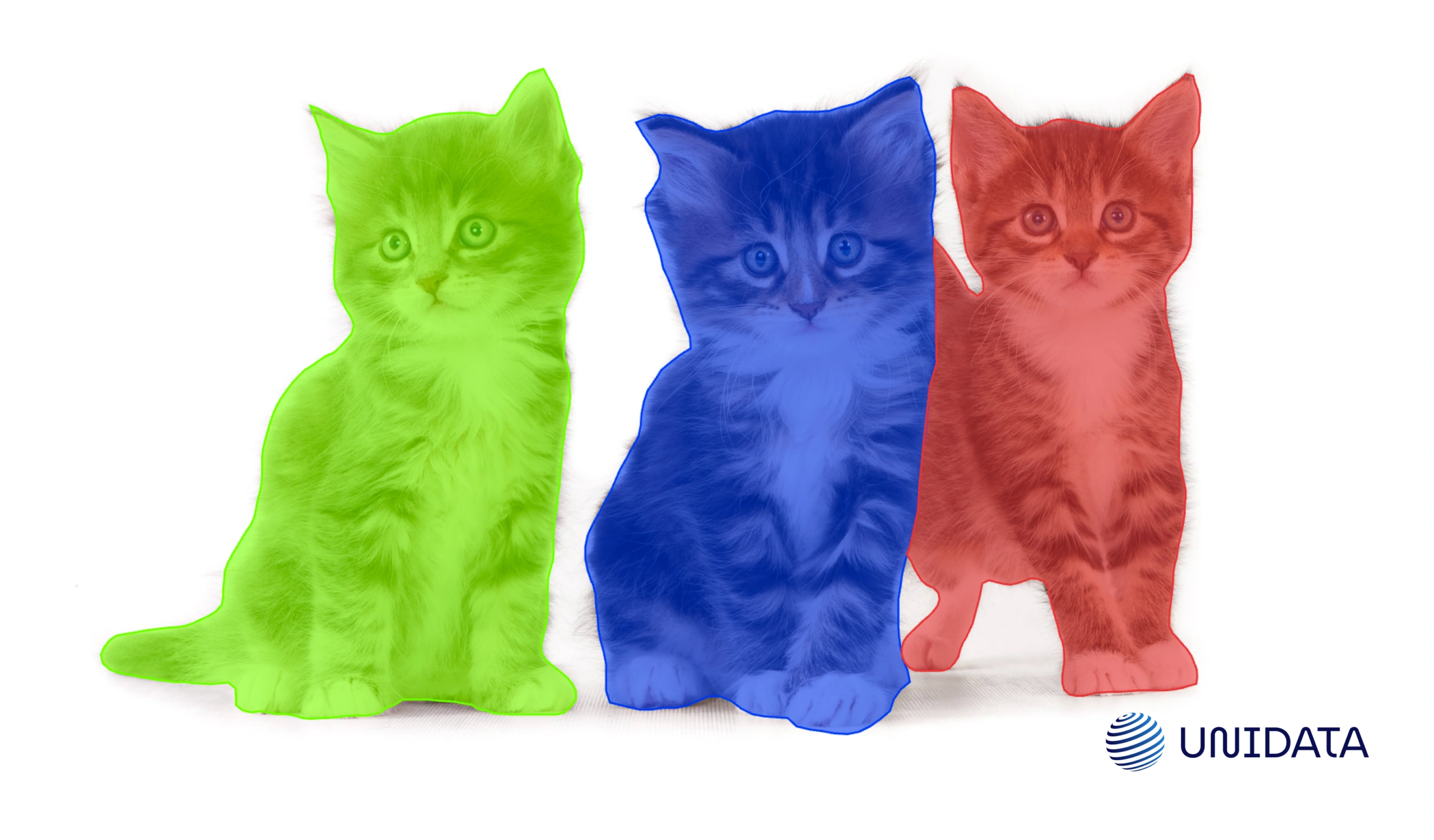
Instance segmentation, on the other hand, distinguishes between different instances of the same class. Each object is assigned a unique mask and label, making it possible to precisely outline the boundaries of individual objects, even if they overlap or are closely packed together. Unlike semantic segmentation, instance segmentation does not usually focus on background objects, as it primarily targets foreground elements of interest.
Panoptic Segmentation
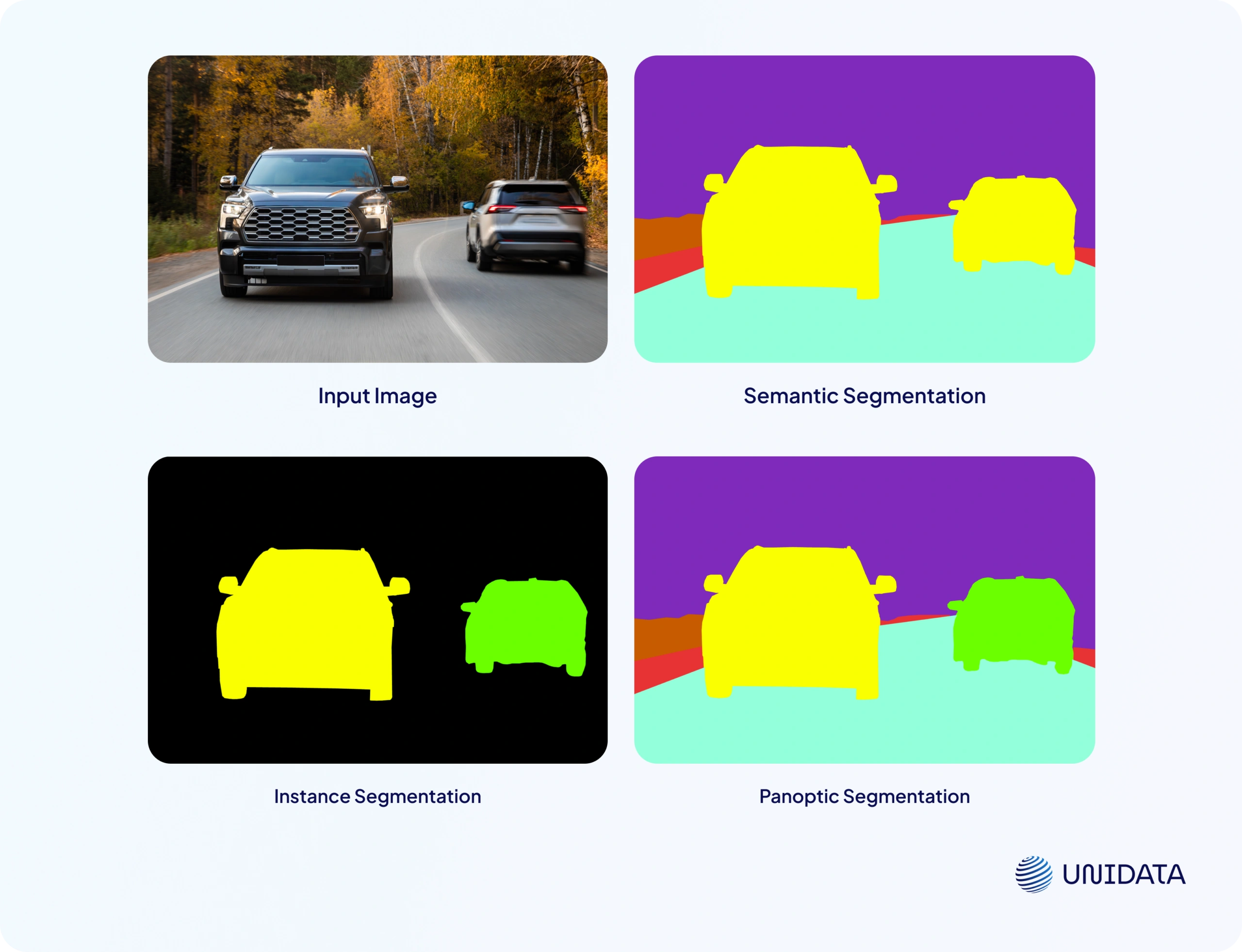
Panoptic segmentation merges the principles of semantic and instance segmentation to provide a more comprehensive scene understanding. It assigns unique labels to separate objects within the same class (like individual cars) while also segmenting background elements as unified regions (such as the sky, road, or trees). This hybrid approach offers a detailed, structured interpretation of an image, making it invaluable for tasks requiring precise environmental awareness, such as autonomous driving and advanced image analysis.
Applications of Panoptic Segmentation in ML and Computer Vision
Panoptic segmentation plays a crucial role in various machine learning (ML) and computer vision (CV) tasks where understanding not only objects but also their spatial relationships is essential. Let’s explore some key applications:
Autonomous Vehicles
In self-driving cars, panoptic segmentation helps models interpret their surroundings with high accuracy. It enables precise differentiation between roads, sidewalks, vehicles, pedestrians, and other urban elements. This capability is critical for safe navigation, obstacle detection, and predicting the movements of other road users.
Robotics
In robotics, panoptic segmentation is used for navigation and situational awareness in autonomous systems. Service robots in urban environments or autonomous warehouse systems rely on it to analyze their surroundings, avoid collisions, and plan efficient routes.
Medical Diagnostics
In the medical field, panoptic segmentation enhances the analysis of medical images such as MRIs, CT scans, and X-rays. It allows for precise segmentation of organs, tissues, and pathological formations, improving diagnostic accuracy and assisting healthcare professionals in disease detection and treatment planning.
Satellite Image Analysis
Panoptic segmentation is widely applied in processing satellite imagery. It helps classify landscapes, identify water bodies, forests, urban areas, and infrastructure. These insights are valuable for environmental monitoring, agriculture, and urban planning.
Surveillance and Security Systems
In security and surveillance, panoptic segmentation enables advanced object and behavior analysis. It is used in intelligent surveillance systems for monitoring public spaces, detecting suspicious activities, and tracking crowd movement in real time.
Semantic vs Instance Segmentation: All the Differences
Learn more
Data Annotation for Panoptic Segmentation
For machine learning models to effectively perform segmentation tasks, they require properly annotated datasets. The process of labeling images for panoptic segmentation involves several key steps:
1. Data Preparation
The first step is to gather and prepare images, ensuring they contain the key objects that need segmentation. For example, if the goal is to segment vehicles, the dataset should include images of cars in various conditions—different angles, lighting scenarios, and weather conditions.
2. Defining Classes and Annotation Rules
At this stage, it is essential to establish a comprehensive list of classes to be annotated and define clear labeling guidelines for each. It is crucial to decide in advance which objects should be treated as distinct instances and which should be categorized as background elements (e.g., roads or the sky). Well-structured guidelines ensure consistency among annotators and reduce errors or ambiguities during the annotation process.
3. Choosing an Annotation Tool
Panoptic segmentation requires specialized annotation tools such as CVAT or Label Studio. These platforms allow users to create precise object boundaries and export labeled data in the required formats.
4. Manual Annotation Using Polygons
Once the images are uploaded to the annotation tool, annotators begin the manual segmentation process. A polygon tool is typically used to outline objects with high precision.
Steps in the Annotation Process:
- Selecting an Object – Identify the object in the image that needs segmentation.
- Creating Polygon Points – Using the polygon tool, the annotator clicks along the object's boundary, adding vertex points. The more points used, the more accurately the shape is captured.
- Closing the Polygon – The annotation is completed by connecting the last point with the first. Some tools provide an auto-close feature to simplify this step.
- Assigning Labels – The segmented object is tagged with its corresponding class label. This process is repeated until all objects in the image are annotated.
5. Review and Refinement of Annotations
Once annotation is completed, a quality check is necessary to ensure accuracy. Errors such as misaligned object boundaries or incorrect class labels can negatively impact the model’s learning process. This review can be done manually or using automated validation tools.
6. Saving and Exporting Data
After verification, the annotated dataset is saved in the required format, such as COCO JSON, to ensure compatibility with the segmentation model and machine learning frameworks. The choice of format depends on the specific model requirements and the framework used for training.

Image Annotation for Retail Product Classification
- E-commerce and Retail
- 100,000 annotated images
- 6 weeks
Ambiguous Cases in Annotation: How to Avoid Mistakes
Accurate annotation is critical for training high-performing panoptic segmentation models. However, certain challenges, such as subjectivity and layer mismanagement, can lead to inconsistencies. Here’s how to mitigate these risks.
Subjectivity in Annotation
Visual perception varies from person to person. One annotator might outline an object’s boundary with extra precision, capturing small details, while another might take a more simplified approach, cutting off minor protrusions. Additionally, some objects may be visually ambiguous—such as road surfaces that blend seamlessly into sidewalks—making it difficult to define clear boundaries.
To reduce errors, it is essential to create detailed annotation guidelines specifying how objects should be outlined, where boundaries should be drawn, and what should be considered part of an object. These guidelines should include examples of how to handle ambiguous cases and set clear rules for placing polygon points to maintain consistency.
Managing Annotation Layers Correctly
Panoptic segmentation requires careful handling of both background regions and individual objects. If all polygons are placed on a single layer, there is a risk of incorrect overlap, leading to labeling conflicts. To avoid this, it is recommended to use annotation tools that support multi-layered segmentation, allowing for better organization of object and background annotations. Structuring layers hierarchically ensures correct visibility and overlap, while regular quality checks help prevent inconsistencies.
By considering these nuances and following best practices, it is possible to achieve a higher level of annotation consistency. The better the training data, the more accurate the machine learning model will be.
Key Takeaways
Panoptic segmentation is one of the most precise data annotation methods in computer vision. It combines the advantages of semantic and instance segmentation, enabling models to better understand scene structures. This method is widely applied in autonomous transportation, healthcare, robotics, and various other fields where accurate object-background separation is crucial.
Frequently Asked Questions (FAQ)
Panoptic segmentation is a computer vision task that assigns a label to every pixel in an image while also distinguishing individual object instances. It combines the strengths of semantic and instance segmentation to deliver a complete understanding of a scene.
The difference between panoptic segmentation and semantic segmentation is that panoptic segmentation distinguishes individual objects, while semantic segmentation labels all pixels of the same class identically.
In semantic segmentation, multiple objects of the same type are treated as one category without separation. Panoptic segmentation, however, assigns unique identities to each object and also segments background regions.
Panoptic segmentation is implemented by combining instance segmentation and semantic segmentation approaches with properly annotated datasets.
Panoptic segmentation is important because it provides a complete and structured understanding of visual scenes. Combining object-level and pixel-level information enables systems to understand both what is present in an image and how different elements relate to one another spatially.
Panoptic segmentation requires high-quality datasets with detailed pixel-level annotations and clearly defined object instances.