
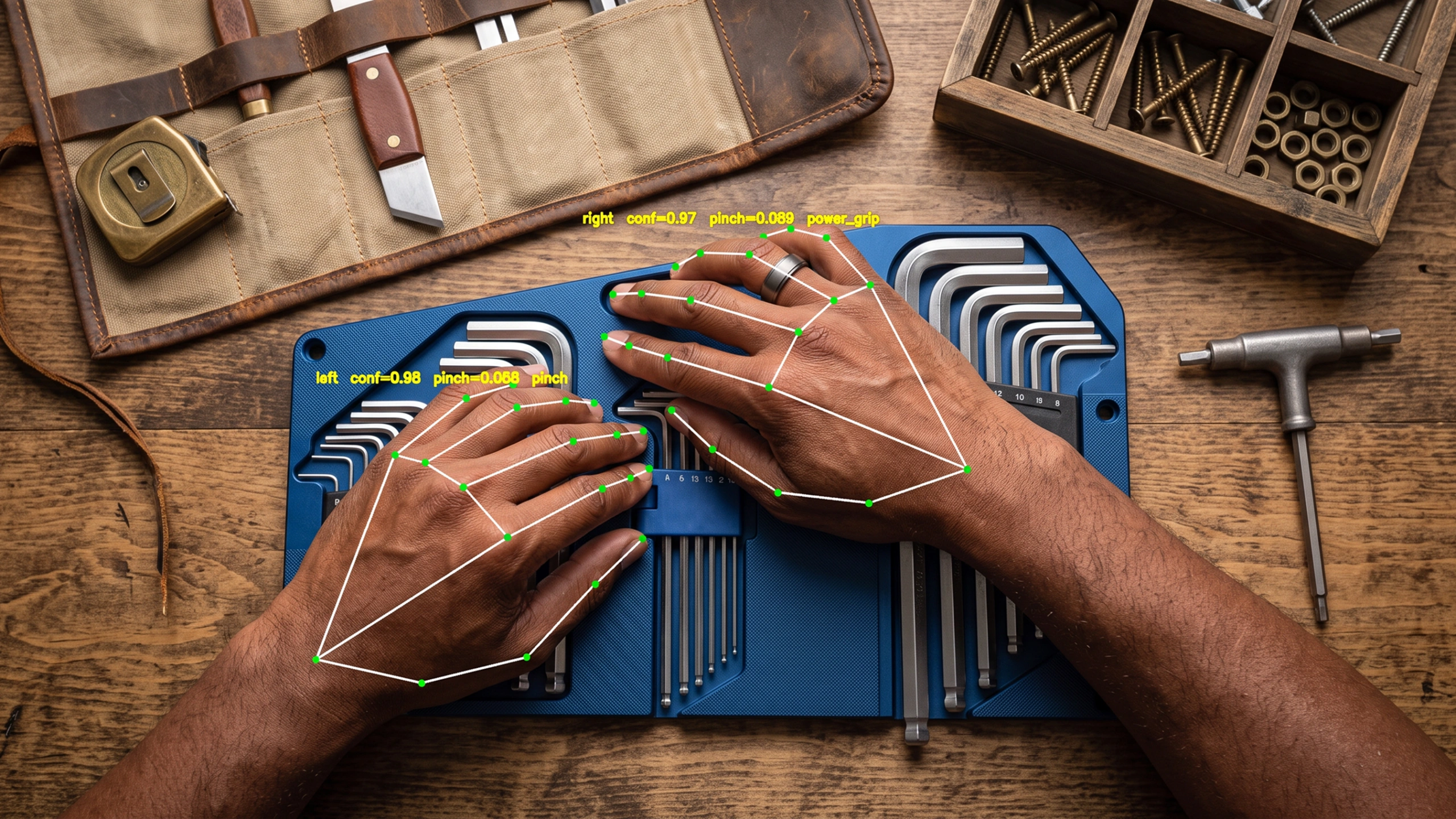
You can put your own recording service on a Pico 4 Ultra and read its cameras, its hand tracking and full-body pose straight off the headset. Not every headset lets you near that data, and that access is what makes egocentric data collection practical here.
The headset alone will not cover fine manipulation, though. That takes wrist cameras, and with them come a second clock to reconcile and a per-episode check to pass. Those are the two setups we run, and choosing between them is the first real decision in a capture programme.
The egocentric data gap in robot and embodied-AI training
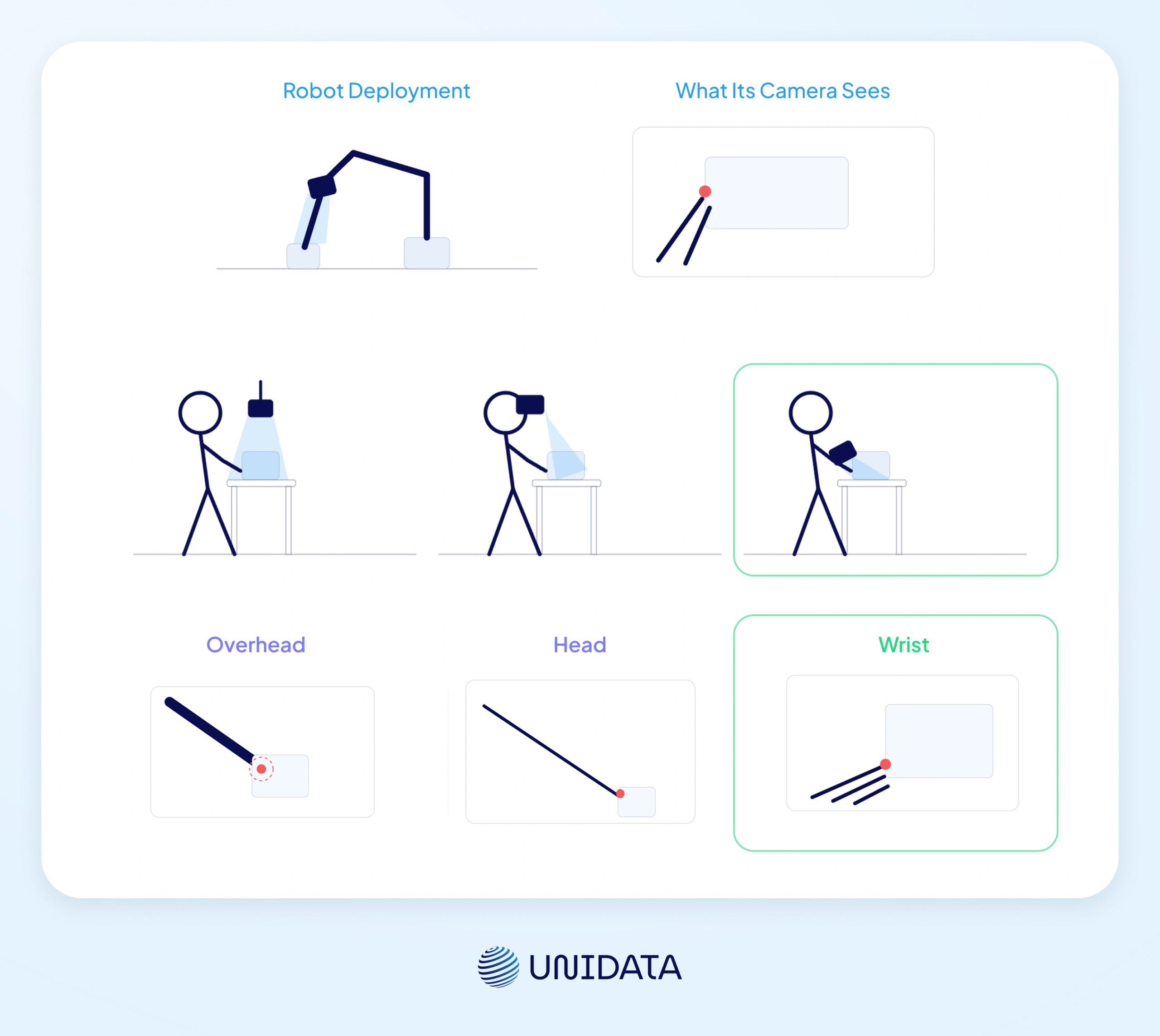
Whether a trained policy — the model that turns what a robot sees into how it moves — transfers at all depends on the distinction between egocentric and exocentric data. An overhead camera records the task; a head- or wrist-mounted camera records what the robot will see. The signals that matter most for manipulation are only visible from inside the task: hand position relative to the object, grasp closure geometry, the precise moment of contact.
EgoMimic (Georgia Tech, 2024) showed in controlled experiments that one hour of human egocentric hand data contributes more to policy performance than one additional hour of robot teleoperation data [1]. How much of that advantage survives depends on where the capture rig sits relative to where the robot's camera will sit, which on a manipulator is the end-effector, the working tip of the arm. A mismatch between how a human holds a camera and where that sensor is mounted is the failure we hit most often on the floor. Matching the geometry is the part that costs money on site, and it is where hardware selection matters.
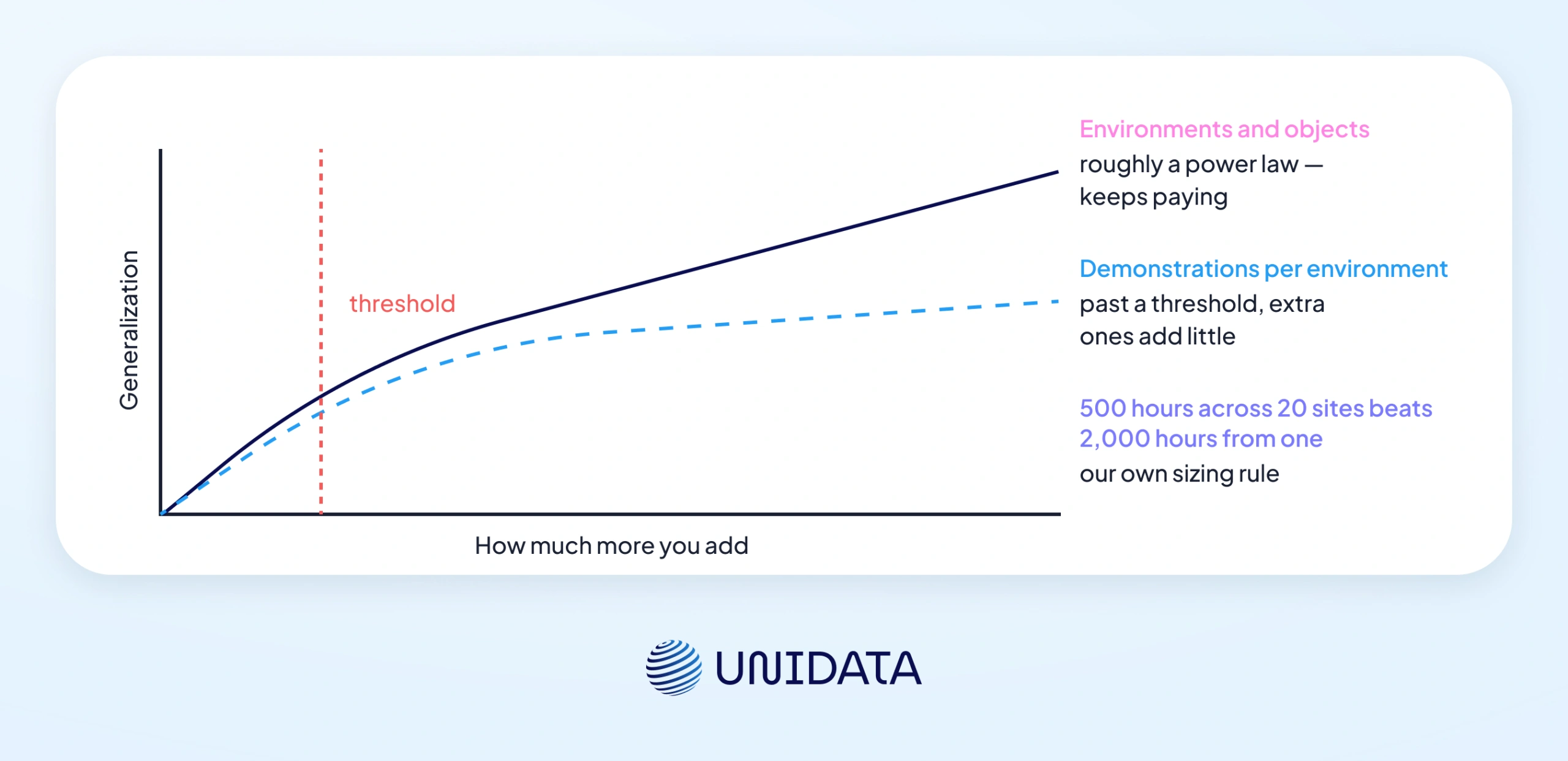
The same holds at scale. EgoScale trained a vision-language-action model on over 20,854 hours of action-labelled egocentric human video and found a log-linear scaling law between human data scale and validation loss, which in turn correlates strongly with downstream real-robot performance [2]. Our own reading of what that means for a collection brief: the first 500 hours are not interchangeable with the next 500. Where the ceiling sits is measured separately: past a certain number of demonstrations per environment, additional ones add little, while environment and object diversity keep paying [9].
Pico 4 Ultra specs that matter for dataset capture
Four things decide whether a headset can carry a collection pipeline: the resolution of the app-accessible camera feed, body- and hand-tracking fidelity, whether the SDK lets you install your own recording service, and how much headroom is left for that service to run in.
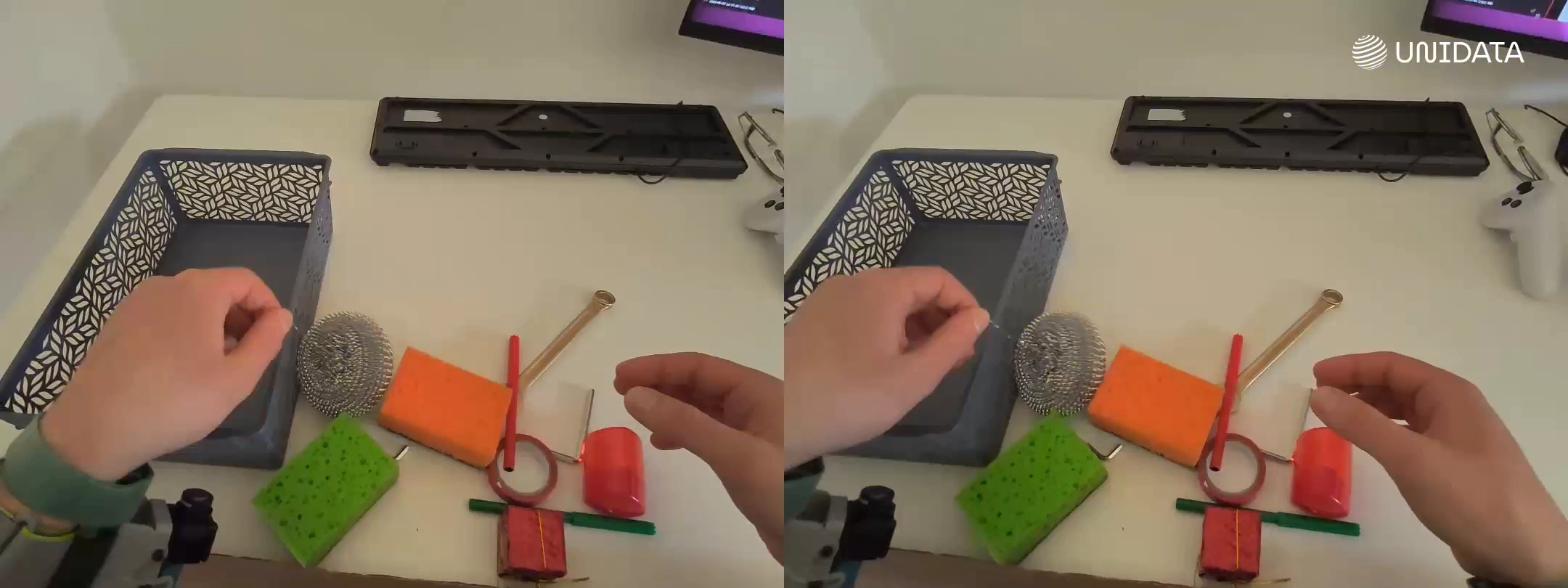
RGB: stereo 32 MP cameras, lower-resolution app stream
Two 32 MP colour cameras sit on the front. The app-accessible stream is lower resolution than the sensor: EgoKit measured 1280×960 at 89 fps on this device [5]. What our own service records is different again, and the episode format below gives those figures.
Depth and the two setups we run
Pico's own environment-perception algorithm builds a real-time map of the space and the objects in it, drawing on the iToF (indirect time-of-flight) camera among three sensor types [3]. That is a headset function for MR mode, and our capture pipeline does not draw on it. Consumer iToF is short range, roughly tabletop to small-room scale, and it becomes less reliable in direct sunlight. Depth information reaches the dataset through the stereo feed instead: two views are enough to derive it downstream if a policy needs it, so an episode carries the video and no separate depth channel.
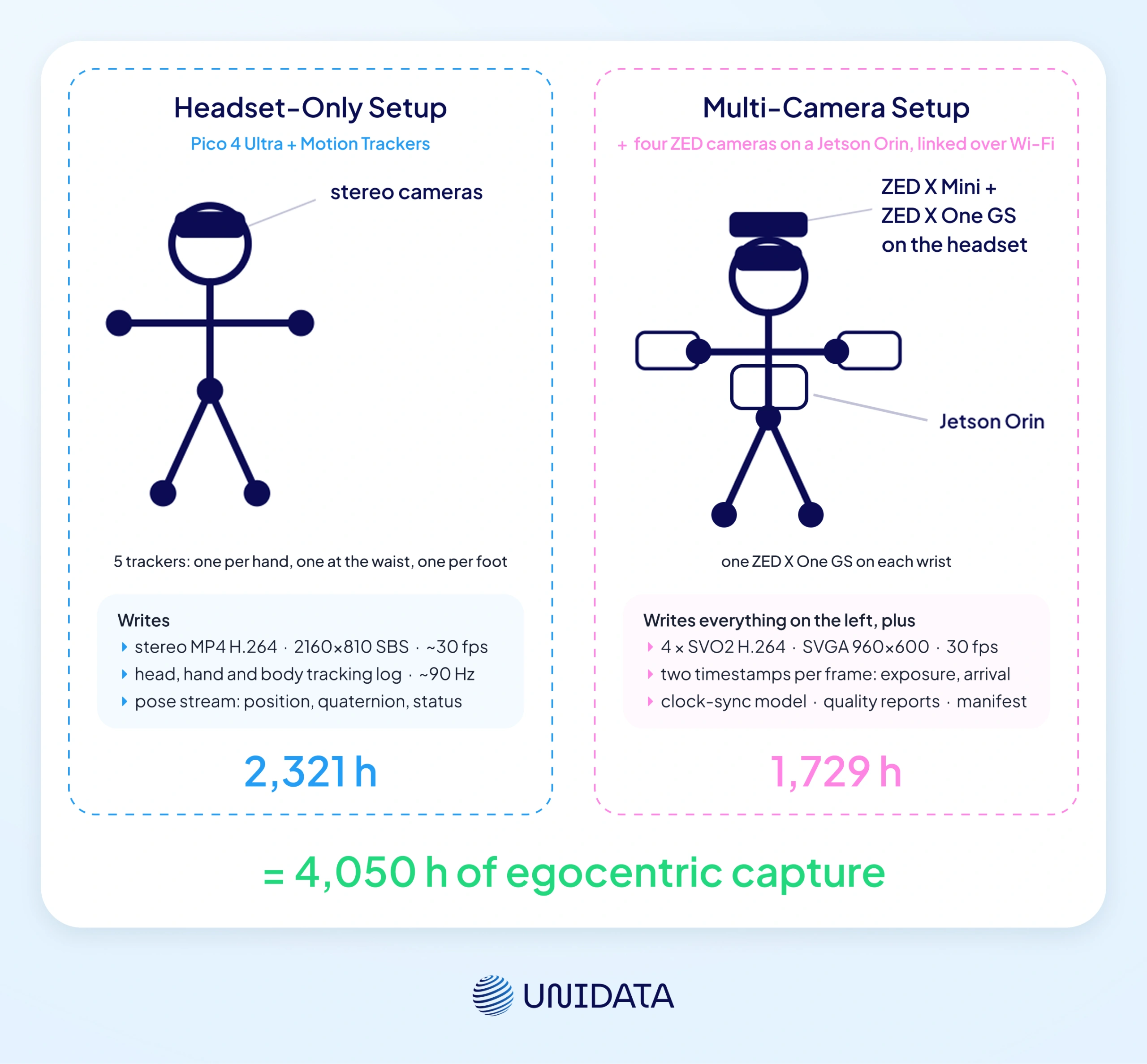
We run two standard setups. The headset-only setup is Pico 4 Ultra plus Motion Trackers. The multi-camera setup adds four ZED cameras (a ZED X Mini stereo and a ZED X One GS on the headset, plus a ZED X One GS on each wrist) recorded on an onboard NVIDIA Jetson Orin, with the headset linked to it over Wi-Fi. Both setups are in active use: of the 4,050 hours in our egocentric dataset, 2,321 were captured headset-only and 1,729 with the multi-camera setup.
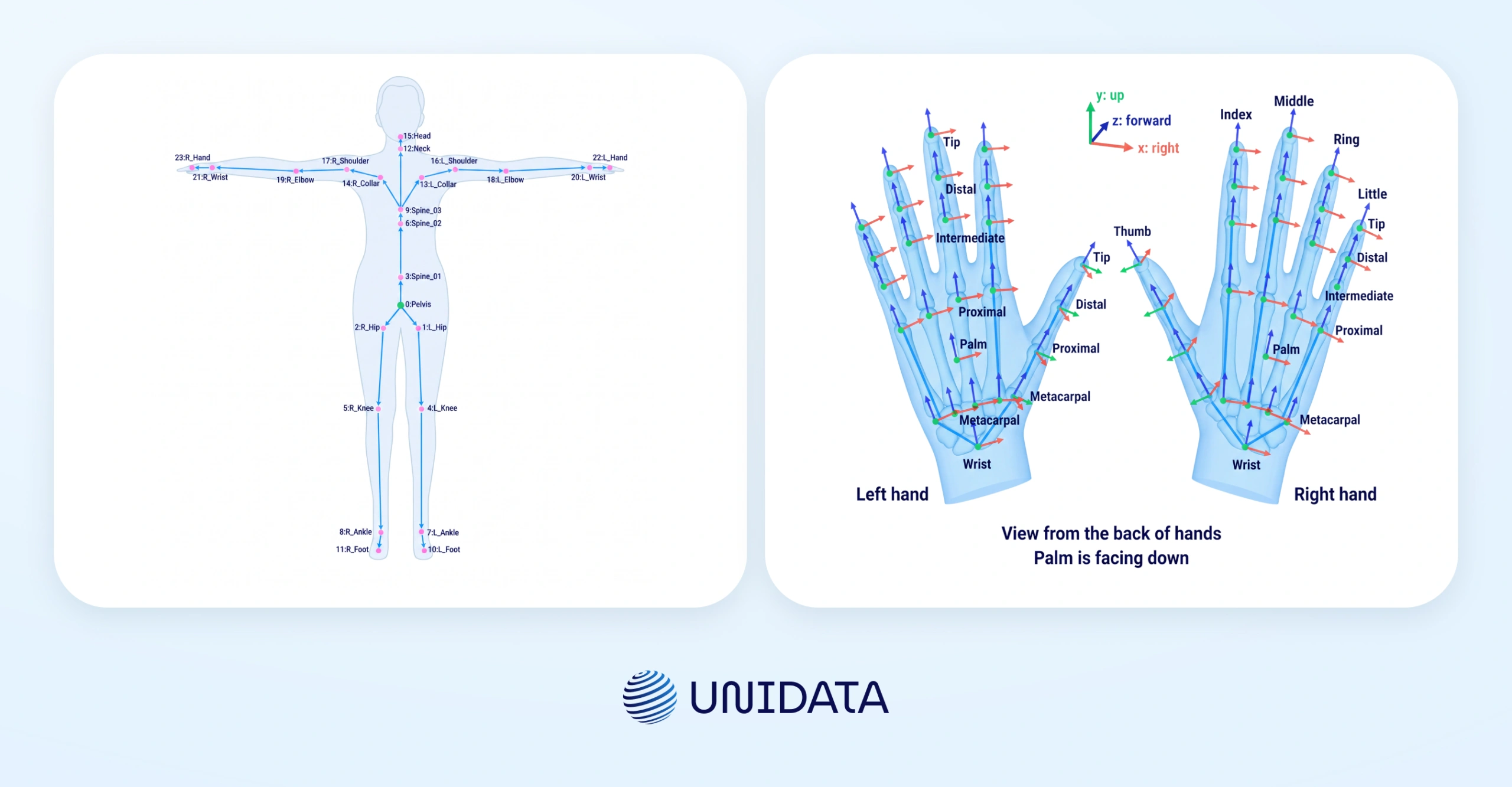
Body tracking: 24 skeleton points, 26 per hand
With Pico Motion Trackers, the system tracks 24 full-body skeleton points, with 20 ms latency and step-recognition accuracy no lower than 98% in full-body tracking mode [4]. In our own capture, the head, hand and body tracking log runs at ~90 Hz nominal. Hand tracking adds 26 keypoints per hand, the OpenXR joint set.
We typically deploy five trackers per operator, one per hand, one at the waist, and one per foot, for full-body loco-manipulation scenarios: moving through a space and handling objects in it at the same time. For tabletop tasks, the trackers add little: hand pose comes from the headset's own hand tracking, which holds up as long as the palm stays visible to the cameras.
What limits a capture day is not battery capacity but how much usable content one operator produces. Our capture target is 5–5.5 hours per operator across an eight-hour shift with roughly 15 minutes of break at a time; six hours is the ideal, and how that time falls inside the shift varies by operator. Treat it as a capture target: how many of those hours survive review is a separate question, and the automated checks described below do not answer it.
Power stops being the binding constraint without being fully solved. Motion Trackers run 90–110 minutes on a charge and spares are kept on hand, and both the headset and the onboard Orin sit on mains. Mains draw is not enough to hold the headset's level while it is recording, but it catches up at rest during a break. The figures are broadly the same in both setups.
RAM is the other thing worth checking before committing to a fleet: the Snapdragon XR2 Gen 2 ships here with 12 GB, 4 GB more than Meta Quest 3 on the same chipset [3], and that headroom is what lets our recording service run alongside capture without competing with it.
From setup to exported dataset: a practical workflow
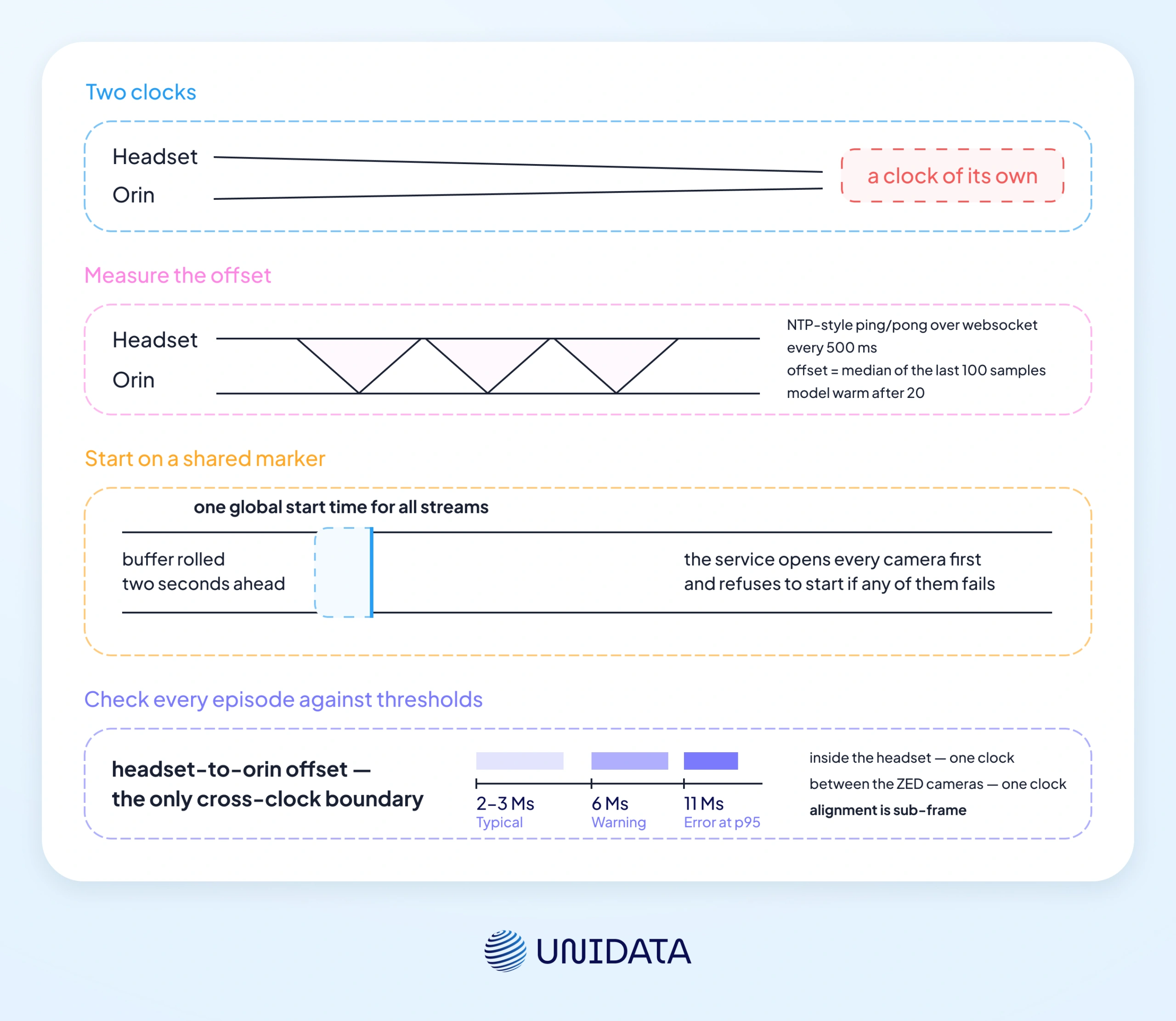
With only the headset and its trackers in the rig there is nothing to synchronize across clocks: stereo video and the head, hand and body poses are all timestamped by the headset itself, and they diverge by fractions of a frame. Synchronization becomes a problem on the second device — when four ZED cameras are added, recorded on an onboard computer with a clock of its own. Hence the two setups, and in the multi-camera one the main work is reducing two timelines to one.
Stage 1: Calibration
Calibration is Motion Tracker calibration, and it runs through PICO's official app. Each tracker takes around five seconds; pairing is automatic at startup [4]. It is required every time the headset is activated, not once per rig — which is why it belongs in the operator's start-of-session routine.
Stage 2: Recording configuration
Two services do the recording: the PICO Data collection service on the headset, and the Orin Data collection service on the onboard computer in the multi-camera setup. What the operator sees before recording differs by setup. In the headset-only setup, the view through the headset is the frame that lands in the dataset — there is no separate monitor to check. In the multi-camera setup, the Orin Data collection service exposes a preview in the local network, openable from any device on it, and only before recording starts. That preview is also where a drifting skeleton or an occluded tracker gets caught before the operator starts. In the headset-only setup there is no such view, so anything the operator does not notice through the headset is not caught until the footage is reviewed.
Synchronization is the setup step that most often decides whether episodes are usable, and it is software synchronization by per-frame and per-sample timestamps, with no hardware genlock. The headset and the Orin exchange NTP-style ping/pong over WebSocket every 500 ms; the working clock offset is the median of the last 100 samples, and the model is considered warm after 20. Recording then starts on a shared marker: the service opens every camera first and refuses to start if any of them fails, computes one global start time for all streams, and rolls the buffer two seconds ahead of it so the beginning of the action is never clipped.
What this buys is measurable. Between the ZED cameras, and between the video and pose streams inside the headset, alignment is sub-frame because each side shares one clock. Across the headset-to-Orin boundary, the offset typically sits at 2–3 ms, with 6 ms on the mean flagged as a warning and 11 ms at p95 treated as an error. P95 is the 95th percentile, so the check watches the tail and not just the average. Cross-device drift is what misaligns the wrist views against the head view at grasp closure, so in that setup, every episode is checked against those thresholds before it leaves.
Stage 3: Recording output and data format
An episode is a self-contained folder. What lands in it:
- From the headset — stereo video as MP4 H.264, side-by-side at 2160×810 and roughly 30 fps; the head, hand and body tracking log at ~90 Hz; a pose stream carrying position, quaternion and tracking status; a frame sidecar with the timing of every video frame.
- From each ZED camera — video as SVO2 H.264 at SVGA 960×600 and 30 fps, plus a sidecar with two timestamps per frame: exposure time, and arrival time on the Orin.
- Episode-level — the clock-sync model and its raw samples, an event log, quality reports, and a manifest carrying the start and stop in global time and the version of the data format.
Quaternions are used because they avoid gimbal-lock artifacts. SVO2 is Stereolabs' container and is read through the ZED SDK, so budget for that dependency if the multi-camera streams go into your pipeline; the headset video is plain MP4 and needs nothing special.
That structure is what lets downstream processes consume only the streams they need without parsing a full session. The recording application on the headset is the same in both setups, and the recording parameters above are confirmed for both.
Stage 4: Episode-level QA before export
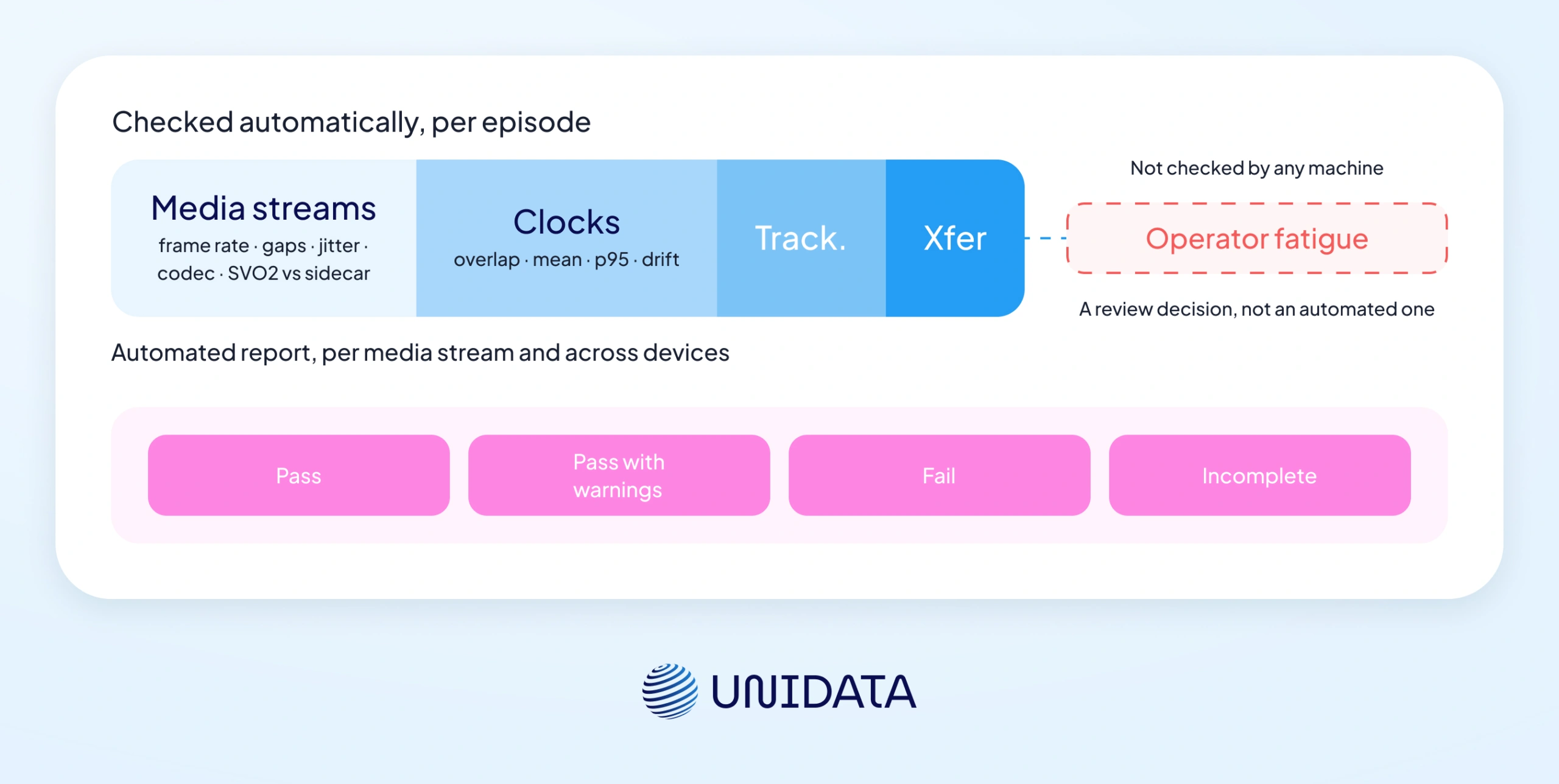
Episodes go through an automated check before they leave our environment. The headset-only setup runs its own check; the multi-camera setup runs that one plus the synchronisation and extra-camera checks below. The check exists so that no episode leaves on someone's judgement of whether it looked fine. What it reports:
- Per media stream: real frame rate and frame count, the number and share of frame gaps, the largest gap, jitter, and the codec, resolution and bitrate read back out of the file itself. It also compares the frame count inside the SVO2 against the sidecar, which is how truncation gets caught.
- Across devices: stream overlap, the mean and p95 of the headset-to-Orin offset, the number of clock-sync samples, and the drift from the start of the episode to its end, held under 5 ms.
- On the tracking side: the share of valid tracking status, plus a frequency analysis of the trackers at mean, start, middle and end. That last one is what surfaces tracking that dropped out mid-recording.
- On transfer: checksums. An episode whose files have not finished moving across is held as pending sync and not counted, and export can byte-verify with MD5 before the source copy is deleted.
Each metric carries its own warn and error band, which is what the four verdicts are built from: stream overlap warns below 80% and fails below 60%, valid tracking status warns below 95% and fails below 80%. Each episode ends up as PASS, PASS_WITH_WARNINGS, FAIL or INCOMPLETE, and the results roll up into a weekly report and an operator dashboard.
Three integrity rules sit in front of all of that:
- Recording does not start unless every selected camera opened. An episode that fails that gate is marked rejected, so a half-recorded shooting day cannot happen.
- If the prepare command never reaches the headset, the start is cancelled outright, so the ZED cameras are never left recording on their own.
- If the headset drops off mid-episode, the service waits 15 seconds for it to come back, then finalizes the recording properly so no episode is left hanging.
Our working rule is to re-collect rather than correct: a patched episode introduces inconsistencies that are harder to detect downstream than a straight re-shoot.
What the check cannot judge is whether a demonstration was performed well. It reads frame rate, gaps, synchronisation and tracking status, and none of those show whether the operator was tired by the end of a shift, or whether a grasp was hesitant. A technically clean episode can still be a weak demonstration, which is why the last call on an episode is a human one.
What a Pico 4 Ultra session actually captures — and what can be annotated
A single session writes video and tracking: stereo video from the headset, up to four more camera streams in the multi-camera setup, and the head, hand and body pose log. What we deliver today is the captured data itself: on our current programme the data ships unannotated, and annotation is a separate scope on request.
| Modality | Output format | What can be annotated on request |
|---|---|---|
| RGB video | MP4 H.264 stereo head view; in the multi-camera setup, four more streams as SVO2, two of them wrist-mounted | Action-level temporal segmentation: timestamps plus action names |
| Body and hand pose | 24 body points + 26 per hand, quaternion-based, ~90 Hz | Hand-skeleton annotation |
Both of those are capability rather than track record: our image-processing team is set up to take them on when a client asks. Depth arrives through the stereo video, as above. The episodes themselves are successful task completions: failure and recovery runs are not something we currently prioritise collecting, and it is worth asking for them explicitly if your policy needs to learn recovery.
Three things we would steer a client away from scoping: per-frame object bounding boxes, background segmentation, and world-origin camera pose. They add cost without adding training signal for most manipulation tasks.
Which ML tasks Pico-captured data actually fits
The same session serves a manipulation policy and a perception model very differently: one needs the hand-keypoint stream, the other needs almost none of it.
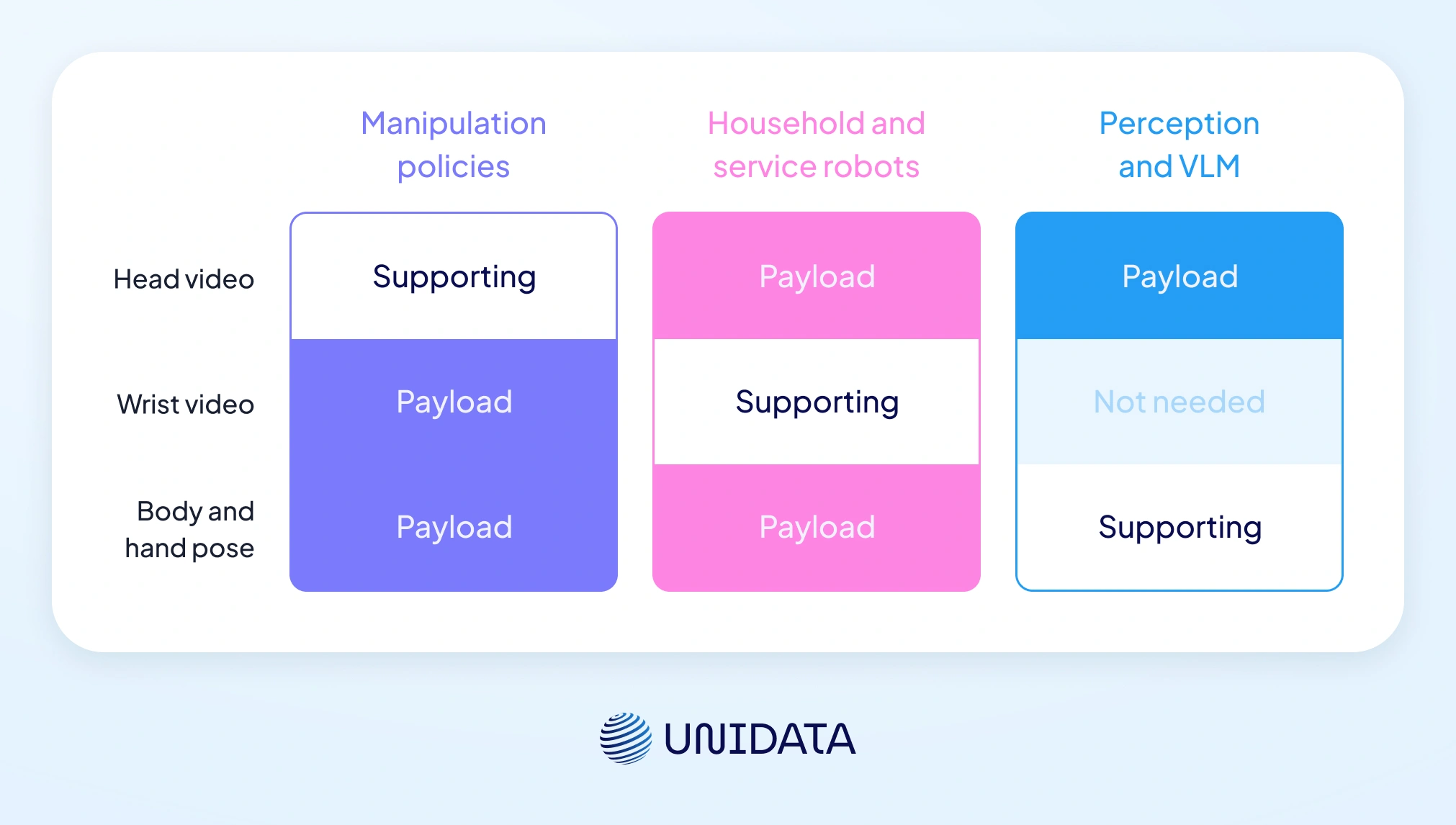
Manipulation policies: hand pose is the payload
This is our primary use case. The body-and-hand pose stream from Pico plus Motion Trackers is what feeds imitation learning directly. TWIST2 drove a humanoid robot through a Pico 4 Ultra, retargeting the operator's motion with General Motion Retargeting, which maps human joint angles onto a robot's different joint layout [6] [8]. It also marks where capture ends and retargeting begins. Our part is capture: synchronized video, timing, and body-and-hand pose streams.
Household and service robots: scene variation is the hard part
For clients building robots that operate in home environments, the 13-scenario coverage in our Egocentric Video Dataset and the cleaning, laundry and dishwashing coverage in the Robotic Household Activities Dataset represent what we have already collected and can extend. Household tasks add a complication that structured industrial environments avoid. Scene variation is high, since every home is different, and the objects involved (soft fabrics, liquid-filled vessels, fragile dishware) bring in properties that rigid-object manipulation never has to describe.
Perception and VLM training: when the head view alone is enough
For clients building perception systems, the egocentric stream alone is often sufficient. Head-mounted RGB with 13 scenario types and synchronized body pose is well-structured for temporal action localization benchmarks, which means finding when in a video each action starts and ends. The same footage supports vision-language work, but only with language added on top: what we deliver is video and pose, not text. A model being fine-tuned to respond to "wash the dish on the left" benefits from egocentric footage of a human doing exactly that, and turning our footage into that kind of pair needs a separate text-annotation pass.
Robot Types: A Complete Classification Guide
Learn more
Dataset best practices when using Pico 4 Ultra at scale
Environment diversity versus capture volume
This is the same budget question as how much training data a model actually needs, asked one level up. Where the policy has to work across environments, environment variety wins: 500 hours across 20 sites beats 2,000 hours from one. For a task tied to a single environment, volume inside that environment is the more useful spend. Treat the 500-versus-2,000 comparison as a working rule and not a measured result. It is the pattern we see across client projects, we would not claim it holds for every training scenario. Across more than 40,000 demonstrations, generalization followed roughly a power law in the number of environments and objects, and diversity mattered far more than the absolute number of demonstrations; past a threshold per environment, extra ones added little [9]. Our hour counts are ours; the direction is theirs.
Multi-site collection costs more in logistics than in capture hours, which is why single-location briefs keep getting proposed and keep underperforming.
The arithmetic is worth doing before the brief is written. At 5–5.5 hours of capture per operator per shift, 500 hours across 20 sites is roughly 95 operator-days, or about five shifts per site. That is what a schedule and a per-site logistics budget get built from, before any device, annotation or storage cost enters the picture.
Why one egocentric view is not enough
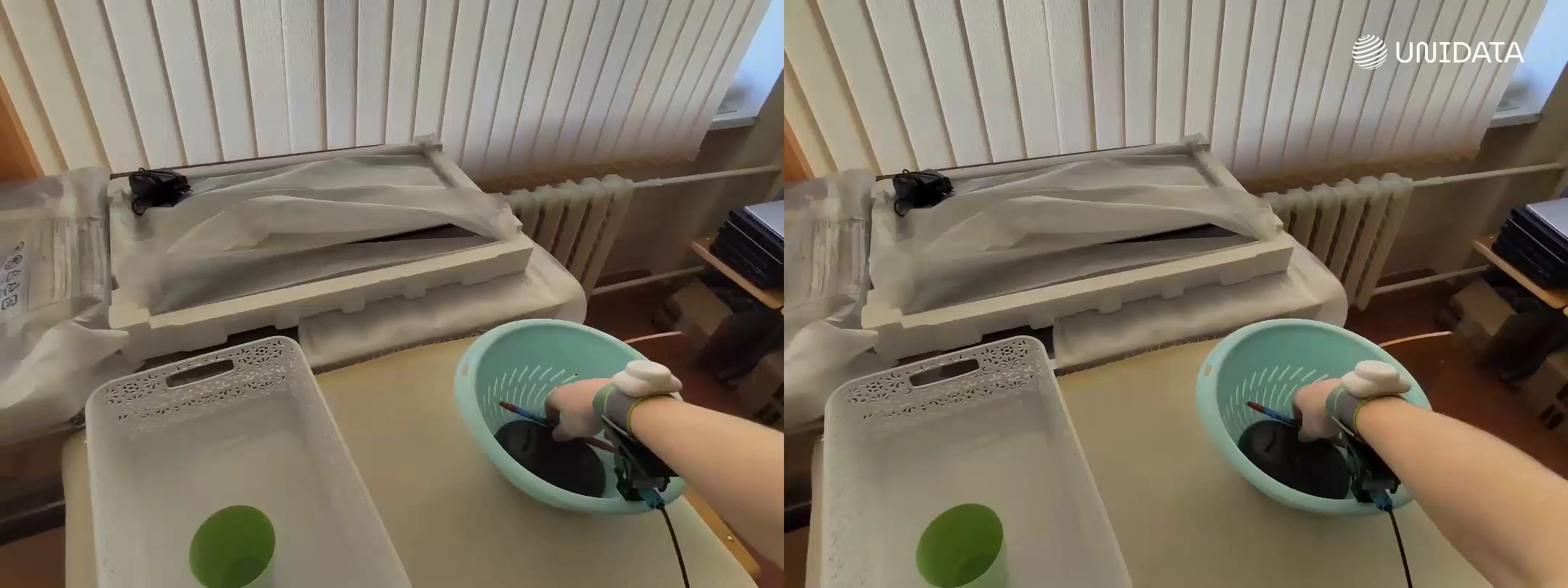
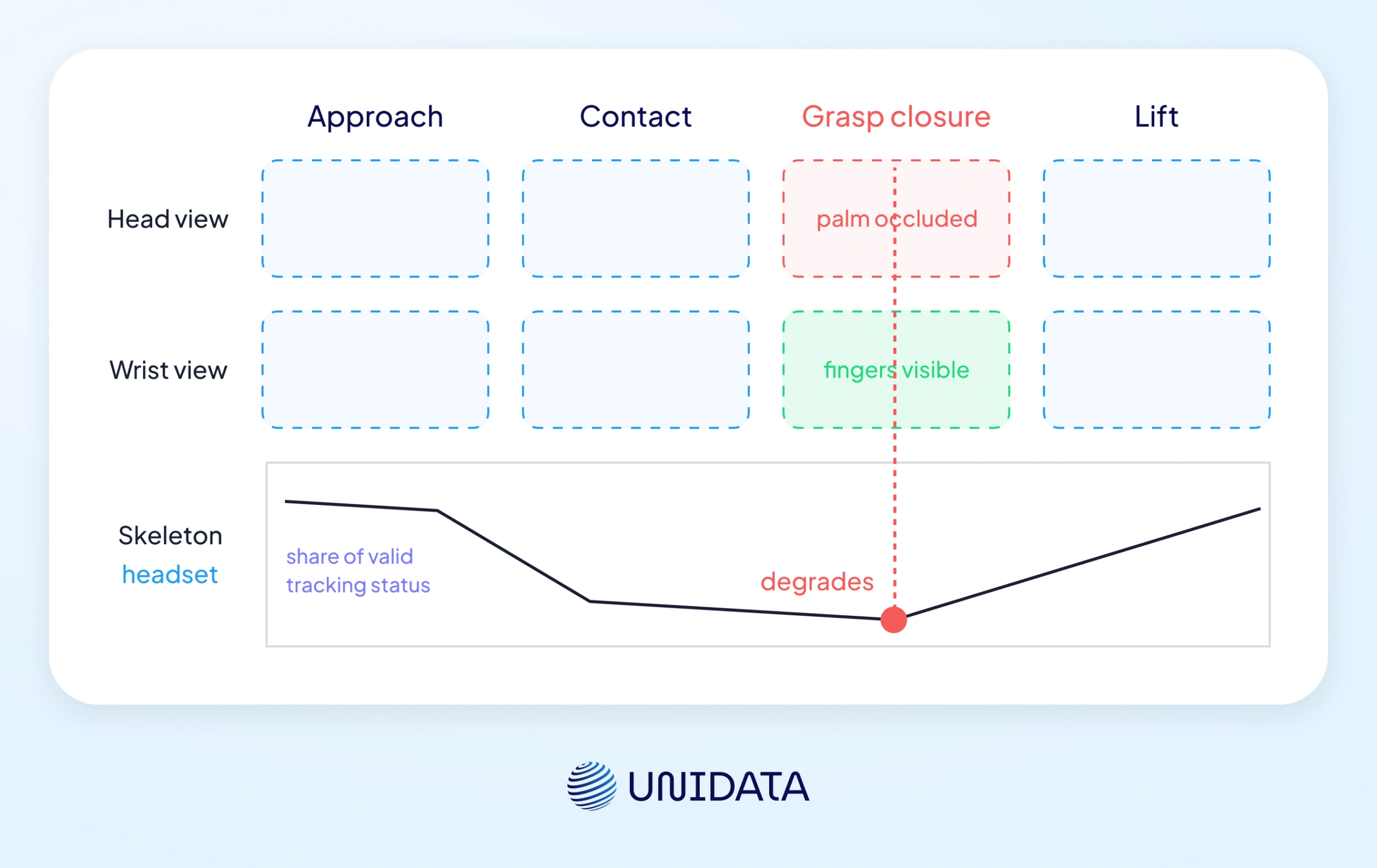
The single egocentric view is not enough for fine manipulation work, and the headset's own hand tracking is part of the reason: the hand skeleton it produces is usable but not precise, and it degrades when the palm is occluded, which is exactly the moment a grasp closes. In the multi-camera setup we therefore run two wrist-mounted ZED X One GS cameras alongside the headset, at angles chosen to match the client's robot wrist camera geometry. The wrist views are what make the grasp-closure moment legible at all, which is also the precondition for annotating it when a client asks. The head view provides task context and object approach. In the headset-only setup there is nothing compensating for that, which is the main reason to choose the multi-camera rig for fine manipulation work.
Consent and biometric data rules
Pico recordings are personal data under GDPR. Whether they also count as special-category biometric data turns on whether they are processed through a means allowing unique identification of the person (Art. 4(14), Recital 51) [11]. That is a question about the processing, not about the file format. In the US three states have dedicated biometric statutes: Illinois (BIPA, which enumerates retina and iris scans, fingerprints, voiceprints, and hand or face geometry [10]), Texas (CUBI) and Washington (RCW 19.375); elsewhere the ground is covered by general state privacy law such as CCPA. We do not offer a view on how any given egocentric capture programme lands under those statutes.
Hand keypoints in particular sit close enough to enumerated categories that it is a question for counsel, and one worth asking before a collection contract is signed. Consent has to be written and informed, and cover both training and evaluation use, alongside a documented retention policy and environment preparation that keeps non-consenting third parties out of frame.
That is what our collection process is built to satisfy. These are scoping requirements: they affect which environments are usable and how sessions must be structured. On the technical side, device serial numbers and identifiers are replaced with a deterministic token across API responses, episode metadata and exports, so an episode path carries an encrypted prefix in place of the device name.
Choosing your egocentric capture device: Pico 4 Ultra, Meta Quest 3, Apple Vision Pro, Project Aria
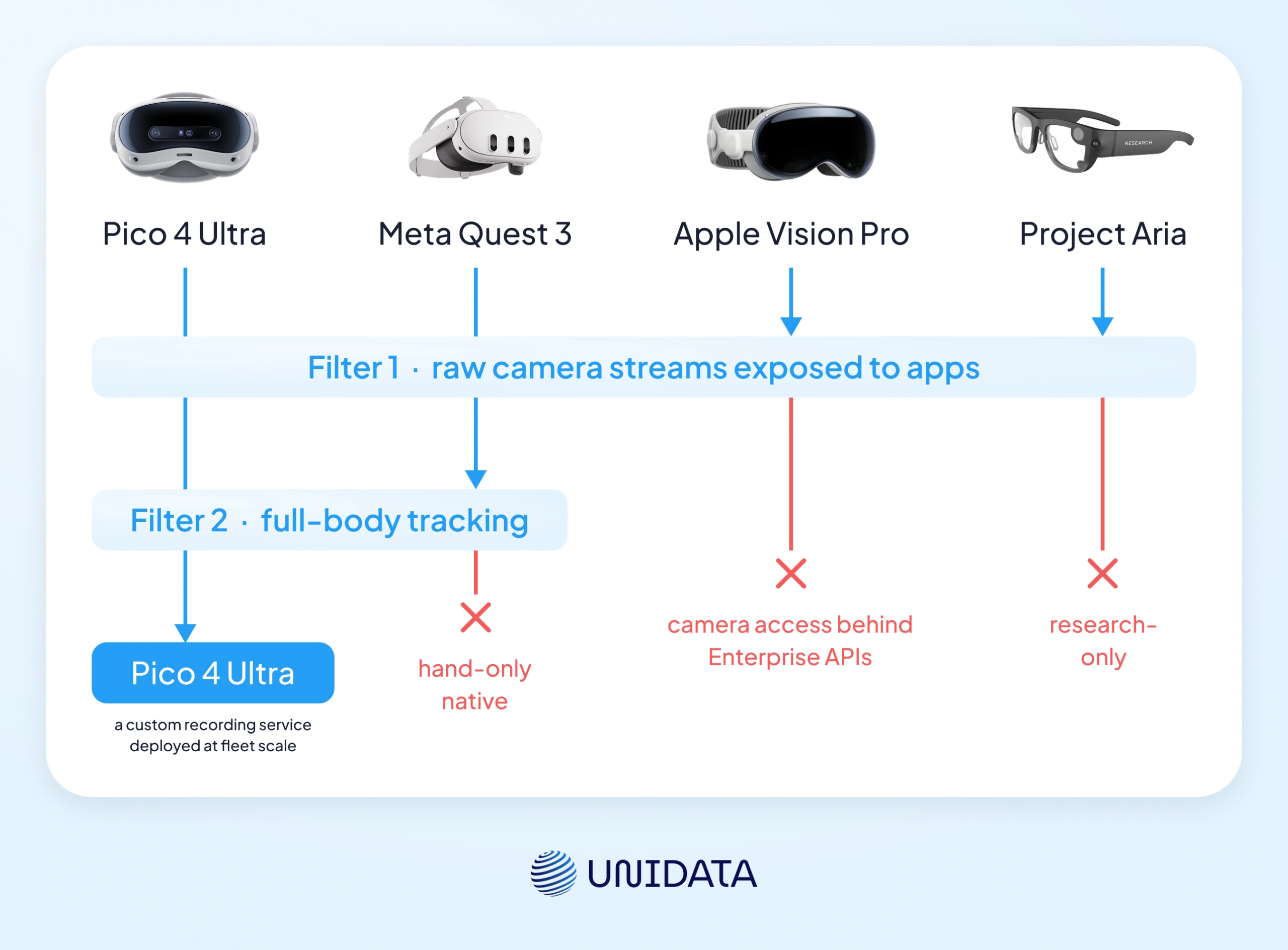
Before comparing devices at all it is worth settling whether you are building this capability or buying the dataset, because the device question only matters on one side of that. If it is yours to answer: SDK access decides it more often than sensor quality does. Among the four platforms in use in mid-2026, Pico 4 Ultra and Quest 3 both expose raw camera streams (Pico via PXR_CameraImage, Quest via PassthroughCameraAccess), while Apple Vision Pro gates camera access behind Enterprise APIs, which EgoKit's authors call less suitable for egocentric collection after testing seven host devices [5]. Project Aria is research-only. Camera access is therefore the gate, not the differentiator: Pico and Quest both pass it, and that access is what let us build our own capture stack — the PICO Data collection service on the headset, and the Orin Data collection service on the onboard computer in the multi-camera setup. For any team that needs to deploy its own recording service across a fleet, that access is the precondition. What separates the two devices that pass is further down the table: native full-body tracking, and the frame rate of the stream an application can actually read.
The four platforms differ most in three things: what a recording service can read, body tracking, and how far the SDK lets you go.
| Pico 4 Ultra | Meta Quest 3 | Apple Vision Pro | Project Aria | |
|---|---|---|---|---|
| Sensor RGB | 2 × 32 MP | Not published by Meta | Stereo main cameras, 6.5 stereo MP (Apple's own unit) [13] | 1 RGB + 2 mono SLAM (Gen 1) [12] |
| App-accessible camera stream | 1280×960 at 89 fps, as measured by EgoKit [5] | 1280×960, or 1280×1280 from Horizon OS v83; 60 Hz; left and right forward cameras [14] | Gated behind Enterprise APIs | Research-only |
| Depth | iToF | Not published by Meta | LiDAR | None (stereo overlap) [12] |
| Body tracking | Hands 26 points per hand native; full body 24 skeleton points with Motion Trackers | Hand-only native | Hand-only native | Eye + hand |
| Tracking rate | Motion Tracker up to 200 Hz; headset IMU not published | Not published | High (undisclosed) | IMU 1000 / 800 Hz (two IMUs) [12] |
| SDK openness | High | Medium | Low | Research-only |
Read the second row before the first: what a recording service can read is not what the sensor can see, and on both devices the accessible stream is a fraction of the sensor behind it. On resolution the two are comparable. On frame rate they are not. Meta's own documentation caps the Quest stream at 60 Hz [14], and it is that gap, not megapixels, that shows up in a manipulation dataset.
When Quest 3 is the better choice
For hand-only tasks where full-body tracking is not needed, Quest 3 is a reasonable choice on paper: camera access is documented, and the developer community is larger, which means more available tooling. Its app-accessible stream is capped at 60 Hz [14], so check that figure against the task before committing if temporal resolution matters. We collect on Pico 4 Ultra only, so this is a read of the documentation, not a report from our own fleet, and we deliberately make no claim about which device costs less to run at scale.
When Pico 4 Ultra is the better choice
Full-body loco-manipulation scenarios, any project requiring a custom recording service deployed at scale, and any project that needs the multi-camera ZED setup. Outdoors it holds up too: EgoHumanoid collected in-the-wild loco-manipulation demonstrations on a PICO headset in February 2026 [7]. The 12 GB RAM versus Quest 3's 8 GB gives the recording service room to run alongside capture.
Project Aria: a research platform, not a collection tool
Aria is a research sensor platform. The geometry argument from the top of this article, that matching the capture device to the robot's deployment sensors is what preserves the transfer benefit, would argue for Aria if your robot deploys Aria sensors. For most commercial robotics platforms, Pico 4 Ultra is closer to what the end-effector camera actually looks like.
What this comes down to
Pico 4 Ultra is the right capture device if you need full-body tracking, or your own recording service across more than a handful of units. Quest 3 works for hand-only tabletop capture where 60 Hz on the camera stream is enough. Vision Pro is not a collection platform in any practical sense, and Aria is one only if your robot carries Aria sensors.
Two things will matter more than which of those you pick. Whether the capture geometry matches where the robot's camera actually sits, which is where the transfer benefit comes from. And whether your policy has to generalize across environments. If it does, environment diversity is the constraint that costs, and 500 hours across 20 sites works out to about five shifts per site before anything is annotated or stored.
Scoping a campaign against your robot's own sensor geometry, meaning camera placement, field of view and depth sensor type, is the first thing our egocentric video collection service does, before a single session is recorded.
- AI Training
- Robotics
- Data Annotation
- Python
- AWS

Frequently Asked Questions (FAQ)
Egocentric data collection captures video and sensor data from a first-person, head-mounted perspective. For robot and embodied AI training, it matters because the recording viewpoint matches what a robot’s onboard camera will see during deployment, capturing the hand position, grasp geometry, and object contact signals that outside cameras cannot see. In our own capture that means stereo head-mounted video plus a 24-point body and 26-point-per-hand pose log, written as one synchronized episode.
Yes. Via the PICO SDK, recording applications can access the passthrough RGB streams and the body keypoints from Motion Trackers; EgoKit measured that stream at 1280×960 and 89 fps. We use that access in production; our own recording writes stereo video at 2160×810 and around 30 fps. The headset feed is stereo, so depth can be derived from the video if a model needs it. The dataset ships that stereo video, without a separate depth channel.
Pico 4 Ultra has 12 GB RAM versus Quest 3’s 8 GB with the same Snapdragon XR2 Gen 2 chipset, plus Wi-Fi 7 support. Both devices expose raw camera streams to recording applications, so SDK access is not the deciding factor between these two; the app-accessible stream differs. Quest caps it at 60 Hz, while EgoKit measured 89 fps on Pico. Quest 3 has a larger third-party developer community and more available tooling. For full-body data collection, Pico 4 Ultra’s native Motion Tracker integration gives it a clear advantage. For hand-only tasks, the choice comes down to tooling availability and whether 60 Hz is enough.
With Pico Motion Trackers (sold separately), the system tracks 24 full-body skeleton points, with 20 ms latency and step-recognition accuracy no lower than 98% in full-body tracking mode; our own capture log runs at ~90 Hz. Hand tracking adds 26 keypoints per hand on the OpenXR joint set. We use five trackers per operator — one per hand, one at the waist, one per foot — for full-body loco-manipulation; for tabletop tasks the headset’s own hand tracking covers it, as long as the palm stays visible.
There is no single number, and we would rather say so than publish one we cannot source. What is known is the shape: a specific manipulation task with limited object variation saturates, and it saturates per environment. Past that threshold the payoff moves to adding environments, not to more demonstrations. Generalization to new environments requires significantly more. The trade-off is scenario-dependent: where the policy has to work across environments, 500 hours across 20 sites beats 2,000 hours from one, based on patterns we have observed across client projects. Where the task lives in a single environment, volume inside that environment is the better spend. Treat the first half as a working rule rather than a measured result.
Yes. Our Egocentric Video Dataset contains 4,050 hours of first-person video across 13 daily-activity scenarios, captured with Pico plus Motion Trackers (2,321 hours) and ZED plus Pico plus Motion Trackers (1,729 hours), with quaternion-based orientation for 3D pose estimation. Our Robotic Household Activities Dataset covers 1,000 hours of cleaning, laundry folding, and dishwashing. Both are available commercially. Sample downloads are on each dataset page.
Yes, with caveats. EgoHumanoid demonstrated outdoor collection with a PICO VR headset for loco-manipulation in February 2026. The headset-only setup works outdoors in ideal conditions, which means no rain or snow among other things. The multi-camera setup is not adapted for outdoor use yet; that is on our roadmap. Body tracking via Motion Trackers does not depend on outdoor lighting the way the cameras do.
Further Reading & References:
- [1] Kareer, S., Patel, D., Punamiya, R., et al. "EgoMimic: Scaling Imitation Learning via Egocentric Video" — arXiv — 2024
- [2] "EgoScale: Scaling Dexterous Manipulation with Diverse Egocentric Human Data" — arXiv — 2026
- [3] PICO. "PICO 4 Ultra — Product Overview and Specifications" — PICO Global — 2024
- [4] PICO. "PICO 4 Ultra — Technical Specifications" — PICO Global — 2024
- [5] Yu, L., Murat, E., Wang, B., et al. "EgoKit: Towards Unified Low-Cost Egocentric Data Collection with Heterogeneous Devices" — arXiv — 2026
- [6] Ze, Y., Zhao, S., Wang, W., et al. "TWIST2: Scalable, Portable, and Holistic Humanoid Data Collection System" — arXiv — 2025
- [7] Shi, M., Peng, S., Chen, J., et al. "EgoHumanoid: Unlocking In-the-Wild Loco-Manipulation with Robot-Free Egocentric Demonstration" — arXiv — 2026
- [8] Araujo, J. P., Ze, Y., Xu, P., et al. "Retargeting Matters: General Motion Retargeting for Humanoid Motion Tracking" — arXiv — 2025
- [9] Lin, F., Hu, Y., Sheng, P., et al. "Data Scaling Laws in Imitation Learning for Robotic Manipulation" — arXiv — v1 2024, v4 June 2026
- [10] Illinois General Assembly. "Biometric Information Privacy Act, 740 ILCS 14/10 — Definitions" — 2024
- [11] European Union. "Regulation (EU) 2016/679 (GDPR), Art. 4(14) and Recital 51" — EUR-Lex — 2016
- [12] Meta. "Project Aria — Hardware Specifications" — Project Aria Tools — 2026
- [13] Apple. "Apple Vision Pro — Technical Specifications" — Apple — 2026
- [14] Meta. "Passthrough Camera API Overview" — Meta Horizon OS Developers — updated 21 April 2026