
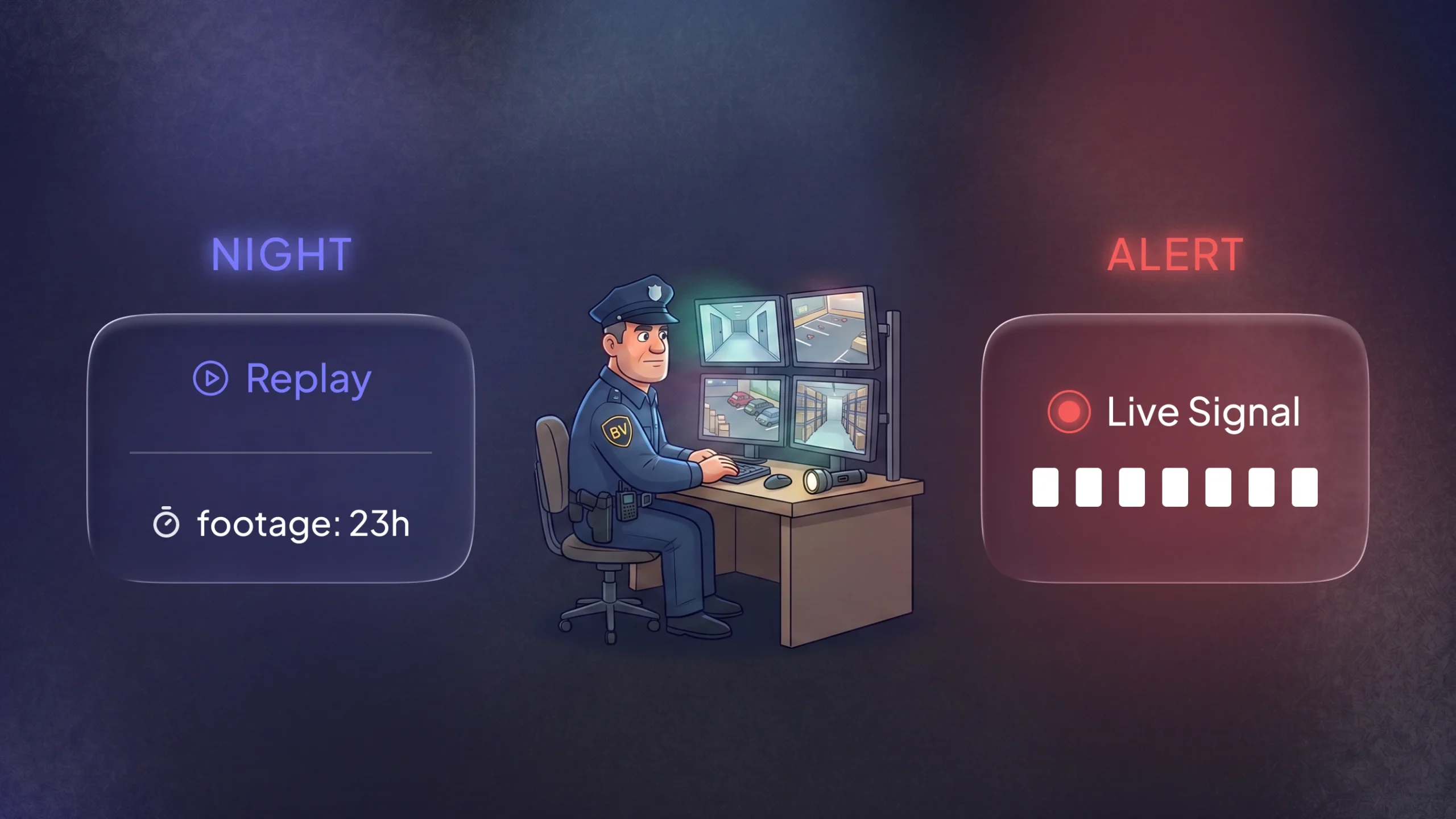
Imagine you’re guarding a bank vault. Batch processing is the nightly routine: you lock up, then review the day’s footage after hours. Stream processing is the live alarm: the moment something happens, you get a signal and can act.
In data systems, batch jobs work on a stored slice of data. Streaming systems work on an ongoing flow of events. Both patterns are common, and many teams use a mix of the two. The choice affects latency, cost, and team load.
What Batch and Stream Processing Mean
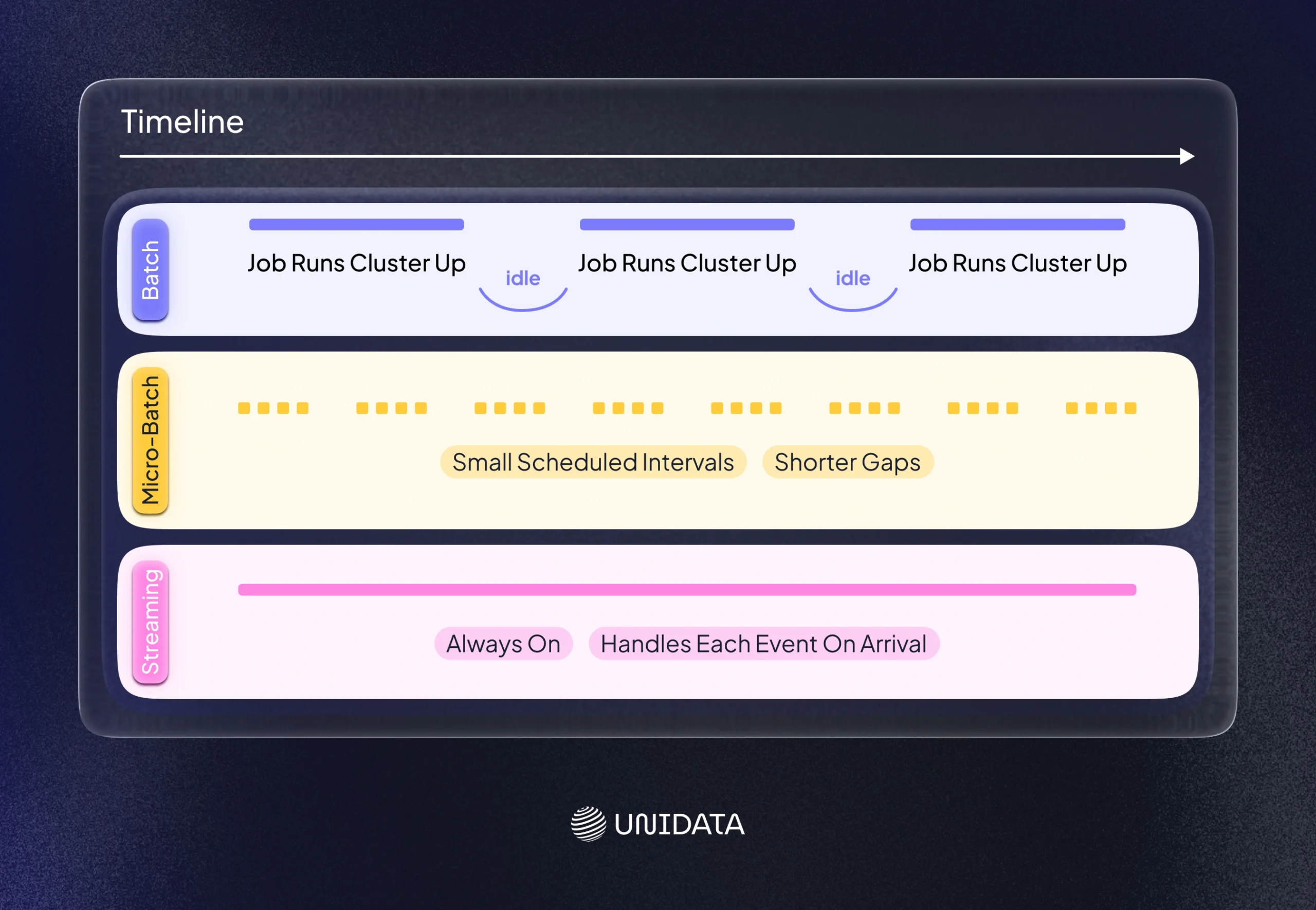
Batch processing groups data and runs a job on a schedule. You might run it every hour, every night, or once a month. The job reads a large set of records and produces outputs in one go, like reports, updated tables, or exported files.
Payroll is a classic example. The system collects hours for a week, then calculates pay for everyone in one run. Many billing workflows work the same way. Many compliance checks also run in batches, because they need full coverage of a time window.
Batch systems often optimize for volume. They aim to process a lot of data per run. That fits tasks like end-of-day reporting, bulk ETL, and offline model training.
Stream processing handles data as it arrives. Each event, like a card payment or a log line, moves through the pipeline right away. The system can score, filter, join, or route events without waiting for a full batch.
Streaming is a strong fit when you need fast feedback. Fraud detection is the headline case, because you want to stop a bad transaction before it clears. Confluent describes the core issue in plain terms: fraud happens quickly, and batch checks often come too late. Confluent’s explainer on real-time streaming for fraud prevention.
Many real systems use both. A team might use streaming for alerts and user-facing actions, then use batch for audits, backfills, and training data. This “mix and match” approach often reduces risk, because you do not force one style onto every job.
Key Differences at a Glance
| Aspect | Batch processing | Stream processing |
|---|---|---|
| Processing model | Runs on a schedule over a stored dataset | Runs continuously over events as they arrive |
| Latency | Higher. Results arrive after the job finishes | Lower. Results can arrive near real time |
| Data freshness | Uses snapshots of past data | Uses the newest events |
| Typical use cases | ETL loads, billing, payroll, compliance, reporting, offline training | Monitoring, fraud detection, alerts, live analytics, online features |
| Compute style | Spiky: scale up for the job, then scale down | Steady: services stay up to handle the stream |
| Ops and debugging | Easier: jobs start and finish | Harder: code runs all the time and keeps state |
| Late or missing data | Often handled by reruns or backfills | Must be handled live (late events, out-of-order events) |
Latency is the time from when data arrives to when you see an output. Freshness is how old the data is when you process it. In streaming, the system often keeps state, like running counts or recent history, so it can update results event by event. In batch, you usually recompute results from the snapshot for that window.
Batch is often simpler to run. Streaming is often faster to act. Streaming also adds extra moving parts, like state, replay, and decisions about late events. Databricks calls out this exact pain point: streaming gets harder when events arrive late or out of order.
How Batch Processing Works
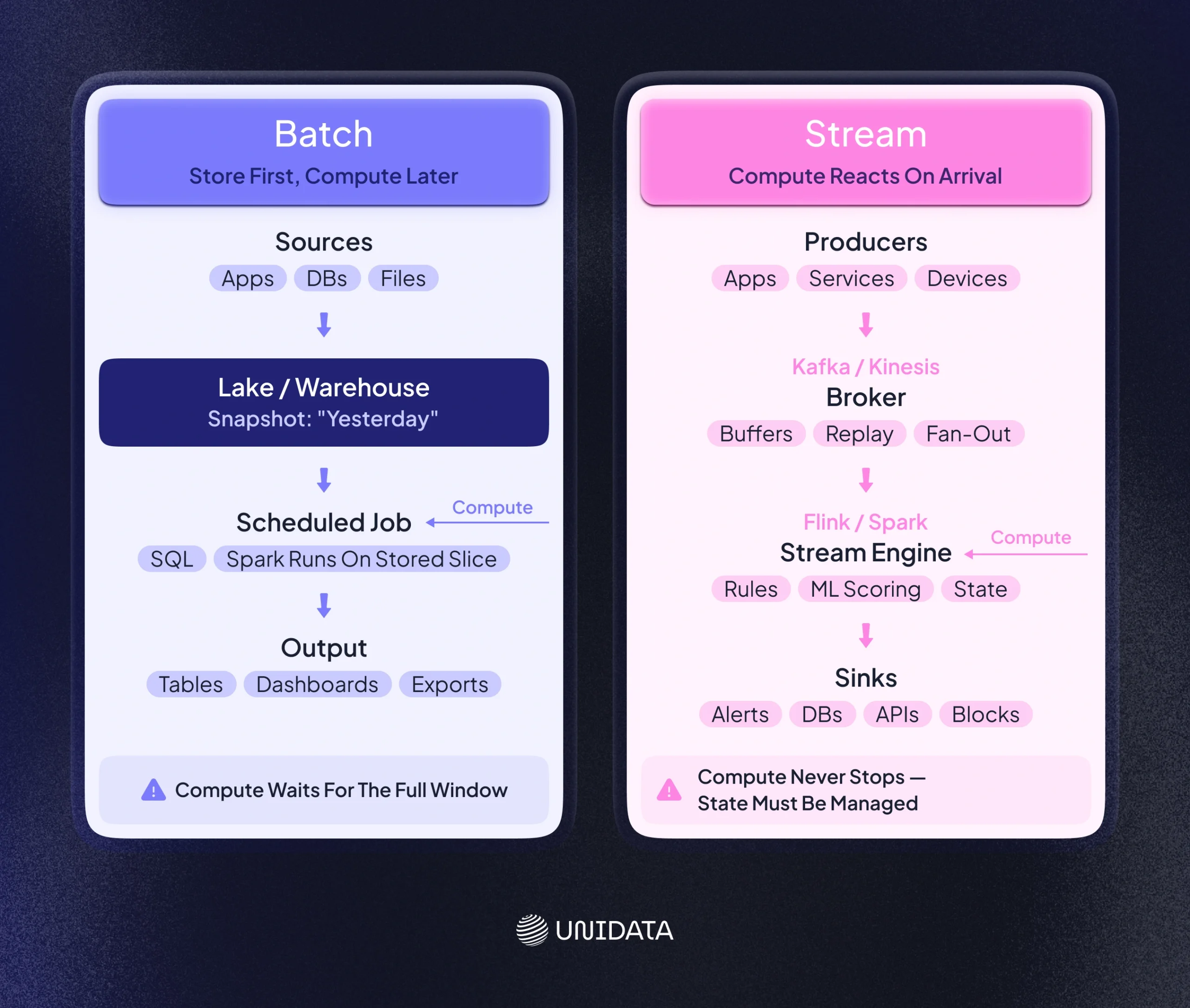
A batch pipeline follows a clear rhythm. It ingests data, stores it, then runs a job on that stored data. The job produces outputs, then the system waits for the next schedule.
A common shape looks like this:
- Ingest: pull data from apps, databases, or files into a lake or warehouse.
- Store: keep it as a snapshot for the batch window (for example, “yesterday’s data”).
- Process: run a job that reads the snapshot, transforms it, and writes results.
- Publish: load outputs into dashboards, tables, or downstream systems.
Batch processing fits cases where the business can wait. It also fits cases where you want the same job to be repeatable. If a run fails, you fix the issue and rerun. You usually get a clean “start” and “end,” which helps with testing and incident response.
Pros of batch
- Efficient for big loads. You can process large volumes in one run.
- Clear reruns. If the job fails, you rerun the same window.
- Good for heavy analytics. Large joins and large aggregates often fit batch well.
- Fits reporting habits. Many teams already work with daily and weekly reports.
- Good for offline ML. Training on historical data often works best in batch.
Cons of batch
- Slow feedback. You only see results after the run ends.
- Weak for urgent actions. If you detect fraud hours later, the money is already gone.
- Reruns can be costly. A small bug can force a full rerun of a big job.
- Batch windows can break. As data grows, jobs can spill into business hours.
Batch is the right tool when delay is acceptable and completeness matters. It is also a good default when you want simpler operations and fewer always-on services.
How Stream Processing Works
A streaming pipeline never really stops. Producers publish events to a log or broker, and consumers process those events as they arrive. Instead of “process everything at midnight,” the system keeps up with the flow.
A common shape looks like this:
- Publish: apps write events to Kafka, Kinesis, or a similar system.
- Process: a stream engine reads events, applies rules or ML scoring, and updates state.
- Act: the pipeline writes alerts, updates a database, or triggers a block.
Streaming is built for time-sensitive work. It is also common in systems with high event rates, like payments, clickstreams, device telemetry, and logs. In these systems, waiting for a batch can hide problems until they are expensive.
Pros of streaming
- Fast response. You can detect and act in near real time.
- Fresh context. Each new event can update the latest state right away.
- Continuous monitoring. The same pipeline can power alerts and live dashboards.
- Better for “always changing” signals. Fraud patterns and risk signals can shift fast.
Cons of streaming
- More system parts. You need brokers, processors, and reliable sinks.
- State is hard. You must store and update state across events.
- Ordering is messy. Events can arrive late or out of order.
- Debugging is live. A bug can affect every new event until you ship a fix.
- Costs can be steady. Streaming services tend to stay on, not just during a job.
Streaming errors can hit your operations immediately, so recovery choices matter. Teams often decide between replaying missed events or accepting some loss to reduce downtime.
Pseudocode: batch vs stream
To illustrate the difference in approach, consider pseudocode for processing transactions for fraud detection:
transactions = collect_transactions(time_window=3600) # e.g., collect last hour of transactions
fraudulent = []
for tx in transactions:
if is_suspicious(tx):
fraudulent.append(tx)
generate_batch_report(fraudulent)
Stream processing pseudocode
while True:
tx = read_next_transaction() # handle each transaction as it arrives
if is_suspicious(tx):
block(tx) # immediate action
alert_team(tx)
In the batch code, you first gather a window of transactions. You then scan the full set and produce a report. In the stream code, you handle one transaction at a time and react at once. That is the key trade-off. Batch gives you delayed but complete processing. Streaming gives you faster action, but it must run correctly all the time.
Day-to-day Trade-offs
The biggest differences show up in operations. Speed is only part of the story.
Scheduling and load
Batch systems have predictable runs. You can plan around them. You often run heavy jobs at night, then stop the cluster or scale it down.
Streaming systems must handle traffic spikes while staying up. When load grows, you need more partitions, more workers, or both. When load drops, you can scale down, but the system still needs to stay online.
Error handling
A batch failure usually delays results until you rerun the job. It can be painful, but it is contained to that window.
A streaming bug can affect every new event until you deploy a fix. That means your incident response must be fast. You also need a plan for what happens after the fix. Do you replay the events that arrived during the issue? Do you accept a gap? Many teams decide based on business risk. Monte Carlo’s comparison of stream vs. batch processing.
State, time windows, and ordering
Batch reads a stable snapshot. Streaming must handle events that arrive late or out of order. This is where windowing and watermarks come in. You decide which time window an event belongs to. You also decide how long you wait for late events before you close a window.
Databricks points out that this late and out-of-order behavior is a main reason streaming adds complexity. The system must keep state and update results as new events show up.
Monitoring and debugging
Batch jobs are easier to inspect after the run. You check logs, metrics, and outputs. You fix issues before the next schedule.
Streaming needs live monitoring, because problems can pile up fast. Lag can grow. Backpressure can show up. A sink can slow down. You need alerts that fire early, not after a day of bad data.
Architecture and Common Tools
Batch and streaming often use different building blocks, even when they solve the same business problem.
Batch architecture
Batch stacks look simple on paper because they run in a loop: ingest, store, process, publish. The key idea is that data lands first, then compute runs later on a defined slice of time. That makes the pipeline easier to reason about, test, and rerun.
A simple batch stack looks like this:
- Sources (apps, DBs, files). Data comes from production systems, logs, or flat files. It usually arrives in bursts, not as a perfectly steady flow.
- Storage (data lake or warehouse). The system stores a snapshot for the batch window. Warehouses fit when you want fast SQL over structured tables. Lakes fit when you land raw files first, then refine them in steps.
- Scheduled compute (SQL jobs, Spark jobs). A job reads the stored snapshot and transforms it. This is where you join tables, clean fields, aggregate metrics, and write curated outputs.
- Output stores (tables, dashboards, exports). Results land where people or systems consume them. That could be BI dashboards, reporting tables, or files pushed to downstream services.
In this setup, the scheduler is the “conductor.” It starts the job, enforces dependencies, and defines the window. That window could be “last day,” “last hour,” or “all data since the last successful run.” If something fails, you typically rerun the same window, which helps keep results consistent.
Batch stacks often work well with warehouses because you can run large queries over stored data with predictable performance. They also work well with lake setups, where raw data lands first and compute happens later in a controlled job.
Streaming architecture
If batch is “store first, compute later,” streaming flips that rhythm. Compute stays awake, and it reacts to each event as soon as it appears. The system still has stages, but they are built around an event log and continuous processing.
A simple streaming stack looks like this:
- Producers publish events. Apps emit events like transactions, clicks, or logs. Each event is small, but the volume can be high.
- A broker stores the event log. Kafka or Kinesis acts as the central bus. It buffers events, lets many consumers read them, and supports replay when you need to reprocess.
- A stream engine consumes and processes events. The processor applies rules, joins, or ML scoring. This is also where state matters, like “how many attempts in the last 10 minutes” or “current session context.”
- Sinks receive results (alerts, databases, APIs). Outputs go to alert systems, real-time dashboards, feature stores, or services that can block or approve actions.
One practical difference is where “time windows” live. In batch, the window is mostly a scheduler choice. In streaming, windowing is part of the logic. You often define rolling windows (last 5 minutes, last hour) and decide how to handle late or out-of-order events. That is why streaming systems can feel heavier to operate: they are always running, always updating state, and always dealing with messy time.
Kafka and Kinesis are common brokers. Flink and Spark are common stream engines. Some teams also use managed services, like cloud stream processors, to reduce ops load. The core pattern is the same. You move events through the system as they arrive.
Hybrid setups
Most teams end up hybrid. They use streaming where speed matters and batch where completeness matters.
This split is common:
- streaming for alerts, risk scoring, and user-facing updates
- batch for reports, audits, backfills, and training data
You can also blend styles inside one platform. Many systems support incremental processing that feels like “small batches” or “micro-batches.” That can reduce delay without forcing a fully continuous stream.
Databricks frames this as a direct comparison. Batch is simple but repetitive, because each run can touch data you already processed. Streaming avoids reprocessing, but gets harder with late and out-of-order events.
Use Cases
Fraud detection is a strong driver for streaming, but it is not the only one. The right choice depends on how quickly you need to act.
Fraud detection (financial services)
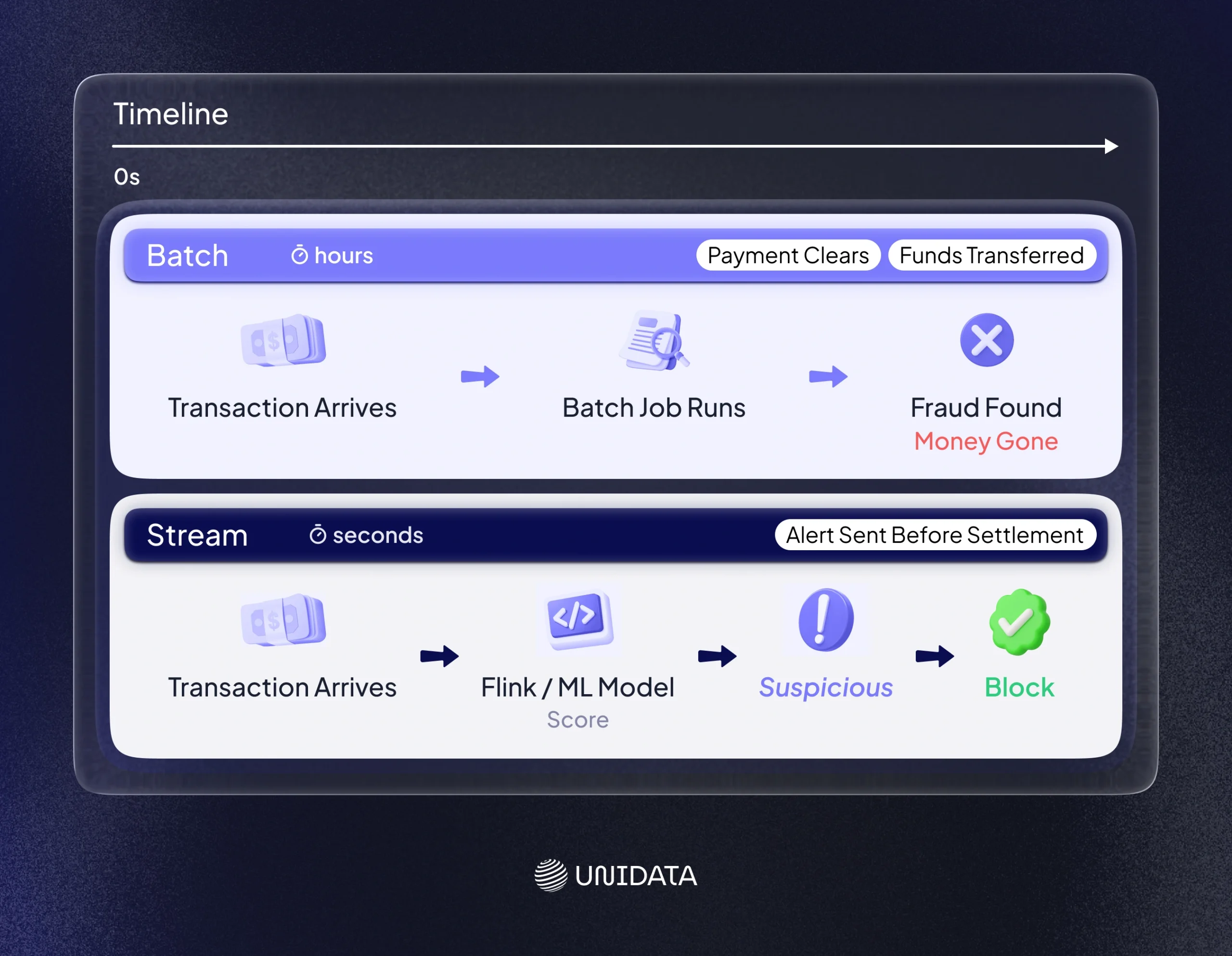
Fraud is time sensitive. A stolen card can be used multiple times in minutes. A real-time pipeline can score a payment as it arrives and trigger a block or alert before settlement.
Batch checks still help, but mostly after the fact. They help you audit patterns, review edge cases, and build training sets. They do not stop the first bad transaction in time.
Batch systems analyze transactions later, while fraud happens quickly in the moment. Confluent’s explainer on real-time streaming for fraud prevention.
Risk reporting and compliance
Risk reporting often values accuracy and coverage over speed. A daily batch can compute risk metrics across a full day of transactions. The same is true for many compliance audits that need complete windows and repeatable runs.
This is one reason many banks run both. They use streaming to stop fraud fast, then use batch to produce official reports and audit trails.
E-commerce and recommendations
Many retail teams use streaming to update user features, sessions, and “what just happened.” That helps personalization. At the same time, they use batch to analyze sales trends, forecast demand, and reconcile inventory.
Batch is also useful for rebuilding features from scratch, which is a common need when you change feature logic.
Operational monitoring (IT and IoT)
Logs and sensor events often arrive nonstop. Streaming pipelines can detect anomalies and trigger alerts when something breaks. Batch can then summarize trends and support longer-term planning, like capacity forecasting.
Media and audience analytics
Live audience events can feed streaming dashboards. Batch jobs can compute deep reports, like weekly audience segments and content performance.
In all these cases, the same rule shows up. If you need to react fast, streaming fits. If you mainly need complete reporting, batch fits.
Strategic Questions for Decision Makers
Choosing between batch and streaming is not only a technical choice. It changes cost, risk, and how teams work.
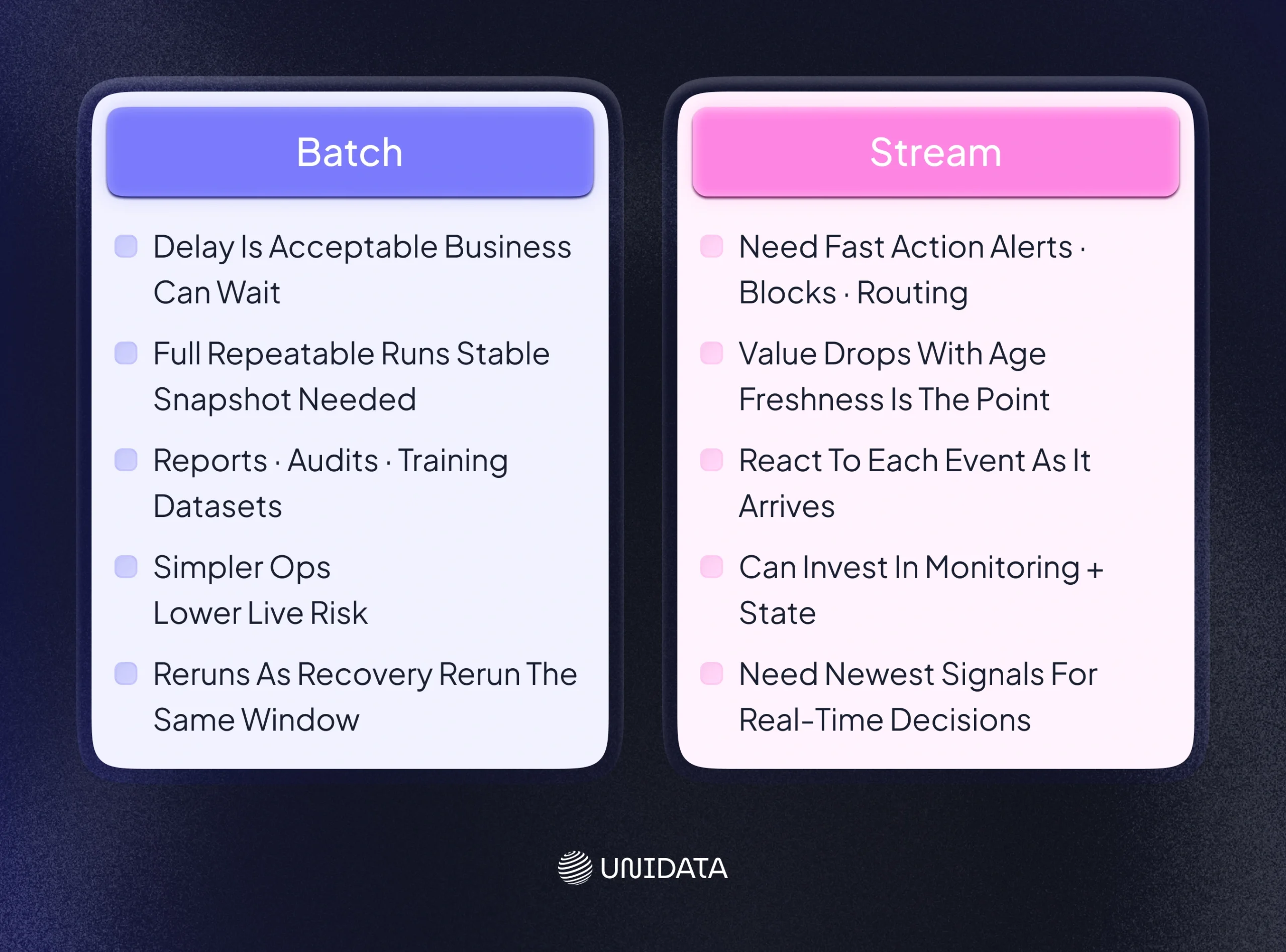
What does delay cost?
Ask this first. If delay causes real loss, streaming has clear value. Fraud is the obvious case. Security monitoring is another case. In these domains, fast reaction reduces damage.
If delay mainly affects convenience, batch can be enough. Many reports are still useful even if they arrive next morning.
How much complexity can you absorb?
Streaming systems are powerful, but they ask more from your team. You need reliable brokers. You need a plan for state. You need monitoring that works in real time. You often need stronger on-call coverage.
Batch is often easier to run. You can test jobs in isolation. You can rerun windows. You can run compute only when needed.
Monte Carlo describes the operational side in a practical way. Because streams run continuously, issues can affect every new event until you deploy a fix. Monte Carlo’s comparison of stream vs. batch processing.
What kind of data do you have?
If data arrives continuously and you want to use it right away, streaming is a natural fit. If data lands once per day, batch may be the simplest path.
Also consider data quality. Late events and missing fields are common in the real world. Streaming systems need to handle that in the pipeline, not as an afterthought.
What stack do you already have?
If your main strength is a warehouse and scheduled SQL, batch may be faster to ship. If you already run event-driven services, streaming may fit your current skills.
A common path is to start with batch, then add streaming for the few use cases that truly need it. That keeps complexity under control.
Fraud Detection: Batch vs Stream Side by Side
Here is a direct comparison focused on fraud work:
| Fraud pipeline step | Batch approach | Streaming approach |
|---|---|---|
| Data flow | Collect transactions, then score them later | Score each transaction as it arrives |
| Detection timing | After the batch run | During the transaction |
| Best for | Reports, audits, training sets, backfills | Blocking, alerts, live risk scoring |
| Main risk | Fraud slips through before you see it | More complex systems and on-call work |
This is why many fraud teams use streaming for immediate decisions, while batch supports deeper review after.
Example Design: a Fraud Pipeline
A real-time fraud pipeline often looks like this:
[Transaction Source] -> [Kafka/Kinesis Topic] -> [Stream Processor (Flink/Spark)] -> [Alert/Dashboard Database]
↘-> [ML Model Scoring Service] -> [Alerting Service]
Each transaction becomes an event. The stream processor applies rules and calls a scoring model. If the score looks risky, the system can alert a team, slow the transaction, or block it.
At the same time, you usually keep raw events for later work. That history supports audits and model training. It also gives you a way to replay data when you change logic.
Conclusion
Batch and streaming solve different problems. Batch gives you scheduled runs over stored data. Streaming gives you faster actions on live events, but adds state and operational complexity.
Most teams use both. Streaming handles urgent decisions, like fraud alerts. Batch supports deep analysis, reporting, audits, and backfills. The key is to match the processing style to the business need, not to force one tool everywhere. IBM’s overview of stream processing.
- Data Collection
- AI Data Collection
- Crowdsourcing
- Biometric Data
- Synthetic Data

Frequently Asked Questions (FAQ)
Data processing is the umbrella term. It means cleaning, transforming, and analyzing data so you can use it. Batch processing is one way to do data processing. It runs on a schedule, over a defined batch window, like “yesterday’s logs” or “the last hour of transactions.” Other styles of data processing include stream processing and real-time data processing, where the pipeline handles events as they arrive.
The difference is timing and action. Batch processing waits, collects data, then runs a job (often via a scheduler) and writes results to a data lake or data warehouse. Real-time processing handles each event right away, usually through an event stream (Kafka/Kinesis) and a stream engine (Flink/Spark Structured Streaming). If latency matters (fraud detection, monitoring, live personalization), real-time wins. If completeness and cost control matter (billing, reporting, backfills), batch is often enough.
Use batch processing when you can tolerate delay and you want simple, repeatable runs over a stable snapshot. It fits ETL jobs, daily KPI reports, and offline model training. Use stream processing when freshness is the point and you need low latency outputs, like alerts, live dashboards, or instant risk scoring. Many teams run both: streaming for immediate decisions, batch for audits, recomputes, and long-range analytics.
Batch shows up anywhere work is periodic and high-volume. Common examples include nightly ETL pipelines that load a data warehouse, end-of-day financial reconciliation, daily log aggregation, scheduled database backups, and weekly payroll runs. In each case, the system processes a batch of records in one job, then publishes results as tables, exports, or reports.