---
title: "Video Annotation"
description: "Data Annotation Vs Labeling Tasks Video Data AnnotationVideo Data LabelingDefinitionFrame-by-frame or sequence-level detailed marking with temporal consistency for moving objects and eventsAssigning classification labels to…"
url: "https://unidata.pro/data-annotation/video/"
date_modified: "2026-06-16T17:11:48+03:00"
language: "en-US"
---
Data Annotation Vs Labeling Tasks
---------------------------------
| | ******Video Data Annotation****** | ****Video Data Labeling**** |
|---|---|---|
| **Definition** | Frame-by-frame or sequence-level detailed marking with temporal consistency for moving objects and events | Assigning classification labels to entire videos or simple time-based scene tags |
| **Work Coverage** | Temporal understanding: object tracking, action sequences, event boundaries, and motion patterns | Video-level or clip-level categorization without frame-level spatial details |
| **Common Tasks** | - Object tracking across frames - Temporal action localization - Activity recognition marking - Event boundary detection - Multi-object interaction labeling - Pose estimation across sequences | - Video-level classification - Scene change detection - Simple object presence tagging - Clip-level timestamp labeling - Content categorization |
| **Complexity Level** | Very high complexity: requires temporal reasoning, object persistence understanding, and motion pattern analysis | Low to medium complexity: primarily descriptive tagging without spatial or temporal precision |
| **ML Impact** | Enables: action recognition, object tracking, temporal localization, event detection, activity prediction | Enables: video classification, scene recognition, content filtering, basic video search |
## Block: Hero
**Title:** Video Annotation **Description:** Unidata provides comprehensive video annotation services to support AI video analytics across 20+ industries. Our team ensures precise, efficient annotations, helping organizations extract valuable insights from their video data **Button 2:** Invite to tender **Button-link 2:** #
## Block: Text block
**Title:** Video annotation in machine learning **Description:** Video annotation for machine learning (ML) is the process of labeling and tagging specific elements within video footage to create structured data that can be utilized for training ML models. This involves identifying and marking objects, actions, or events within the video, such as people, vehicles, gestures, or specific behaviors, to provide context and facilitate understanding for AI algorithms. **Description second:** Video annotation is essential in various applications, including autonomous driving, security and surveillance, sports analytics, and content moderation. By providing accurate and detailed annotations, organizations can enhance the performance of their ML systems, enabling them to recognize patterns, make predictions, and drive data-driven decision-making. **Image on the left side:** 
## Block: Services
**Block title:** Types of video annotation services **Block items:**
- **Title:** Object Tracking — **Image:**  — **Description:** In object tracking, specific objects are identified and tracked across multiple frames in a video. This involves labeling the object's position and movement throughout the video, often using bounding boxes or polygons.
- **Title:** Semantic Segmentation — **Image:**  — **Description:** Semantic segmentation involves labeling each pixel in the video according to the object or region it belongs to. This provides a detailed understanding of the scene by assigning a class to every pixel across all frames.
- **Title:** Instance Segmentation — **Image:**  — **Description:** Similar to semantic segmentation, instance segmentation goes a step further by not only labeling each pixel but also distinguishing between different instances of the same object class. For example, in a video of a crowd, each person would be labeled separately.
- **Title:** Action Recognition — **Image:**  — **Description:** Action recognition involves annotating videos to identify specific actions or activities taking place within the frames. This often includes labeling sequences of frames where a particular action occurs.
- **Title:** Keypoint Annotation — **Image:**  — **Description:** Keypoint annotation involves marking specific points of interest on objects or persons within the video, such as facial landmarks, joint positions, or object corners. These keypoints are then tracked across frames.
- **Title:** Event Tracking — **Image:**  — **Description:** Event tracking focuses on identifying and annotating specific events that occur in the video. This could include things like a car stopping at a traffic light, a ball crossing the goal line, or any other significant event.
- **Title:** Temporal Segmentation — **Image:**  — **Description:** Temporal segmentation involves dividing a video into segments based on different scenes or actions. Each segment is labeled to indicate a specific event, activity, or change in the scene.
- **Title:** Polyline Annotation — **Image:**  — **Description:** Polyline annotation involves drawing lines over video frames to label and track paths, edges, or boundaries. This is commonly used for annotating roads, lanes, or movement paths in videos.
- **Title:** 3D Cuboid Annotation — **Image:**  — **Description:** 3D cuboid annotation involves drawing three-dimensional bounding boxes around objects in video frames to capture their spatial dimensions, including height, width, and depth. This provides a better understanding of the object’s size and positioning in a 3D space.
- **Title:** Object Detection — **Image:**  — **Description:** Object detection in videos involves identifying and labeling specific objects within frames. Unlike tracking, object detection focuses on the presence and location of objects in each frame, rather than following their movement across frames.
- **Title:** Scene Text Recognition — **Image:**  — **Description:** Scene text recognition involves detecting and annotating text within video frames. This includes recognizing and transcribing text from signs, labels, documents, or any other text-based content visible in the video.
## Section Title
Video Annotation Use Cases
## image case
- **Image case repeater image:**  — **Title:** Automotive (Autonomous Vehicles) — **Main Text:** Video labeling is vital for autonomous vehicles in teaching AI to understand dynamic road environments. By labeling pedestrians, cars, road signs, and obstacles in videos captured by cameras, AI can learn to predict actions and make real-time driving decisions. Annotating video footage also helps with motion tracking, allowing self-driving cars to respond to sudden changes, like a pedestrian stepping onto the road, to ensure safer navigation.
- **Image case repeater image:**  — **Title:** Retail & E-commerce — **Main Text:** In the retail industry, tagging is used to analyze consumer behavior in-store or during online shopping. By labeling video footage with key actions, such as browsing, purchasing, or interacting with product displays, AI can identify shopping trends and improve product recommendations. It also helps with inventory management, where AI tracks stock movement and replenishment needs, ensuring optimal stock levels and efficient in-store operations.
- **Image case repeater image:**  — **Title:** Agriculture — **Main Text:** This service helps monitor crop conditions and farming activities by labeling footage from drones or field cameras. Annotating crops, irrigation systems, and machinery allows AI to analyze crop health, detect diseases or pests, and even predict harvest times. It also aids in livestock management, where videos of animals are annotated to track behavior, health, and activity, optimizing farm operations and ensuring better outcomes.
- **Image case repeater image:**  — **Title:** Healthcare — **Main Text:** In healthcare, video annotation is crucial for training AI systems to analyze medical procedures or patient behavior. By annotating videos of surgeries, doctors can teach AI to recognize key moments such as critical steps in a procedure, enabling real-time guidance and improving decision-making. Additionally, videos of patient movement and posture are annotated to help AI detect signs of distress or monitor recovery after surgery, improving patient care and monitoring efficiency.
- **Image case repeater image:**  — **Title:** Finance — **Main Text:** In finance, it is used to review and label transaction videos, surveillance footage, and customer interactions, aiding in fraud detection and improving customer service. By tagging video content such as customer behaviors, facial expressions, and interactions with products, AI can identify suspicious actions or abnormal behavior patterns, flagging potential security threats. Annotated videos also assist in customer support, allowing AI to analyze service interactions for better engagement and satisfaction.
- **Image case repeater image:**  — **Title:** Security & Surveillance — **Main Text:** Video annotation plays a crucial role in security systems by labeling footage of individuals, suspicious activity, and environments. Annotating faces, vehicles, and movements in surveillance footage helps AI to identify known threats, such as unauthorized access, and alert security teams in real-time. In law enforcement, annotated videos assist in tracking individuals or vehicles across multiple camera feeds, enabling faster response times and more accurate monitoring of potential risks.
- **Image case repeater image:**  — **Title:** Manufacturing — **Main Text:** In manufacturing, these services are used to label footage from production lines, helping AI detect anomalies such as defects or inefficiencies. By annotating product quality issues, such as misalignments or missing parts, AI can automate quality control processes, reducing human error. Additionally, videos of machinery and equipment are annotated to help AI systems predict maintenance needs, ensuring smooth operations and preventing costly downtime.
- **Image case repeater image:**  — **Title:** Entertainment & Media — **Main Text:** For the entertainment industry, annotation is crucial for content moderation and tagging. Annotating scenes, characters, or objects within videos helps AI systems recognize and categorize content, allowing platforms to filter inappropriate material or organize content based on themes or genres. Video annotation is also used in generating subtitles or transcriptions, ensuring content accessibility for wider audiences, including those with hearing impairments.
- **Image case repeater image:**  — **Title:** Real Estate — **Main Text:** Video annotation is applied to property tours or construction site footage, where it helps label key details such as room sizes, amenities, and features. By tagging elements within property videos, AI can generate more accurate property recommendations for potential buyers or tenants. It also supports urban planning, where video footage of neighborhoods or construction sites can be annotated to analyze space utilization, traffic patterns, and future development needs.
- **Image case repeater image:**  — **Title:** Customer Service & Support — **Main Text:** In customer service, these tasks help AI systems understand customer inquiries, particularly in video calls or recorded service interactions. By labeling customer emotions, product issues, or support requests, AI can improve its responses and assist support agents more effectively. Annotated video content also enables AI to track common service issues, helping companies fine-tune their support processes and improve overall customer satisfaction.
## section_title
How we deliver video annotation services
## Content for section deliver data annotation services
- **Slide Title:** Consultation and Requirements — **Slide description:** Description: Our video annotation process begins with a comprehensive consultation to understand your project’s specific needs. We work closely with you to define the objectives, such as the types of objects to be annotated, the level of detail required (e.g., bounding boxes, keypoints, or segmentation), and any particular use cases, such as autonomous driving, action recognition, or security surveillance. We also discuss the scope, timeline, budget, and any regulatory or confidentiality requirements, ensuring that our approach is fully aligned with your goals. — **Slide image:** 
- **Slide Title:** Team and Roles Planning — **Slide description:** Description: Based on the complexity and scale of the project, we assemble a team of experts tailored to your video annotation needs. This team may include video annotators, quality assurance specialists, project managers, and domain experts. Each team member’s role is clearly defined, with responsibilities allocated to ensure efficient workflow and high-quality output. We also establish a communication strategy to keep you updated on progress and to facilitate quick resolutions to any challenges that may arise. — **Slide image:** 
- **Slide Title:** Tasks and Tools Planning — **Slide description:** Description: In this stage, we outline the specific annotation tasks required for your project. This includes determining the types of annotations needed (e.g., object tracking, activity recognition, frame-by-frame labeling) and planning the workflow accordingly. We also identify opportunities for automation, such as using AI-assisted tools to streamline repetitive tasks, which helps to enhance efficiency and accuracy. Detailed task assignments are made, and schedules are developed to ensure that the project proceeds smoothly. — **Slide image:** 
- **Slide Title:** Software Selection — **Slide description:** Description: Selecting the right software is critical for effective video annotation. We evaluate various platforms based on your project’s specific requirements, considering factors such as ease of use, support for different annotation types, integration with your existing systems, and the ability to handle large video datasets. We may choose tools like V7 or CVAT for their robust video annotation capabilities. If necessary, we customize the software to better suit your unique needs, ensuring that it facilitates a smooth and efficient annotation process. — **Slide image:** 
- **Slide Title:** Project Stages and Timelines — **Slide description:** Description: We divide the project into manageable stages, each with clearly defined milestones and deadlines. These stages typically include initial setup, pilot testing, full-scale annotation, and final delivery. A detailed timeline is created, outlining the expected duration for each stage and key deliverables. We use project management tools to track progress in real-time, ensuring that the project stays on track and any potential delays are addressed promptly. Regular status updates keep you informed throughout the project. — **Slide image:** 
- **Slide Title:** Annotation Tasks Execution — **Slide description:** Description: With the planning complete, our team begins the video annotation process. Annotators follow the guidelines established during the planning phase, using the selected tools and software to ensure precision and consistency. Whether it’s tracking objects across frames, labeling activities, or segmenting regions of interest, our team works meticulously to meet the project’s requirements. Our project managers oversee this phase closely, ensuring that any issues are quickly resolved to maintain the highest standards of quality. — **Slide image:** 
- **Slide Title:** Quality and Validation Check — **Slide description:** Description: Quality assurance is a critical component of our video annotation services. We implement a rigorous validation process, involving multiple levels of review to ensure that the annotations are accurate and consistent. Automated validation tools are used where applicable, supplemented by manual checks from our quality assurance team. Any errors or inconsistencies are flagged and corrected before the data is finalized. We also perform inter-annotator agreement (IAA) checks to ensure consistency across different annotators, which is essential for maintaining high-quality standards. — **Slide image:** 
- **Slide Title:** Data Preparation and Formatting — **Slide description:** Description: Once the annotations have been validated, we prepare the data for integration into your machine learning models. This involves formatting the annotated video data according to your specific requirements, such as converting it into compatible formats, organizing it into directories, or labeling it according to your system’s standards. We ensure that the data is clean, well-organized, and ready for immediate use without further processing. — **Slide image:** 
- **Slide Title:** Prepare Results for ML Tasks — **Slide description:** Description: The finalized annotated video data is now ready to be used in your machine learning tasks. We ensure that the data is structured to maximize its utility in training, testing, and validating your models. This may include organizing the data into training and validation sets, normalizing the annotations, or applying any other preprocessing steps required by your machine learning framework. Our goal is to deliver data that enhances the performance and accuracy of your models. — **Slide image:** 
- **Slide Title:** Transfer Results to Customer — **Slide description:** Description: After thorough validation and preparation, we securely transfer the annotated video data to you. Depending on your preferences and security requirements, this can be done through cloud storage, secure FTP, or direct integration into your systems. We ensure that all files are delivered as agreed and provide any necessary documentation or support to help you integrate the data into your workflows. If needed, we offer post-delivery support to address any issues or questions you might have. — **Slide image:** 
- **Slide Title:** Customer Feedback — **Slide description:** Description: Following the delivery of the annotated data, we actively seek your feedback to ensure that the results meet your expectations. We are committed to continuous improvement and value your input in refining our processes. If any adjustments are needed, we are ready to make them promptly to your satisfaction. This stage also serves as an opportunity to discuss potential future projects and explore how we can continue to support your video annotation needs. — **Slide image:** 
## "Software" Section Heading
The best software for video annotation tasks
## Slider software
- **Header (left side):** V7 — **Text under the heading on the left side:** V7 is a powerful video annotation platform designed for handling complex and large-scale annotation tasks. It offers advanced tools for annotating videos, including object tracking and instance segmentation, with AI-assisted automation to enhance efficiency. — **Image on the left:**  — **List of Key Functions:**
- **thesis:** AI-powered auto-annotation and object tracking.
- **thesis:** Supports a wide range of annotation types, including 3D cuboids, polylines, and semantic segmentation.
- **thesis:** Collaboration tools for managing large teams and complex projects.
- **thesis:** Real-time quality control and workflow automation. — **Heading below the list of key features:** Best For: — **Text under the heading (Best For:):** Teams and enterprises looking for a comprehensive, AI-driven video annotation platform that supports advanced features and large datasets.
- **Header (left side):** SuperAnnotate — **Text under the heading on the left side:** SuperAnnotate is an advanced platform that excels in both image and video annotation tasks. It offers high precision and automation, making it ideal for projects requiring detailed and accurate annotations across multiple video frames. — **Image on the left:**  — **List of Key Functions:**
- **thesis:** Automated annotation tools powered by AI to speed up the annotation process.
- **thesis:** Collaboration tools for large teams, with role-based access control.
- **thesis:** Supports a wide range of annotation types, including bounding boxes, polygons, and keypoints.
- **thesis:** Integration with popular machine learning frameworks and cloud storage. — **Heading below the list of key features:** Best For: — **Text under the heading (Best For:):** Teams looking for a powerful, AI-assisted annotation tool that can handle complex video data with precision.
- **Header (left side):** CVAT (Computer Vision Annotation Tool) — **Text under the heading on the left side:** CVAT is an open-source tool developed by Intel, specifically designed for video and image annotation. It is highly customizable and supports a wide range of annotation types, making it suitable for complex projects that require flexibility. — **Image on the left:**  — **List of Key Functions:**
- **thesis:** Free and open-source with a strong community for support.
- **thesis:** Supports various video annotation tasks, including object tracking and action recognition.
- **thesis:** Advanced tools for manual and semi-automated annotation.
- **thesis:** Highly customizable with support for custom scripts and plugins. — **Heading below the list of key features:** Best For: — **Text under the heading (Best For:):** Developers and researchers who need a free, customizable tool for detailed and complex video annotation tasks.
- **Header (left side):** Labelbox — **Text under the heading on the left side:** Labelbox is a versatile annotation platform that extends its capabilities to video annotation. It offers robust tools for managing large-scale projects, with AI-assisted features that help streamline the annotation process. — **Image on the left:**  — **List of Key Functions:**
- **thesis:** AI-powered tools for automating repetitive tasks, including object tracking.
- **thesis:** Supports a variety of video annotation types, including frame-by-frame labeling and semantic segmentation.
- **thesis:** Integrated project management and collaboration features.
- **thesis:** API support for seamless integration with machine learning workflows. — **Heading below the list of key features:** Best For: — **Text under the heading (Best For:):** Enterprises and teams needing a scalable video annotation solution with strong project management and collaboration capabilities.
- **Header (left side):** Scalabel — **Text under the heading on the left side:** Scalabel is an open-source platform designed for scalable video and image annotation. It supports a wide range of annotation tasks and is particularly strong in managing large datasets and collaborative projects. — **Image on the left:**  — **List of Key Functions:**
- **thesis:** Supports multiple video annotation types, including object tracking, 3D bounding boxes, and semantic segmentation.
- **thesis:** Real-time collaboration features for team-based projects.
- **thesis:** Scalable architecture suitable for large datasets.
- **thesis:** Open-source and customizable to fit specific project needs. — **Heading below the list of key features:** Best For: — **Text under the heading (Best For:):** Teams and organizations looking for an open-source, scalable solution for large-scale video annotation projects.
- **Header (left side):** VoTT (Visual Object Tagging Tool) — **Text under the heading on the left side:** VoTT is an open-source annotation tool by Microsoft that offers a simple and flexible solution for video annotation tasks. It supports various output formats and integrates well with cloud services like Azure. — **Image on the left:**  — **List of Key Functions:**
- **thesis:** User-friendly interface for creating and managing video annotations, including object tracking.
- **thesis:** Supports export in popular formats like YOLO, TFRecord, and CSV.
- **thesis:** Integration with Azure ML and other cloud-based services.
- **thesis:** Free and open-source with active development and support. — **Heading below the list of key features:** Best For: — **Text under the heading (Best For:):** Teams and developers needing a straightforward, Azure-integrated tool for video annotation tasks.
- **Header (left side):** Datasaur — **Text under the heading on the left side:** Datasaur is a robust annotation platform that supports both text and video annotation. It is designed for teams that require real-time collaboration and high-quality annotations, with features tailored for detailed video analysis. — **Image on the left:**  — **List of Key Functions:**
- **thesis:** Real-time collaboration tools for team-based annotation.
- **thesis:** Supports complex video annotation tasks, including keypoint annotation and event tracking.
- **thesis:** AI-powered suggestions to improve speed and accuracy.
- **thesis:** Detailed analytics and reporting to track project progress. — **Heading below the list of key features:** Best For: — **Text under the heading (Best For:):** Teams that require a collaborative environment with advanced video annotation capabilities and robust quality control features.
- **Header (left side):** RectLabel — **Text under the heading on the left side:** RectLabel is a macOS-based video annotation tool focused on simplicity and efficiency. It is particularly useful for users within the Apple ecosystem who need to perform quick and straightforward video annotations. — **Image on the left:**  — **List of Key Functions:**
- **thesis:** Intuitive macOS interface with support for video annotation tasks, including bounding boxes and polylines.
- **thesis:** Customizable shortcuts and tools for efficient annotation.
- **thesis:** Supports exporting in various formats, including YOLO, COCO, and VOC.
- **thesis:** Lightweight and optimized for quick use on Mac devices. — **Heading below the list of key features:** Best For: — **Text under the heading (Best For:):** MacOS users looking for a simple and effective tool for video annotation tasks, particularly for quick and easy project execution.
## CTA Headline
Request Custom Research
## CTA Description
Have questions about the process? Every project starts with a free consultation — no commitment required.
## List of Points
- **SVG icon:**
— **text description:** 95%+ annotation accuracy
- **SVG icon:**
— **text description:** 1,000+ domain-matched annotators
- **SVG icon:**
— **text description:** Pilot launched within days
## Block: Hero
**Title:** Video Annotation and Labeling Services **Description:** Unidata provides comprehensive video annotation services to support AI video analytics across 20+ industries. Our team ensures precise, efficient annotations, helping organizations extract valuable insights from their video data.
## Заголовок Annotation template
Image Data Annotation Types
## List of Types
- **Title:** Object Tracking — **Description:** Bounding boxes and polygons applied by expert annotators to identify and track objects across video footage frames, enabling motion tracking, trajectory prediction, and object detection for computer vision and surveillance ML models. — **Image:** 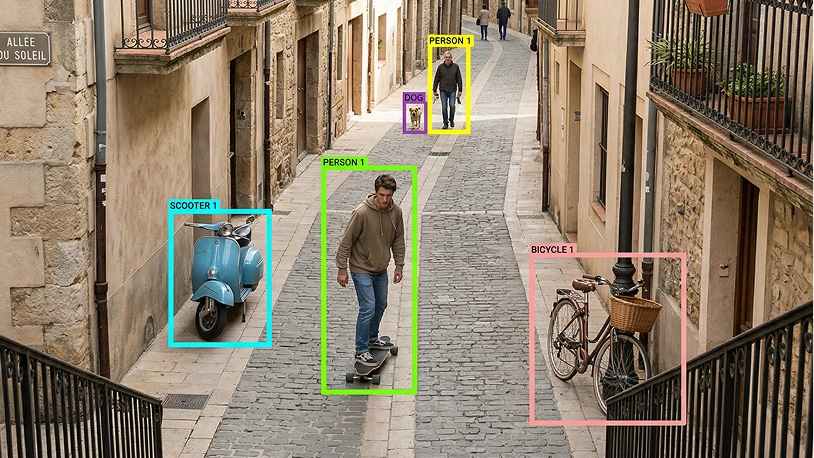
- **Title:** Semantic Segmentation — **Description:** Pixel-level labels assigned to every frame in raw video by human annotators, giving learning models the dense scene understanding needed for autonomous driving, security systems, and AI-powered visual data analysis. — **Image:** 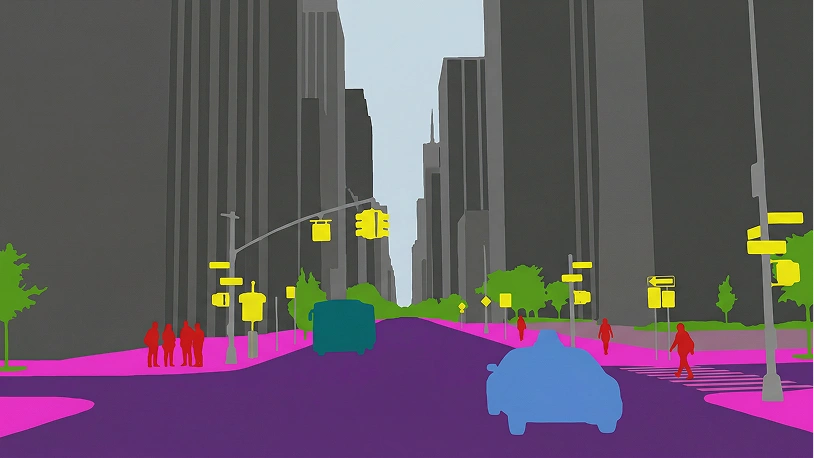
- **Title:** Instance Segmentation — **Description:** Per-pixel masks distinguishing individual object instances of the same class across video footage, enabling crowd analysis, defect detection, and multi-agent scene parsing for properly annotated training datasets. — **Image:** 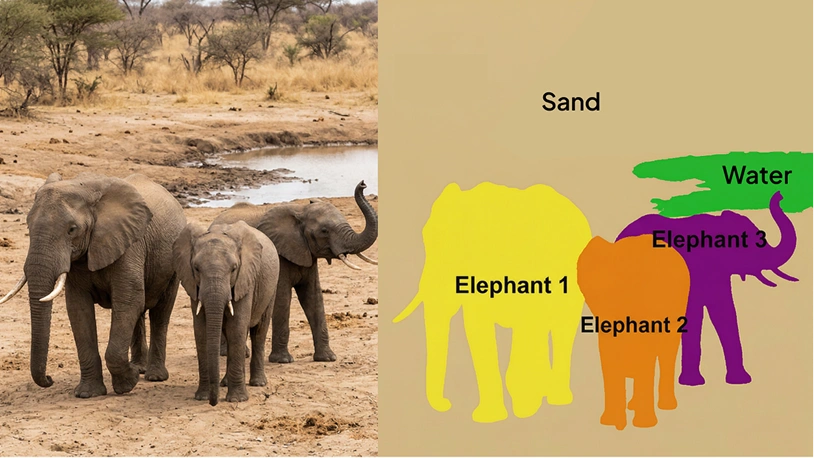
- **Title:** Action Recognition — **Description:** Frame-sequence labels identifying human actions, gestures, and activities across video clips, providing high-quality annotated datasets for activity detection, motion analysis, and behavior recognition in AI models. — **Image:** 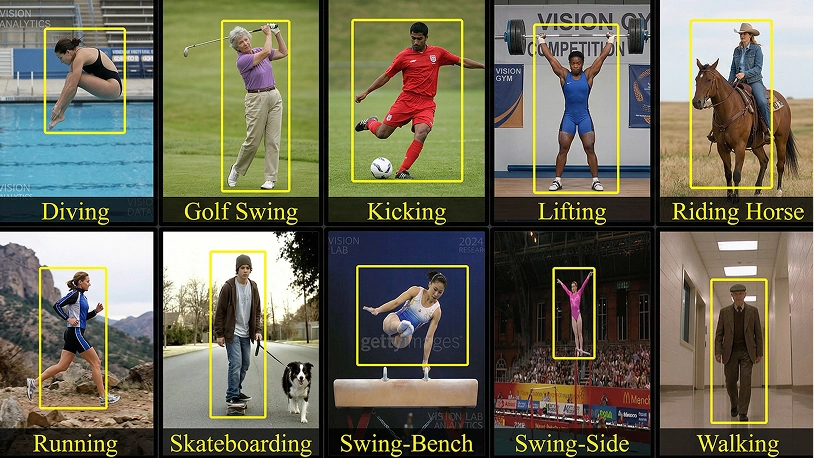
- **Title:** Keypoint Annotation — **Description:** Facial landmarks, joint positions, and object corners marked and tracked by expert annotators across video segments, giving pose estimation and face recognition models the spatial training data for gesture and motion analysis. — **Image:** 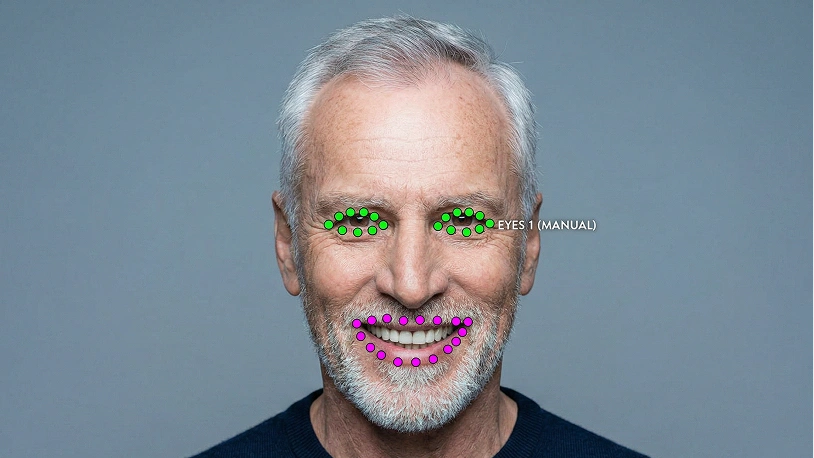
- **Title:** Event Tracking — **Description:** Temporal tags and event labels tied to specific in-frame triggers across video footage, structuring high-quality datasets for predictive ML algorithms and automating video intelligence workflows. — **Image:** 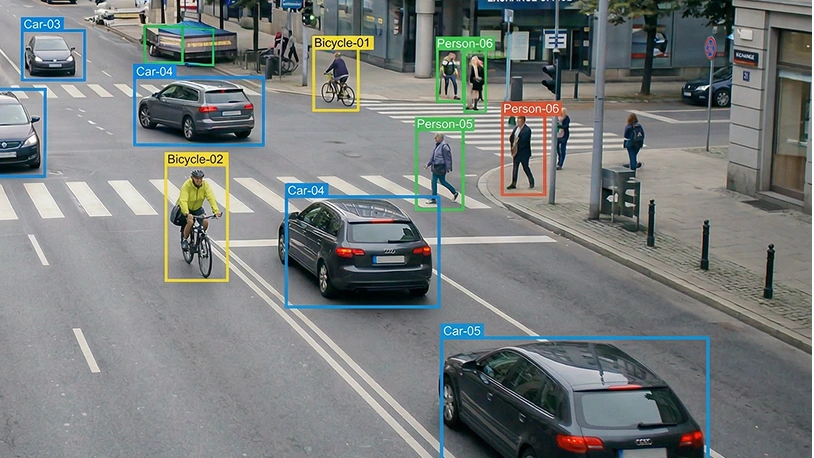
- **Title:** Temporal Segmentation — **Description:** Scene-change boundaries and activity intervals labeled across raw video files, enabling clip classification, metadata extraction, and contextual scene understanding for AI-powered video search and recommendation models. — **Image:** 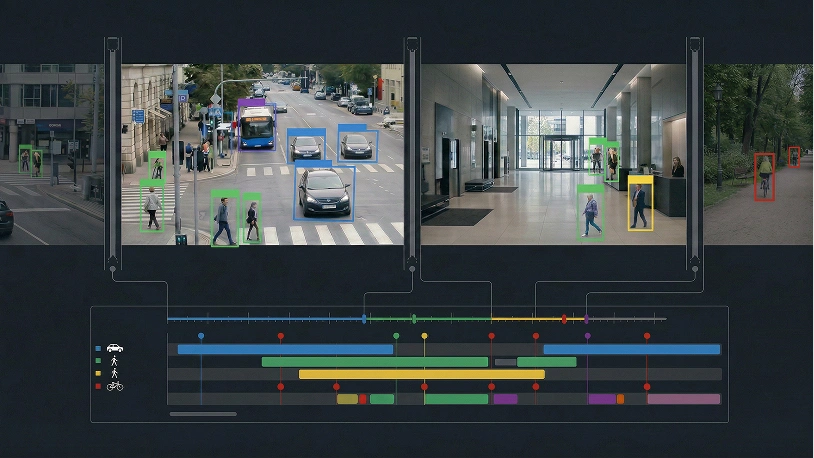
- **Title:** Polyline Annotation — **Description:** Vector path lines drawn over video frames to label roads, lanes, and object movement paths, giving autonomous driving and robotics models the directional training data for lane detection and motion tracking. — **Image:** 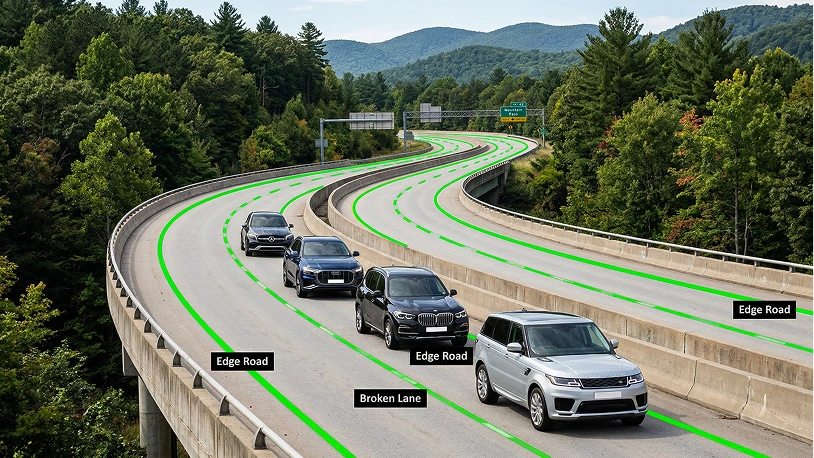
- **Title:** 3D Cuboid Annotation — **Description:** Three-dimensional bounding boxes and 3D cuboids capturing object depth, height, and spatial orientation across video frames, providing volumetric annotated datasets for autonomous vehicles, robotics, and AR model training. — **Image:** 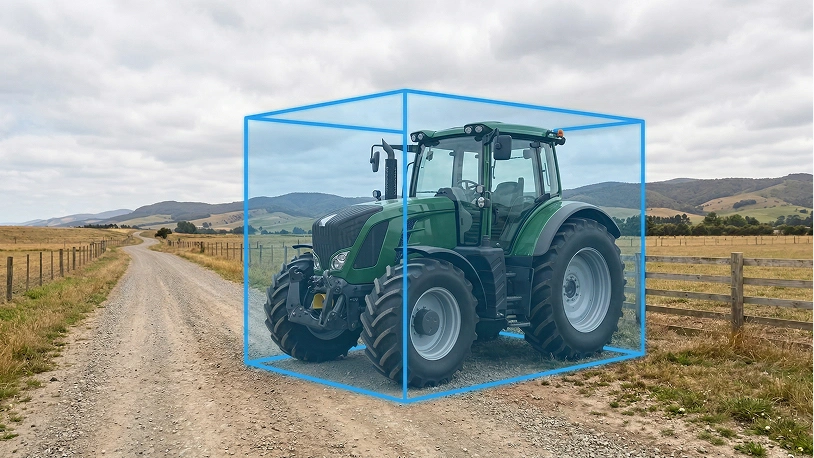
- **Title:** Object Detection — **Description:** Per-frame localization labels identifying and tagging objects in video files without cross-frame continuity, giving computer vision models the accurately annotated ground truth for security cameras, retail analytics, and industrial inspection. — **Image:** 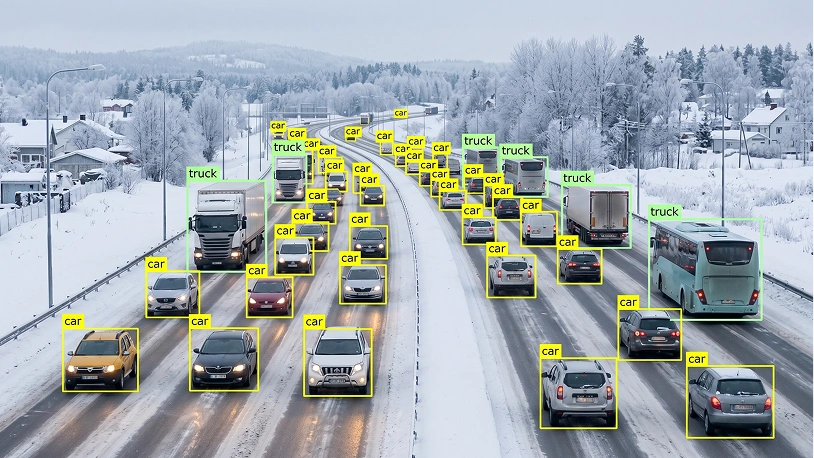
- **Title:** Scene Text Recognition — **Description:** Text regions and video transcription labels extracted from in-frame signage, documents, and overlays by expert annotators, enabling ML algorithms to detect, parse, and digitize visual text content across video footage. — **Image:** 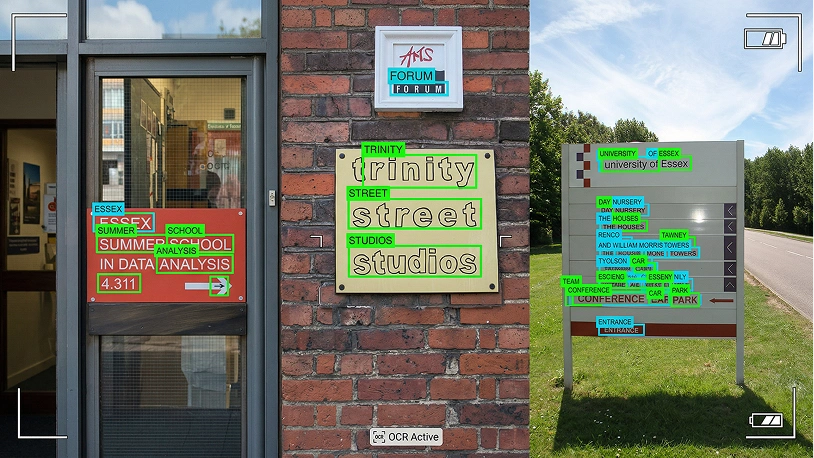
## Section Heading: Industries
Industries
## List of Industries
- **Industry Headline:** Autonomous Vehicle — **Industry Description:** Dynamic road understanding, motion tracking, and real-time decision-making for safe driving. — **An Overview of the Industry:** 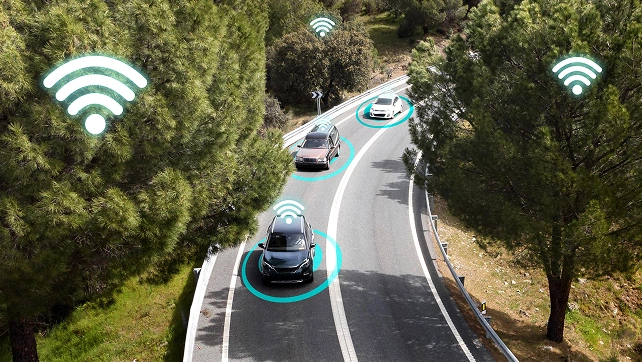
- **Industry Headline:** Retail & E-commerce — **Industry Description:** Consumer behavior analysis, shopping trends, and inventory tracking for optimal operationsю — **An Overview of the Industry:** 
- **Industry Headline:** Agriculture — **Industry Description:** Crop monitoring, pest detection, and livestock tracking through drone and field camera footage. — **An Overview of the Industry:** 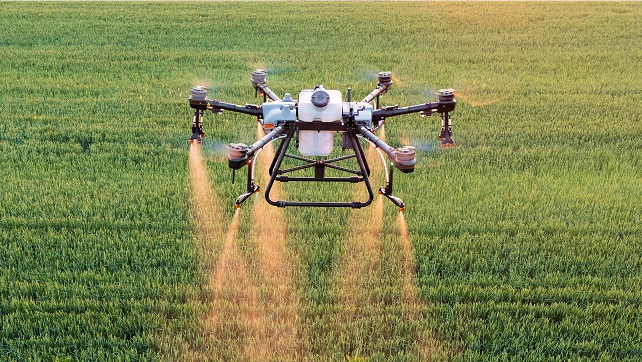
- **Industry Headline:** Healthcare — **Industry Description:** Surgical procedure analysis, patient monitoring, and recovery tracking for better care. — **An Overview of the Industry:** 
- **Industry Headline:** Finance — **Industry Description:** Transaction review, fraud detection, and customer interaction analysis for security. — **An Overview of the Industry:** 
- **Industry Headline:** Security & Surveillance — **Industry Description:** Threat identification, movement tracking, and real-time alerts across camera networks. — **An Overview of the Industry:** 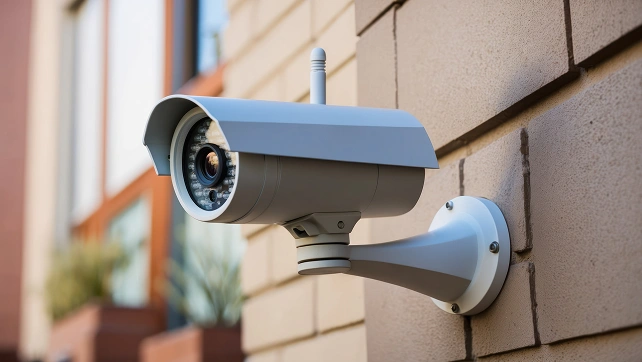
- **Industry Headline:** Manufacturing — **Industry Description:** Production line monitoring, defect detection, and predictive maintenance automation. — **An Overview of the Industry:** 
- **Industry Headline:** Customer Service & Support — **Industry Description:** Emotion recognition, issue tracking, and response optimization for better satisfaction. — **An Overview of the Industry:** 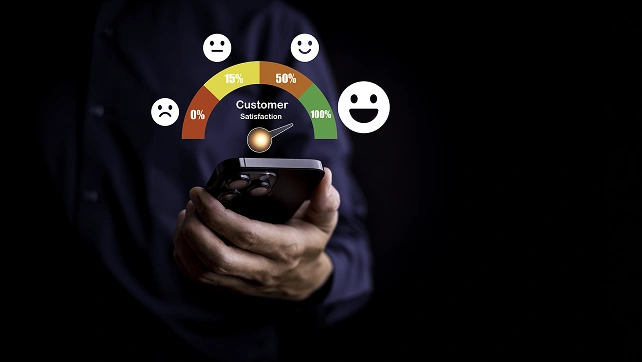
## CTA Template - Image

## Section Heading: Questions - Take 2
FAQ
## List of Questions - Take 2
- **Question:** What is Video Annotation? — **Answer:** Video annotation for machine learning (ML) is the process of labeling objects, actions, and events within video footage to create structured datasets for AI model training. It involves analyzing sequences of frames so ML algorithms can understand motion, context, and interactions over time. By accurately annotating elements such as objects, movements, and temporal changes, video annotation enables AI systems to perform tasks like object tracking, action recognition, motion analysis, and behavior detection more effectively.
- **Question:** Why is video annotation important for Artificial Intelligence and Machine Learning? — **Answer:** Video annotations provide high-quality training data required for vision models and ML algorithms. Accurate annotated datasets help AI models understand movement, context, and interactions across video segments, improving real-world performance.
- **Question:** What types of video annotation do you support? — **Answer:** We support a wide range of annotation types, including object tracking, semantic segmentation, keypoint annotation, action recognition, LiDAR annotation and 3D cuboids. These techniques enable precise object detection, motion tracking, and analysis of complex visual data.
- **Question:** What are the risks of poor-quality video annotation? — **Answer:** Low-quality video annotations can compromise the entire training process, leading to inaccurate predictions and weaker performance of computer vision and AI models. Inconsistent labeling across video frames creates confusion for ML algorithms, resulting in higher retraining costs, project delays, and unreliable results in tasks like object tracking and motion analysis.
- **Question:** What is the minimum dataset size required for video data annotation services? — **Answer:** We typically work with datasets starting from 500–5,000 data points (video clips or segments), while 5,000–50,000 is a common range for building high-quality training datasets. For pilot projects, we usually annotate 10–100 video samples, depending on the complexity of the task and annotation techniques required.
- **Question:** Can I order a pilot project? — **Answer:** Yes, Unidata offers pilot projects so your ML teams can evaluate video annotation quality, workflows, and compatibility with their ML models. This helps validate outsourcing decisions before scaling to full training datasets.
- **Question:** How is my data kept secure? — **Answer:** All services are GDPR and CCPA compliant, running on AWS infrastructure certified under ISO 27001 and ISO 27701. Strict access controls are applied during the annotation process.
- **Question:** How do you ensure the quality of video annotations? Do you use automation for validation? — **Answer:** We combine human expertise with a structured validation workflow to ensure high-quality video annotations. Each project undergoes multiple review stages, from initial checks to final validation, to maintain consistency of video frames and segments. We monitor key metrics such as Error Rate, IAA (Inter-Annotator Agreement), and IoU (Intersection over Union), and use benchmark (“golden”) samples to continuously evaluate performance, supported by AI-assisted tools.
- **Question:** How long does it take to complete a video annotation project? — **Answer:** Timelines depend on video length, dataset size, and annotation complexity, so there is no fixed estimate. We evaluate each project individually and provide a clear delivery timeline based on your requirements.
- **Question:** What technical support do you provide after purchasing data annotation services? — **Answer:** Clients get continuous support from our project managers helping clients with any questions during video data annotation process.
[Full list of this site's AI-readable pages](https://unidata.pro/llms.txt)