---
title: "NVIDIA Isaac Sim for Robot Training: A Complete Guide"
description: "Every robotics team eventually encounters the limitations of physical testing: experiments are time-consuming, expensive, and sometimes unsafe. A warehouse robot can require repeated physical trials…"
url: "https://unidata.pro/blog/nvidia-isaac-sim-for-robot-training/"
date_modified: "2026-09-11T12:05:34+03:00"
language: "en-US"
---
Every robotics team eventually encounters the limitations of physical testing: experiments are time-consuming, expensive, and sometimes unsafe. A warehouse robot can require repeated physical trials to validate navigation, while a humanoid robot can require thousands of attempts to develop stable locomotion. Simulation moves much of this iteration into a virtual environment, allowing engineers to test robot software, sensors, environments, and control strategies before deploying them on physical hardware.
NVIDIA Isaac Sim is a GPU-accelerated robotics simulation platform built on NVIDIA Omniverse. It provides physically based simulation, high-fidelity rendering, sensor simulation, synthetic-data generation, and integration with robotics software such as ROS 2. Isaac Sim can also serve as the simulation environment for large-scale robot-learning workflows built with NVIDIA Isaac Lab.
Simulation does not eliminate the sim-to-real gap. Instead, Isaac Sim provides tools for reducing it through realistic physics, sensor modeling, rendering, domain randomization, and validation against real-world behavior.
**Key Takeaways**
- Isaac Sim is a GPU-accelerated robotics simulator built on NVIDIA Omniverse.
- It provides tools for reducing, not eliminating, the "sim-to-real gap" between virtual training and physical robot performance.
- It serves robotics engineers, researchers, and companies building autonomous mobile robots, robotic arms, and humanoids.
- Its core benefit is letting teams generate training data and test robot behavior safely, cheaply, and at scale without needing physical hardware for every iteration.
What is Isaac Sim?
------------------
[Training a robot](https://unidata.pro/robotics-training-data/) in the real world is slow, expensive, and sometimes dangerous. A robotic arm has to physically fail hundreds of times before it learns to grasp an object reliably, and a delivery robot can't safely practice avoiding pedestrians on a live sidewalk. This is where simulation comes in, and it's why NVIDIA Isaac Sim has become a prominent platform for robotics simulation and robot learning.
Isaac Sim is NVIDIA's GPU-accelerated, physically based robotics simulation application, built on NVIDIA Omniverse, the company's platform for creating and operating 3D virtual worlds. Isaac Sim uses Omniverse's real-time rendering together with PhysX (and, as of Isaac Sim 6.0, experimental Newton integration) to model how robots, sensors, and environments behave, letting engineers test and train robots virtually before deploying them on physical hardware.
The core problem Isaac Sim addresses is what NVIDIA calls the "sim-to-real gap", the tendency for skills learned in simulation to fail when transferred to the real world because the simulation wasn't physically or visually accurate enough. Isaac Sim provides tools for reducing that gap through physics modeling, sensor simulation, rendering, and domain randomization, but simulation can't fully guarantee identical real-world performance, since factors like actuator dynamics, latency, calibration error, and unmodeled contact still have to be accounted for separately (NVIDIA Isaac Sim product page. \[1\]
How Isaac Sim works: from CAD to simulation
-------------------------------------------
Isaac Sim follows a fairly standard technical pipeline that most robotics teams adapt for their own projects. While details vary by use case, the general workflow breaks down into four steps:
1. **Ingest source data.** Teams bring in existing robot and environment designs from CAD files, URDF (Unified Robot Description Format) files, or real-world capture data collected through sensors like cameras and LiDAR.
2. **Convert to USD.** Isaac Sim is built around Universal Scene Description (USD), an open, extensible file format originally developed by Pixar for describing 3D scenes. CAD and URDF assets are converted into USD so they can be assembled, textured, and physically simulated inside Omniverse.
3. **Simulate the scene.** Once assets are in USD, engineers assemble full scenes by adding materials, lighting, and physics properties to recreate the robot's operating environment, whether that's a warehouse floor or a factory line. Tools like NVIDIA Omniverse NuRec can convert real-world sensor capture directly into simulation-ready environments, and NVIDIA Isaac TeleOp can be used to record human-guided demonstrations inside that scene.
4. **Integrate with Isaac Lab for training.** Once the simulation environment and task are ready, they can be integrated into NVIDIA Isaac Lab \[2\], a lightweight reference application built on Isaac Sim and optimized for reinforcement learning, imitation learning, and robot learning at scale. Some pipelines also incorporate NVIDIA Cosmos, NVIDIA's world-foundation-model platform, to generate additional synthetic video data for training.
This ingest → simulate → validate/train sequence is a common Isaac Sim workflow, though it isn't the only one — many Isaac Sim deployments are used for ROS 2 integration testing, perception validation, sensor testing, motion planning, or digital-twin visualization without ever training a policy through Isaac Lab.
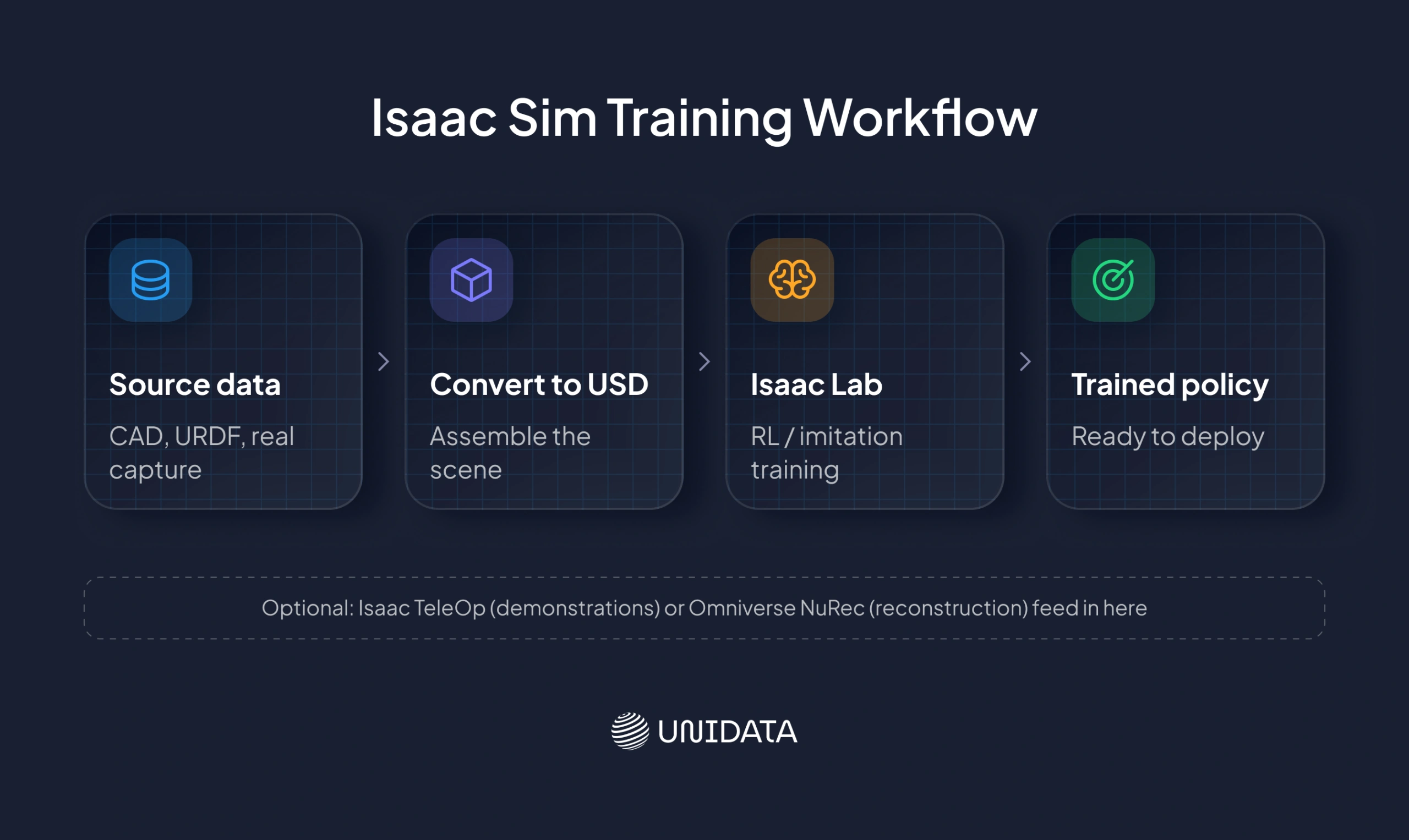This diagram compresses the four-step pipeline into its main line — source data, USD conversion (which is also where the scene gets assembled with materials and physics), Isaac Lab, and the resulting policy. Isaac TeleOp and Omniverse NuRec sit outside that main line as optional inputs: neither is required, and a team can use one, both, or skip them entirely and feed a simulated scene straight into Isaac Lab.
Key features that make NVIDIA Isaac Sim stand out
-------------------------------------------------
Isaac Sim's popularity comes down to a specific combination of capabilities that few other robotics simulators offer together. Here are the features engineering teams cite most often:
- **RTX-based photorealistic rendering.** Built on NVIDIA RTX ray-tracing and path-tracing technology, Isaac Sim renders scenes with real-world lighting and material accuracy using MDL (Material Definition Language) and OpenUSD assets useful for training perception models that need to recognize objects under realistic lighting conditions. Not every workload uses full path tracing; Isaac Sim 6.0 offers multiple rendering configurations, and performance depends on scene complexity and the renderer selected.
- **Physics simulation via PhysX, with experimental Newton support.** Isaac Sim uses NVIDIA PhysX \[3\], NVIDIA's physics engine, to model rigid body dynamics, joint articulation, and collisions nd supports GPU-accelerated simulation for relevant workloads. As of Isaac Sim 6.0, the platform also has experimental integration with Newton (covered below), described in NVIDIA's own documentation as "simulate with PhysX or Newton.
- **Synthetic data generation.** Through NVIDIA Omniverse Replicator \[4\], Isaac Sim can automatically generate large, automatically annotated synthetic datasets by randomizing lighting, textures, object positions, and camera angles, so you can train perception models without hand-labeling real images. Throughput varies significantly by GPU, scene complexity, resolution, renderer, and which annotators are enabled, so treat any specific images-per-hour figure as workload-dependent rather than a general benchmark.
- **ROS2 integration.** Isaac Sim connects to **ROS2** \[5\], the open-source robotics middleware used across the robotics industry, through a modular bridge extension, letting existing ROS 2-based robot software stacks communicate with the simulated robot.
- **Sensor simulation.** Isaac Sim can simulate LiDAR, RGB, and depth cameras, IMUs, and other common robot sensors. For example, a warehouse AMR (autonomous mobile robot) project might simulate a 360-degree LiDAR unit, two stereo cameras, and an IMU simultaneously, generating sensor data that's compatible in message and measurement structure with what the physical robot would produce, though simulated readings are a model of the real sensor, not a guarantee of identical noise and artifacts.
- **NVIDIA Isaac Lab integration.** Isaac Sim environments can connect to Isaac Lab for large-scale, GPU-parallelized reinforcement learning, allowing many simulated robot instances to train in parallel.
To put these capabilities in context, the table below lines Isaac Sim up against two other widely used robotics simulators, Gazebo and MuJoCo, across the areas that matter most for robot training.
### Isaac Sim Feature Comparison: Isaac Sim vs. Gazebo vs. MuJoCo
| **Capability** | **NVIDIA Isaac Sim** | **Gazebo Sim** | **MuJoCo** |
|---|---|---|---|
| High-fidelity RTX rendering | Strong (RTX ray/path tracing) | Limited relative to Isaac Sim | Primarily visualization-focused |
| Robotics physics | PhysX, with experimental Newton support | Pluggable physics engines (e.g., Bullet, DART) | Native MuJoCo physics |
| GPU-scale robot learning | Strong, via Isaac Lab | Not its primary focus | Strong, via MJX / MuJoCo Warp |
| ROS 2 support | Native bridge extension | Strong, ROS-centric ecosystem | Available through ROS 2 integrations and community/third-party tooling |
| Synthetic data tooling | Native (Omniverse Replicator) | More external/manual | More external/manual |
| Best fit | Perception + physics simulation + robot learning | ROS-centric robotics simulation | Control and RL research |
This comparison focuses on large-scale robot-learning workflows; each tool has areas of relative strength depending on the specific criterion. Gazebo's physics is pluggable rather than fixed to one backend, and MuJoCo's MJX/MuJoCo Warp stack supports GPU-parallel simulation for RL research, so "GPU-parallel training" isn't unique to Isaac Sim; it depends on which framework a team is already standardized on.
### Sensor simulation and synthetic data generation
Sensor simulation and synthetic data generation are typically used together as a workflow: capture or design a scene → randomize domain parameters such as lighting, textures, object poses, and camera positions → render annotated frames → export the resulting data to a training pipeline.
The same simulated environment can produce multiple data representations for perception training. A warehouse scene, for example, can be rendered as a photorealistic RGB image while also generating depth information, semantic segmentation, and automatically assigned object annotations.
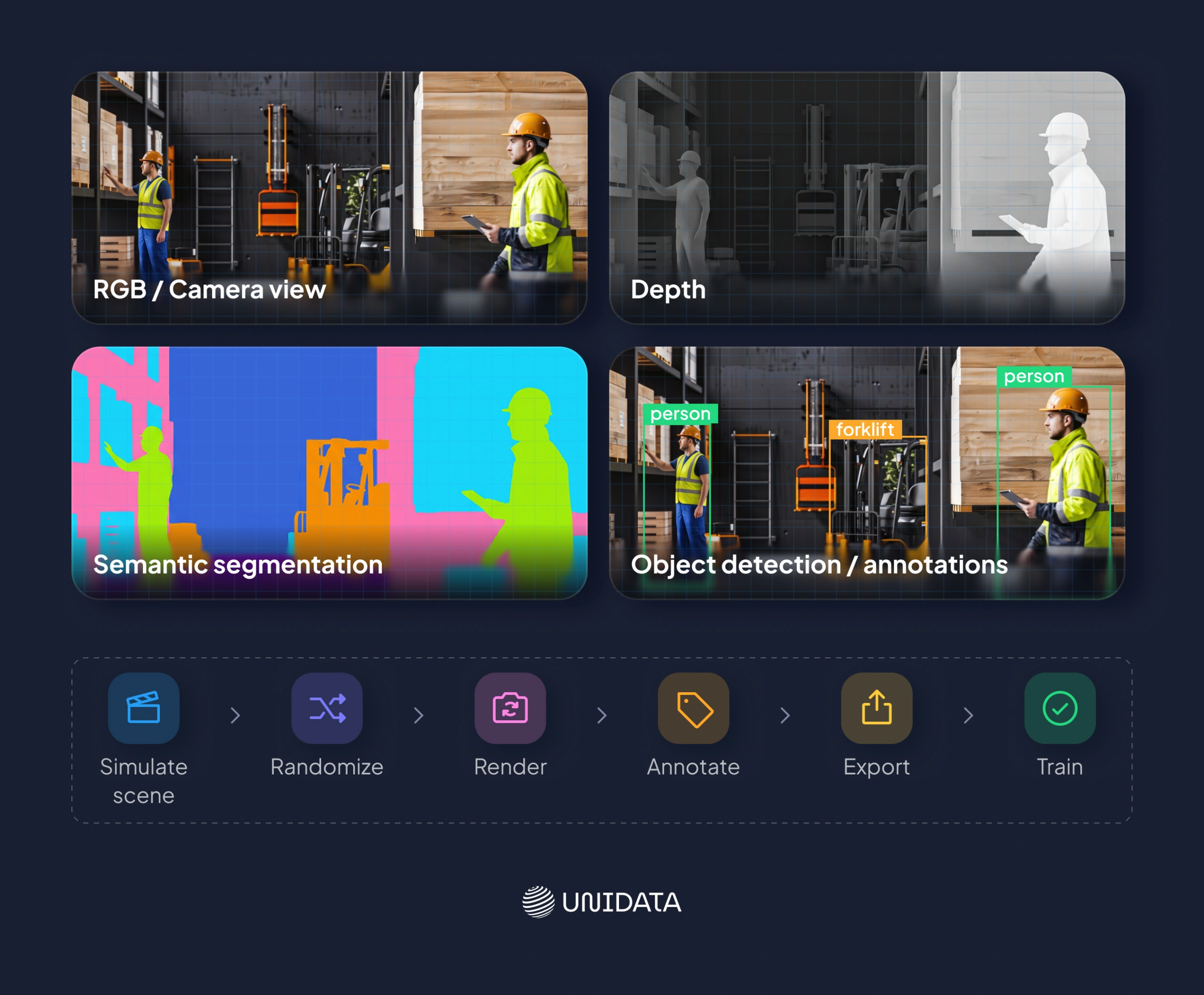From one simulated scene to multiple data representations. Isaac Sim can generate photorealistic RGB imagery alongside depth, semantic segmentation, and automatically annotated object data, creating labeled datasets for perception training.
This approach allows teams to generate large volumes of labeled data without manually capturing and annotating every real-world frame. Domain randomization can further vary factors such as lighting, textures, object placement, and camera parameters to expose perception models to a broader range of conditions.
NVIDIA’s own Isaac Sim 6.0 benchmarks show synthetic-data throughput varying roughly an order of magnitude — from single-digit to several tens of images per second in some configurations — depending on the GPU, scene complexity, resolution, renderer, and annotators enabled. These figures should therefore be treated as workload-dependent rather than as a general benchmark for every Isaac Sim deployment.
Newton: the next-gen physics engine powering Isaac Sim
------------------------------------------------------
One of the most significant developments in the Isaac ecosystem is Newton, an open-source, GPU-accelerated physics engine co-developed by NVIDIA, Google DeepMind, and Disney Research. Newton is built on NVIDIA Warp, a Python framework for writing GPU-accelerated simulation kernels, and it uses OpenUSD as its scene description format, the same foundation Isaac Sim already relies on.
Newton is being contributed to the Linux Foundation as an open-governance project, meaning no single company controls its direction. This matters because open, community-governed physics engines let researchers verify, extend, and audit simulation accuracy rather than relying on a closed black box: a distinction increasingly important as robotics research depends on simulation results being reproducible.
Newton is designed to integrate into the NVIDIA Isaac Lab training stack and is positioned to interoperate with tools like MuJoCo Playground, giving researchers flexibility to move models between simulation environments. NVIDIA describes Newton as now available in Beta, with experimental integration into Isaac Sim 6.0 meaning it's usable today but should not yet be treated as a full replacement for PhysX across all workloads (NVIDIA Newton announcement \[6\]).
NVIDIA Isaac TeleOp & Omniverse NuRec: advanced data capture
----------------------------------------------------------------
Two tools extend Isaac Sim's data pipeline well beyond hand-built virtual scenes.
- **NVIDIA Isaac TeleOp** lets engineers collect robot demonstration data by teleoperating a robot within Isaac Sim and recording the resulting motion and sensor data. This is especially useful for imitation learning, where a robot policy is trained to mimic human-guided demonstrations rather than learning purely through trial and error.
- **NVIDIA Omniverse NuRec** takes a different approach: it uses 3D Gaussian Splatting, a neural reconstruction technique, to convert real-world sensor captures (video or LiDAR scans of an actual location) into neural-volume USD assets that can be rendered as interactive, simulation-ready environments. Instead of an artist manually rebuilding a warehouse in 3D, NuRec can reconstruct it from footage, though there's still a reconstruction and export pipeline involved, and the resulting representation has its own limitations rather than being a perfect 1:1 copy of the real space.
Together, TeleOp and NuRec feed into the synthetic data and training pipeline described earlier: TeleOp supplying demonstration data, NuRec supplying reconstructed environments, both of which can be integrated into Isaac Lab for policy training.
Isaac Sim vs. Isaac Lab: understanding the ecosystem
----------------------------------------------------
This is one of the most common points of confusion for newcomers, so it's worth stating plainly: **Isaac Sim is the simulation environment; Isaac Lab is the training framework that runs on top of it.**
A useful analogy: think of Isaac Sim as the physics-accurate movie set where a robot's world is built and rendered, and Isaac Lab as the film crew and script that actually puts the robot through thousands of takes to teach it a skill. In practice, the line is a little less clean than that. Isaac Lab environments still involve substantial task and environment configuration of their own, but the core division holds: Isaac Sim provides the simulation runtime, scene representation, sensors, physics, and rendering; Isaac Lab provides the robot-learning environments, task definitions, algorithms, and scalable training infrastructure built around the simulator.
| | **NVIDIA Isaac Sim** | **NVIDIA Isaac Lab** |
|---|---|---|
| Purpose | Builds and renders the simulated world | Trains robot policies using that world |
| Primary users | Simulation/environment engineers | RL/ML researchers and engineers |
| Core output | A physically accurate virtual environment | A trained robot policy (model) |
Real-world use cases for Isaac Sim
----------------------------------
Isaac Sim is used across a range of robotics applications, with **NVIDIA Isaac Lab** consistently sitting downstream as the framework that turns the simulated data into a deployable policy:
1. **Autonomous mobile robots (AMRs).** Warehouse and logistics robots can be trained and evaluated for navigating dynamic environments, avoiding obstacles, and planning paths, using synthetic sensor data to reduce reliance on physical test runs.
2. **Robotic manipulation.** Robotic arms can learn grasping, sorting, and assembly tasks in simulation, where failed grasp attempts cost nothing compared to the wear and time cost of failing on physical hardware.
3. **Humanoid robotics.** Bipedal and humanoid platforms can use Isaac Sim to train balance, locomotion, and manipulation skills that would be difficult and risky to iterate on physically.
4. **Warehouse automation.** Beyond individual robots, entire warehouse workflows, multi-robot coordination, dynamic obstacle handling, and fleet management can be simulated before a facility goes live.
5. **Autonomous vehicle perception testing.** Perception stacks (camera and LiDAR-based object detection) can be stress-tested against synthetic edge cases rare weather, lighting, or obstacle scenarios that would be difficult or unsafe to gather real footage of.
Synthetic data generation is central to nearly every one of these cases: it lets teams generate large, labeled datasets covering rare or dangerous scenarios that would be impractical to capture physically, which directly improves the robustness of the resulting model.
### Isaac Sim across industries: from warehouses to aerospace
While robotics labs remain the core audience, NVIDIA positions Isaac Sim as applicable to several adjacent industries. These are potential and NVIDIA-documented application areas rather than a list of confirmed independent deployments across every sector:
- **Industrial automation and machinery**, for simulating and validating factory-floor equipment before deployment.
- **Aerospace and defense**, for testing autonomous systems in controlled virtual environments.
- **Automotive**, for robotics-adjacent manufacturing and autonomous vehicle perception work.
- **Food and beverage**, for automating packaging and handling lines.
- **Semiconductor manufacturing**, for simulating precision automation on the fab floor.
Each of these sectors is, in effect, a downstream adopter of the same core Isaac Sim capabilities described above: photorealistic rendering, accurate physics, and synthetic data generation applied to industry-specific equipment and environments.
Getting started with Isaac Sim: system requirements and setup
-------------------------------------------------------------
Isaac Sim is GPU-intensive by design, since its rendering and physics workloads both rely heavily on NVIDIA hardware acceleration. Before installing it, it helps to understand the hardware and software landscape.
### System requirements (Isaac Sim 6.0.1)
| Element | Minimum Spec | Good | Ideal |
|---|---|---|---|
| OS | Ubuntu 22.04/24.04Windows 11 | Ubuntu 22.04/24.04Windows 11 | Ubuntu 22.04/24.04Windows 11 |
| CPU | Intel Core i7 (7th Generation)AMD Ryzen 5 | Intel Core i7 (9th Generation)AMD Ryzen 7 | Intel Core i9, X-series or higherAMD Ryzen 9, Threadripper or higher |
| Cores | 4 | 8 | 16 |
| RAM | 32GB | 64GB | 64GB |
| Storage | 50GB SSD | 500GB SSD | 1TB NVMe SSD |
| GPU | GeForce RTX 4080 | GeForce RTX 5080 | RTX PRO 6000 Blackwell |
| VRAM | 16GB | 16GB | 48GB |
| Driver | Linux: 580.95.05 Windows: 581.42 | Linux: 580.95.05 Windows: 581.42 | Linux: 580.95.05 Windows: 581.42 |
These figures reflect the official **Isaac Sim 6.0.1** requirements published by NVIDIA. The requirements page lists Ubuntu 22.04/24.04 and Windows 11 for x86\_64 systems, with a GeForce RTX 4080 as the minimum GPU, GeForce RTX 5080 as the “Good” configuration, and RTX PRO 6000 Blackwell as the “Ideal” configuration. NVIDIA also notes that more RAM and VRAM may be required for advanced Isaac Sim usage and that Isaac Lab training requires additional RAM and VRAM.
The listed driver versions are the versions NVIDIA tested with this release: Linux 595.58.03 and Windows 595.97. These are tested versions rather than a statement that every workload must permanently remain on exactly those driver versions; NVIDIA directs users to its technical requirements for current recommended drivers.
Isaac Sim containers are supported only on Linux. The native application supports both Ubuntu and Windows 11. NVIDIA also notes that GPUs without RT Cores, including the A100 and H100, are not supported for Isaac Sim. Workloads using many sensors can require substantially more VRAM than a basic scene, and NVIDIA specifically warns that some tutorials and benchmarks may not run below the minimum GPU specification.
An internet connection is also required for access to Isaac Sim’s online assets and for some extensions when using the default online asset root.
Importing robot models: CAD, URDF, and MJCF support
---------------------------------------------------
Isaac Sim supports several standard formats for bringing existing robot designs into a simulated scene:
- **URDF (Unified Robot Description Format)** — the most common format coming from ROS-based robotics projects, and generally the smoothest import path since Isaac Sim's URDF importer is purpose-built to preserve joint structure and kinematics.
- **MJCF (MuJoCo XML format)** — supported for teams migrating models originally built for MuJoCo-based workflows.
- **CAD files via OnShape or a direct CAD converter** — useful for hardware teams whose robot designs originate in mechanical CAD tools rather than robotics-specific formats.
- **ShapeNet** — a large repository of 3D object models, useful for populating simulated environments with everyday objects for manipulation training.
As a practical example, importing a six-axis robotic arm typically starts with a URDF export from the arm manufacturer's ROS package, which Isaac Sim's importer converts into USD while preserving joint limits, collision geometry, and visual meshes. That import gets the asset into the scene, but it's rarely the final step — robot assets commonly need further tuning of collision geometry, joint drives, inertias, limits, friction, and articulation settings before they behave correctly in simulation.
Cloud deployment: running Isaac Sim on AWS, Brev, and NGC
---------------------------------------------------------
Not every team has a local workstation with an RTX-class GPU, and Isaac Sim's cloud options exist specifically to address that. Three main paths are commonly used:
- **Brev** \[7\] offers one-click access to GPU-equipped cloud instances pre-configured for Omniverse and Isaac Sim workloads, aimed at getting new users running without manual environment setup.
- **NGC (NVIDIA GPU Cloud) containers** \[8\] package Isaac Sim into a ready-to-deploy container image, letting teams run it on their own cloud infrastructure or on-prem GPU clusters.
- **AWS**, including EC2 GPU instances, hosts an Isaac Sim listing through the AWS Marketplace, letting teams spin up cloud simulation resources through a cloud service provider (CSP) they may already use for other infrastructure.
Cloud instances generally trade some cost efficiency for convenience. As a rule of thumb, a dedicated on-prem RTX workstation is often cheaper for sustained, heavy usage, while cloud GPU instances make sense for teams running occasional or bursty simulation workloads, or for onboarding new engineers without provisioning hardware. But the actual break-even depends on utilization, depreciation, electricity, cooling, IT labor, and cloud pricing/discounts, so treat this as a starting heuristic rather than a fixed rule.
### Cloud vs. On-Prem: quick comparison
| **Factor** | **Local RTX Workstation** | **Brev** | **NGC Containers** | **AWS (EC2 / Marketplace)** |
|---|---|---|---|---|
| Setup time | Slow (hardware + drivers) | Fast (one-click) | Moderate (container + orchestration) | Moderate (instance + AMI/config) |
| Best for | Sustained, heavy daily use | Fast onboarding, bursty use | Teams standardizing on containers | Teams already on AWS infrastructure |
| Cost pattern | High upfront, low marginal cost | Pay-per-use GPU hours | Pay-per-use + your infra costs | Pay-per-use GPU instance pricing |
| Scaling | Limited to owned hardware | Elastic | Elastic (on your cluster) | Elastic (EC2 autoscaling) |
None of the four is a universal answer; the right pick mostly comes down to whether your team already has GPU hardware, how steady your simulation workload is, and whether you're already standardized on a particular cloud provider or container workflow.
Best practices and lessons learned in Isaac Sim deployment
----------------------------------------------------------
Teams adopting Isaac Sim tend to run into a similar set of early lessons:
- **Optimize scene complexity before scaling up.** A common early mistake is building a highly detailed scene (dense meshes, excessive lighting complexity) and then discovering it can't run fast enough for large-scale synthetic data generation or parallel training. Simplifying collision geometry and reserving high-fidelity rendering for perception-critical elements usually resolves this.
- **Structure synthetic data pipelines deliberately.** Randomizing too many variables at once (lighting, texture, pose, and camera angle simultaneously) can make it hard to diagnose which factor is hurting model performance. Domain randomization improves model robustness most reliably when applied incrementally and tracked.
- **Know when to move from Isaac Sim to Isaac Lab.** Isaac Sim is for building and validating the environment; once the scene and sensor setup are stable, delaying the move to Isaac Lab for training just slows iteration — teams get the most value once they transition to Isaac Lab's parallelized training as early as the environment allows.
- **Use software- or hardware-in-the-loop testing before full deployment.** Isaac Sim's ROS 2 integration can connect external controller software to the simulation for software-in-the-loop testing, and its simulation-control tooling supports more automated validation workflows. This is a useful intermediate step before deploying a trained policy on physical hardware — but it's worth being precise about which kind of validation you mean, since software-in-the-loop, controller-in-the-loop, and true hardware-in-the-loop are meaningfully different setups, and Isaac Sim doesn't provide a single turnkey HIL solution for arbitrary robot controllers.
- **Budget GPU capacity realistically.** Underestimating GPU load is one of the most frequently cited early-stage mistakes; teams that plan for peak synthetic-data-generation load, not just average load, avoid mid-project bottlenecks.
Scaling tests with CI/CD Integration
------------------------------------
- **Tip:** Manual "run the simulation and eyeball the result" testing doesn't scale. Pairing Isaac Sim with a CI/CD pipeline turns simulation testing into an automated, repeatable process that runs on every code change instead of only when someone remembers to test.
Isaac Sim, combined with ROS2, supports software-in-the-loop testing that can be triggered automatically as part of a CI/CD pipeline. One possible architecture, not an NVIDIA-endorsed standard, just one reasonable way to build it, looks like this: code changes pushed to GitHub trigger a pipeline that spins up Docker containers running Isaac Sim and the ROS2 stack, runs a defined regression test suite, stores results and logs in S3, and surfaces metrics through visualization tools like Foxglove or Rerun. Platforms like ReSim are built specifically to orchestrate this kind of robotics-focused test automation.
The shift this enables is directionally clear even without hard numbers: instead of an engineer manually running and watching a handful of simulations before a release, teams get automated regression testing on every pull request, catching behavioral regressions before they reach physical hardware — moving the point where problems get caught from "right before release" to "the day they're introduced.
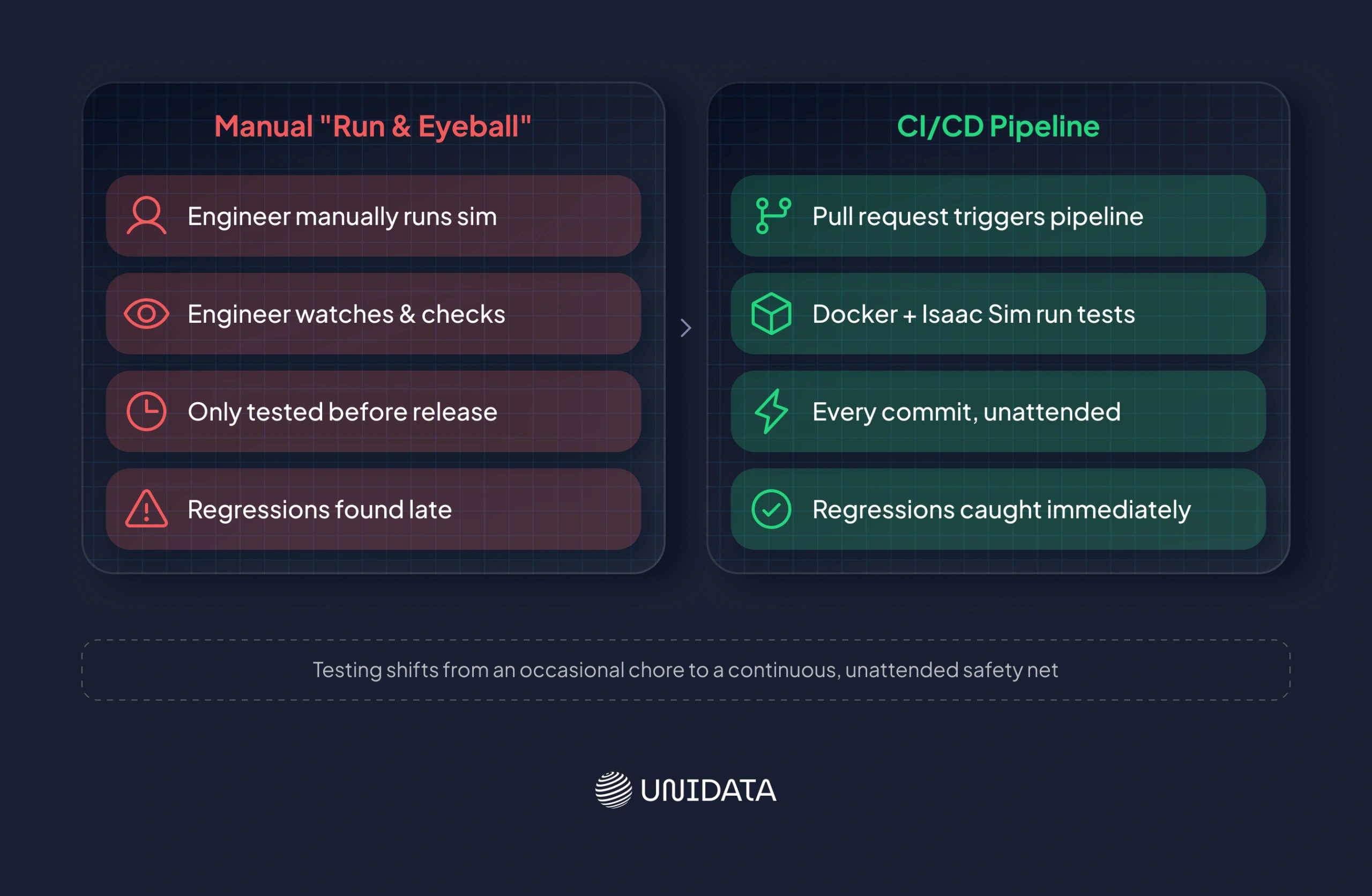Notice where the failure shows up in each column. On the manual side, nothing catches a regression until someone happens to run the simulation and watch it closely enough to spot the problem, usually right before a release, which is the worst possible time to find out something broke. Automate the same testing, and that failure point moves to the very top of the pipeline: a pull request triggers the run, Docker spins up Isaac Sim and the ROS2 stack without anyone needing to remember to test anything, and a regression gets flagged the same day it was introduced instead of weeks later.
Code examples: getting hands-on with Isaac Sim
----------------------------------------------
These snippets show common starting points for Isaac Sim 6.0.x. They are simplified for readability. Isaac Sim’s Python APIs are version-sensitive, so always verify the exact API and version-specific syntax in the NVIDIA documentation before using these examples in production.
### 1. Launching Isaac Sim headless from Python
```
from isaacsim import SimulationApp
# Launch Isaac Sim without the graphical interface.
# Useful for automated testing, batch jobs, and synthetic-data generation.
simulation_app = SimulationApp({"headless": True})
# Perform Omniverse/Isaac Sim imports only after SimulationApp starts.
# Build or load your USD scene here.
# Run your simulation or data-generation code here.
simulation_app.close()
```
**What this does:** `SimulationApp` provides the application-lifecycle interface for starting and stopping Isaac Sim. Setting `headless=True` starts Isaac Sim without the normal graphical interface, which is useful for automated testing, batch simulation, synthetic-data generation, and remote workloads.
For standalone scripts, use Isaac Sim’s bundled Python launcher rather than a system Python installation:
● Linux: `python.sh`
● Windows: `python.bat` \[9\]
### 2. Enabling the ROS 2 bridge extension
```
from isaacsim import SimulationApp
simulation_app = SimulationApp({"headless": True})
# Import the Isaac Sim application utility after SimulationApp starts.
import isaacsim.core.experimental.utils.app as app_utils
# Enable the ROS 2 bridge extension.
app_utils.enable_extension("isaacsim.ros2.bridge")
# Allow Isaac Sim to process and initialize the extension.
simulation_app.update()
# Your ROS 2 / Isaac Sim integration code goes here.
# For example: create ROS 2 publishers, subscribers, services,
# or configure ROS 2 OmniGraph nodes.
simulation_app.close()
```
**What this does:** The script starts Isaac Sim, enables the ROS 2 bridge, and calls `simulation_app.update()` so Isaac Sim can process and initialize the newly enabled extension before subsequent ROS 2 integration code runs.
For Isaac Sim 6.0, `isaacsim.ros2.bridge `is the documented ROS 2 bridge extension. Isaac Sim 6.0 also uses a more modular ROS 2 architecture, with functionality distributed among extensions such as `isaacsim.ros2.core` and `isaacsim.ros2.nodes.`
**Important:** Enabling the bridge does not automatically create ROS 2 publishers or subscribers. Those must be created and configured separately. \[10\]
### 3. Randomizing a scene with Omniverse Replicator
For Isaac Sim 6.0, use the documented Functional API together with `BasicWriter` and `DiskBackend`.
```
from isaacsim import SimulationApp
simulation_app = SimulationApp({"headless": True})
simulation_app.update()
import omni.replicator.core as rep
import omni.usd
# Create a new stage.
omni.usd.get_context().new_stage()
# Prevent capture from being triggered automatically when the timeline starts.
rep.orchestrator.set_capture_on_play(False)
# Create a cube.
cube = rep.functional.create.cube(
position=(0, 0, 0),
name="Cube",
)
# Assign a semantic class for annotation.
rep.functional.modify.semantics(
cube,
{"class": "cube"},
mode="add",
)
# Create a camera looking at the object.
camera = rep.functional.create.camera(
position=(0, 0, 5),
look_at=(0, 0, 0),
name="Camera",
)
# Create a render product.
render_product = rep.create.render_product(
camera,
(1024, 1024),
)
# Configure the output backend.
backend = rep.backends.get("DiskBackend")
backend.initialize(output_dir="out/")
# Configure the synthetic-data writer.
writer = rep.writers.get("BasicWriter")
writer.initialize(
backend=backend,
rgb=True,
bounding_box_2d_tight=True,
)
writer.attach(render_product)
# Randomize the cube's rotation for each captured frame.
with rep.trigger.on_frame(num_frames=1000):
with cube:
rep.modify.pose(
rotation=rep.distribution.uniform(
(-180, -180, -180),
(180, 180, 180),
)
)
# Run the synthetic-data generation.
rep.orchestrator.run()
# Wait until all generated output has been written.
rep.orchestrator.wait_until_complete()
simulation_app.close()
```
**What this does:** Replicator creates a virtual cube and camera, assigns the cube the semantic class cube, randomizes its rotation across 1,000 captures, and writes RGB images together with tight 2D bounding-box annotations.
The `BasicWriter` handles the requested RGB and bounding-box outputs, so separate RGB and bounding-box annotators do not need to be created for this workflow.
For Isaac Sim 6.0, use:
```
writer = rep.writers.get("BasicWriter")
```
Rather than older examples using:
```
rep.WriterRegistry.get("BasicJsonWriter")
```
The documented 6.0 workflow also uses DiskBackend for disk output:
```
backend = rep.backends.get("DiskBackend")
backend.initialize(output_dir="out/")
```
Then pass the backend to the writer:
```
writer.initialize(
backend=backend,
rgb=True,
bounding_box_2d_tight=True,
)
```
\[11\], \[12\]
### 4. Importing a URDF robot model
Isaac Sim 6.0 provides a public Python URDF importer API based on URDFImporter and URDFImporterConfig. For a current Isaac Sim 6.x guide, prefer this API over older examples based on` _urdf.acquire_urdf_interface()`.
```
from isaacsim import SimulationApp
simulation_app = SimulationApp({"headless": True})
import omni.usd
from isaacsim.asset.importer.urdf import (
URDFImporter,
URDFImporterConfig,
)
# Configure the URDF import.
import_config = URDFImporterConfig(
urdf_path="/path/to/robot.urdf",
usd_path="/path/to/output/",
collision_from_visuals=False,
merge_mesh=False,
# Optional settings:
# collision_type=...,
# allow_self_collision=False,
# ros_package_paths=["/path/to/ros_ws/src"],
)
# Convert the URDF to USD.
importer = URDFImporter(import_config)
output_path = importer.import_urdf()
# Open the generated USD asset.
omni.usd.get_context().open_stage(output_path)
simulation_app.close()
```
**What this does:** `URDFImporterConfig` specifies the URDF source path, USD output directory, and import behavior. `URDFImporter` performs the conversion, and `import_urdf()` returns the path to the resulting USD file.
The importer configuration includes options such as:
● `urdf_path`
● `usd_path`
● `merge_mesh`
● `collision_from_visuals`
● `collision_type`
● `allow_self_collision`
● `ros_package_paths`
● ` debug_mode`
For robots that reference meshes or other resources through ROS package:// URLs, provide the appropriate `ros_package_paths `so those resources can be resolved.
For interactive workflows, Isaac Sim 6.0 separates the core importer from its UI:
● `isaacsim.asset.importer.urdf` — core URDF conversion API
● `isaacsim.asset.importer.urdf.ui` — graphical URDF importer interface
The `URDFImporter` / `URDFImporterConfig` API should be preferred over older examples `based on _urdf.acquire_urdf_interface() `when writing new Isaac Sim 6.x code. \[13\]
### **Version note**
These examples target Isaac Sim 6.0.x. Isaac Sim’s Python APIs are version-sensitive, particularly around extensions, Replicator, ROS 2, and asset importers.
For older Isaac Sim releases, you may encounter namespaces and APIs such as:
● `omni.isaac.kit`
● `omni.isaac.urdf`
● `omni.isaac.ros2_bridge`
Do not substitute those older APIs into an Isaac Sim 6.0.x project without checking the corresponding version-specific documentation and migration guidance.
**Conclusion**
--------------
Isaac Sim's core value is straightforward: it gives robotics teams a physically based, photorealistic place to fail safely, generate training data at scale, and validate a robot's behavior before it touches real hardware — with Isaac Lab available for teams that want to take a stable environment into large-scale training. Keep Isaac Sim and Isaac Lab as distinct tools with different jobs, size your GPU against NVIDIA's current official requirements rather than older guidance, and lean on cloud options like Brev, NGC, or AWS if local RTX hardware isn't available yet. The ecosystem — Newton, TeleOp, NuRec, and Isaac Sim's own APIs — is still moving quickly, so treat NVIDIA's official documentation as the source of truth on anything version-specific.
## Additional Modules
### FAQ Section
**Questions and Answers:**
- **Question:** What is NVIDIA Isaac Sim and how does it work? — **Answer:** Isaac Sim is NVIDIA’s GPU-accelerated robotics simulator, built on NVIDIA Omniverse. It uses RTX rendering and PhysX physics (with experimental Newton integration as of 6.0) to create physically based virtual environments where robots can be tested and trained before deployment on real hardware, helping reduce the sim-to-real performance gap.
- **Question:** Is Isaac Sim free to use? — **Answer:** Isaac Sim is available under Apache 2.0, and NVIDIA states it’s free for internal R&D and development. However, it includes additional NVIDIA components governed by separate licenses, and redistributing it or delivering it as a service to third parties can require an NVIDIA AI Enterprise license. Cloud GPU and infrastructure costs are separate from the software license. Check NVIDIA’s current licensing terms for specifics.
- **Question:** What's the difference between Isaac Sim and Isaac Lab? — **Answer:** Isaac Sim is the simulation environment where robots, sensors, and scenes are built and rendered. Isaac Lab is a lightweight reference application built on top of Isaac Sim and optimized for reinforcement learning, imitation learning, and robot learning at scale.
- **Question:** Can I connect ROS 2 to Isaac Sim? — **Answer:** Yes. Isaac Sim includes a ROS 2 bridge extension (split into several modular sub-extensions as of Isaac Sim 6.0), letting existing ROS 2-based robot software communicate with the simulated robot. ROS 2 still needs to be properly sourced and configured for the bridge to work — enabling the extension alone isn’t the full setup. Current documentation centers on ROS 2 (Humble, Jazzy); ROS 1 is legacy.
- **Question:** Can I import my own 3D robot models into Isaac Sim? — **Answer:** Yes. Isaac Sim supports importing robot models via URDF, MJCF, CAD files (including through OnShape or a CAD converter), and ShapeNet object models, with URDF generally offering the smoothest import path for ROS-based robots. Imported assets typically still need some tuning (joint drives, limits, collision geometry) before they behave correctly.
- **Question:** How does synthetic data generation work in Isaac Sim? — **Answer:** Through NVIDIA Omniverse Replicator, Isaac Sim can automatically randomize scene variables like lighting, textures, and object positions, then render and export large volumes of automatically annotated training images — reducing the need to manually collect and label real-world data. Actual throughput depends heavily on your GPU, scene complexity, and which annotators are enabled.
- **Question:** Can I run Isaac Sim in the cloud? — **Answer:** Yes. Isaac Sim can run without local RTX hardware through Brev’s one-click GPU instances, NVIDIA NGC containers deployed on your own infrastructure (Linux-only), or an AWS Marketplace listing using EC2 GPU instances, making it accessible to teams without dedicated workstations. AWS infrastructure charges apply separately from the Isaac Sim software itself.
### references
**List of Links:**
- **Link:** [[1] NVIDIA Isaac Sim (product page) ](https://developer.nvidia.com/isaac-sim) — **Active link:** active
- **Link:** [[2] NVIDIA Isaac Lab (documentation)](https://isaac-sim.github.io/IsaacLab/) — **Active link:** active
- **Link:** [[3] NVIDIA PhysX SDK](https://developer.nvidia.com/physx-sdk) — **Active link:** active
- **Link:** [[4] NVIDIA Omniverse Replicator](https://developer.nvidia.com/omniverse/replicator) — **Active link:** active
- **Link:** [[5] ROS / ROS2 (Robot Operating System)](https://www.ros.org/) — **Active link:** active
- **Link:** [[6] NVIDIA Developer Blog (Newton engine announcement)](https://developer.nvidia.com/blog/) — **Active link:** active
- **Link:** [[7] Brev](https://www.brev.dev/) — **Active link:** active
- **Link:** [[8] NVIDIA NGC Catalog](https://catalog.ngc.nvidia.com/) — **Active link:** active
- **Link:** [[9] Isaac Sim standalone Python scripting guide (python.sh/python.bat launcher)](https://docs.isaacsim.omniverse.nvidia.com/6.0.0/python_scripting/manual_standalone_python.html) — **Active link:** active
- **Link:** [[10] Isaac Sim ROS 2 installation/bridge documentation](https://docs.isaacsim.omniverse.nvidia.com/6.0.0/installation/install_ros_other_platforms.html) — **Active link:** active
- **Link:** [[11] Isaac Sim 6.0 — Replicator Getting Started](https://docs.isaacsim.omniverse.nvidia.com/6.0.0/replicator_tutorials/tutorial_replicator_getting_started.html) — **Active link:** active
- **Link:** [[12] Isaac Sim 6.0 — Scene-Based Synthetic Data Generation](https://docs.isaacsim.omniverse.nvidia.com/6.0.0/replicator_tutorials/tutorial_replicator_scene_based_sdg.html) — **Active link:** active
- **Link:** [[13] Isaac Sim URDF importer API documentation](https://docs.isaacsim.omniverse.nvidia.com/6.0.0/py/source/extensions/isaacsim.asset.importer.urdf/docs/index.html) — **Active link:** active
[Full list of this site's AI-readable pages](https://unidata.pro/llms.txt)